RepliGo is now available for the P800. RepliGo allows you to view any PC document on your phone. You simply run it through a print driver or in some programs click a toolbar button. You then download the converted file to you phone and away you go. Repligo can be purchased or demoed via Handango.
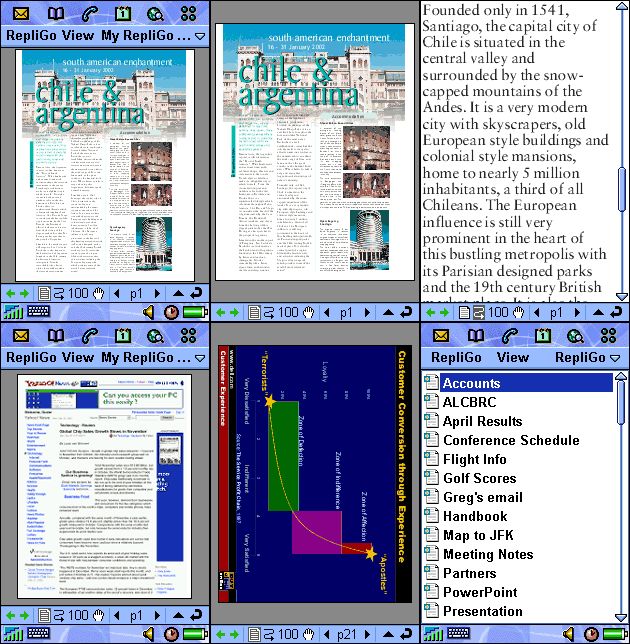
Author's Description:
RepliGo converts, optimizes, and transfers documents from your desktop computer to your Nokia Series 60 (3650/7650) phone, including:
� Microsoft� Office documents; Word, Excel, PowerPoint�
� Adobe� Acrobat PDF files
� Web pages
� Virtually any other document, report, image, or file you can print such as Microsoft� Project files, Visio� drawings, WordPerfect documents, CAD drawings, maps, e-mails, and more.
Overview
RepliGo represents a breakthrough in document conversion technology and mobility. In a matter of seconds, virtually any document you have on your desktop PC can be transferred to your phone while maintaining the document�s original look and feel.
This includes Microsoft� Office documents, Adobe� PDF files, Web pages and hundreds of other formats. Once on your phone, documents can easily be viewed and shared with others using the supplied RepliGo Viewer. You can transfer the document using Bluetooth, infrared or e-mail.
You no longer need multiple programs installed on your phone to view different types of documents. RepliGo is one application that handles any document that can be printed and is specially tuned and integrated into the conversion of Microsoft� Office documents and web pages viewed in Internet Explorer 5.5 or greater. Special conversion technology has also been developed specifically for PDF documents.
You no longer need multiple programs installed on your phone to view different types of documents.
I've not tried this so please bear with me. The reason for having multiple viewers on the P800 is to enable viewing of email attachments received directly to the phone, not just for carrying around documents that you've already viewed on your PC. From what I've read it sounds like the document must first go through a conversion process on the PC before being moved to the phone. If this is correct, how exactly does this replace the requirement for multiple viewers on the P800. Surely we are not expected to inform every single person that may possibly send a document to first purchase this, then convert the file prior to sending the email. While this sounds like it may be a useful application, it does not appear to solve the problem of multiple viwers. Please advise?
crafti,
You are correct. RepliGo does not currently support viewing of email attachments in their native format, so it is not a replacement in this situation.
However, if you just have documents that you'd like to carry around on your phone for reference, then RepliGo can handle just about any document type and can represent it visually just like you'd see it in the native desktop application. RepliGo also allows you to "reflow" the contents of the document for easy reading on the smaller screen of your P800.
RepliGo also works great for quick snapshots of Web pages and other perhaps short-lived information you want to quickly transfer to your phone. Since RepliGo works via a print driver, you can transfer information from any desktop application that supports printing.
Lastly, RepliGo compresses documents (typically greater than 50%) so you can literally store hundreds of documents on your phone's memory card. During testing, we had a 64 MB card with over 1600 documents on it.
I hope this helps clear things up.
davef,
Thank you for your clarification and further advice. However, one further point that would be helpful if you could advise. According to the wesbite documents can only be transfered to the phone via, email, Bluetooth, IrDA or MMS. When it states bluetooth, is this bluetooth beamed or via a bluetooth serial connection? Can one not simply drag and drop files through a serial connection using the PC suite as one would with the standard documents?
Thanks again
You can move RepliGo files to your phone in several ways. PC Suite with a serial connection works just fine. In fact, this gives you the most flexibility since you can choose the destination folder and transfer in one move.
If your desktop computer has Bluetooth support (e.g., a Bluetooth USB dongle), then you can typically set up a Bluetooth connection to your phone and transfer documents that way. In this scenario, the document lands in your phone's inbox where you can subsequently open it. You can then move the document to more permanent storage on your phone if you desire.
Another (costly) alternative is to email the document to yourself.
very grateful for you help. I'll download and trial.
cheers
I want to install repligo on nokia N73 and on Nokia 5320
but the message comes "Uncompatible file format"
Plz help if any one has the updated .sis file of repligo for nokia phones