Hi Love 60. Just read your thread on getting the 6600 to sync with isync. Just a question though, how do you change the 3650 file name to 6600? Please help. Just bought the 6600 and can't sync it with my mac. Thanks.
Problem Apple iSync with 6600 solved
daimy068,
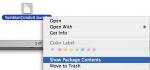
I suspect that you didn't try to "control-click" on the SymbianConduit.bundle then select "Show Package Content." The rest should be easy, you may then open the files from your TextEditor and follow the instructions from the beginning of this thread.
Good Luck.
Attachments:

Hy,
I just own a Siemens SX1 and want to get it to work with isync. How do I get the ATI3 Response string?
Originally posted by steffi
Instead of changing the name of the files for 3650 to 6600 simply copy the existing 3650 set of files to 6600 instead. Then the 3650 device will still work should that be necessary.whenever I use your changes specifically and I have the key in SupportedDevicesInfo set to "6600" I always end up getting an
"App. closed ectcpadapter_00808E5C"
alert on the phone
strangely enoughly if I set the key to "Nokia 6600" so that it will be seen as an unknown phone type I never get this alert.
I get the same message but it works can you advise set the key to stop this ?
😕
Originally posted by steffi
Instead of changing the name of the files for 3650 to 6600 simply copy the existing 3650 set of files to 6600 instead. Then the 3650 device will still work should that be necessary.whenever I use your changes specifically and I have the key in SupportedDevicesInfo set to "6600" I always end up getting an
"App. closed ectcpadapter_00808E5C"
alert on the phone
strangely enoughly if I set the key to "Nokia 6600" so that it will be seen as an unknown phone type I never get this alert.
I get thsame message but it works can you advise on "set the key" thanks😕
i also get the App. closed ectcpadapter_00808E5C message! it's so annoying! (after isync) it's also accompanied by a message saying my phone is low on memory! i have like 30mb free!
can someone please help me on the ff:
1. how do we get rid of the App. closed ectcpadapter_00808E5C, phone low on memory message after i sync?
2. why is it when i receive a message nothing shows on the screen to notify me and there's no message tone too! 😞
3. is there a 6600theme editor for mac?
4. how do i move messages from phone memory to mmc and vice versa?
5. why do we have to reformat our mmc?
please help me on this! you get a nice 6600 icon if you do (i know it aint much but its the least way i could repay you)
Attachments:

oh! and there's one more thing:
i have 3 messages in my draft and sent folder that i cannot erase! help me please. thanks! 😊
I have attached the 6600 iSync files that I use with 10.2.6, iSync 1.3 and iCal 1.5.1 and it works ok except for the strange error codes (see above posts something to do with key Nokia 6600) not sure how to stop this but everythink sync 's ok
Cheers and Beers
😃 😃
Originally posted by KiwiMike
I have attached the 6600 iSync files that I use with 10.2.6, iSync 1.3 and iCal 1.5.1 and it works ok except for the strange error codes..
thanks but im using os10.3 already. 😞
Originally posted by mondo
thanks but im using os10.3 already. 😞
This "should in theory" work with 10.3 as the iSync n' iCal versions are the same ?
Give it a try ..😃
Copy the existing ones first so you can easily replace them !!
hey kiwi! my isync works fine with my 6600. also the ical. but the annoying messages bother me. and also the rest of my complaints from the previous posts.
thanks.
Originally posted by mondo
i also get the App. closed ectcpadapter_00808E5C message! it's so annoying! (after isync) it's also accompanied by a message saying my phone is low on memory! i have like 30mb free![B]can someone please help me on the ff:
1. how do we get rid of the App. closed ectcpadapter_00808E5C, phone low on memory message after i sync?
2. why is it when i receive a message nothing shows on the screen to notify me and there's no message tone too! 😞
3. is there a 6600theme editor for mac?
4. how do i move messages from phone memory to mmc and vice versa?
5. why do we have to reformat our mmc?please help me on this! you get a nice 6600 icon if you do (i know it aint much but its the least way i could repay you) [/B]
See below:
1. don't know yet ......
2.what are you referring to text mesages or b/t transfer ?
3. Not that I know of
4. This may answer 2&4 go to seetings on the phone when you open messages /options/settings chose text or what ever receive report yes /no also same for send messages to MMC under "other" scroll down
5.why reformat ?
6. to delet draft text message click on file in draft folder go to options select delete
Cheers
Originally posted by KiwiMike
2.what are you referring to text mesages or b/t transfer ?
4. This may answer 2&4 go to seetings on the phone when you open messages /options/settings chose text or what ever receive report yes /no also same for send messages to MMC
5.why reformat ?
6. to delet draft text message click on file in draft folder go to options select delete
2- sms messages
4- nope. but thanks.
5- maybe it would make the mmc function better (myth?)
6- duh. i meant there are messages that cannot be erased at all. even if i select all/delete message, there still there.
thanks anyway.
anyone?
Mondo,
I believe your problem is more than just a simple press of a few buttons. It sounds to me that your firmware or the system software on your phone is screwed up. You might want to have your phone OS reinstalled by Nokia service tech. The problem you're having isn't normal. How often do you shut down your phone anyway? Sometimes, unusual problem can be solve by shutting down the phone, remove the battery, remove the SIMM card, then replace them back. I don't know why, but they seem to work some time. Otherwise, just have your phone examined.
Good Luck!
Thanks to all the help in this thread - my 6600 is now syncing perfectly to ical and address book - thanks a lot to everyone!
Like others I am still having an issue with the error message post sync: "App. closed ectcpadapter_00808E5C".
Has anyone found another solution for this...i have tried playing with the file using Nokia 6600 and 6600 interchangeabley within the SupportedDevicesInfo file structure - but it does not alter the error message...problem must lie elsewhere.
Any new thoughts?
Originally posted by Bingo
Like others I am still having an issue with the error message post sync: "App. closed ectcpadapter_00808E5C".
Same boat here. Can't sync without that error or the not enough memory error. I own an Italian 6600 and I am running OS X 10.3.2.
Originally posted by macs
Thanks Steffi, I checked and double checked. I'm very sure that the settings are all correctly changed to 6600, even added new 6600.tiff which shows up and can see the device but when I try to sync, this is the message I was getting...[***] Tuesday, December 9, 2003 6:58:41 PM US/Pacific
|6:58:42 PM|Info| Connecting to SC 6600
|6:58:56 PM|Error| |SC 6600| Could not connect to SC 6600. SymbianConduit may not be correctly installed.
|6:58:56 PM|Warning| Can't synchronize contacts to SC 6600: device is not available
(BTW, I changed my phone name to SC 6600.)Here's my iSync
Did you check your firewall (port 3034 or similar) open?,
Did you repair permissions? (with cocktail for ex)
@+
Tep
Originally posted by intinig
Same boat here. Can't sync without that error or the not enough memory error. I own an Italian 6600 and I am running OS X 10.3.2.
Got the same error:
My 6600 is French.
Related to the USB Bluetooth Dlink?
The Nok is V 3.44.1
dial *#0000# on yr phone to find out
Ciao
I got it working too with some variations, I followed the directions in the original post except for the following:
-I copied instead of renaming in the 2 files you edit.
-I duplicated the 3650.tiff and renamed the duplicate to 6600.tiff
-My phone is called Dave's 6600 but I did not use this name anywhere in the config files (hope that helps some)
-After I had it working I downloaded a 6600.tiff file and replaced the duplicated and renamed 3650.tiff
Things that may help others, I found I got errors on opening iSync, I finally got rid of them by creating a new subfolder for my backup copies of the SymbionConduit.bundle file seems the backups of this file being in the same folder (even though it was named "orig SymbionConduit.bundle"😉 was causing iSync to fail to open.
I also get the app. etc error that many others are getting on my phone after sync. but no error on iSync itself.
Hope my post helps someone.
Where can I get the 6600.tiff file from?
Thanks
Deej.
You should make yourself a 6600.tif, but if you want, I made one 😊
You can find it @ http://www.giovanniintini.it/images/6600.tif
I have the following problem - I made all the changes as discribed, did the 'repair permissions thing', and I could indeed sync with iSync. Once!! When I tried a few hours later iSync kept saying that it could not connect with the 6600. I re-did the whole procedure, and was able to sync once more, but yet again, only once! (I also get this strange message - App. closed ectcpadapter_00808E5C - after the sync has completed). When I do manage to sync the appointments I made on the 6600 show up in iCal, but without the assigned times!? Bluetooth in itself seems to work fine (I can connect, pair both machines, exchange foto's, adressbook data, use the phone as modem - no problem). I use an iBook G3 800Mhz with OS 10.3.2, and a Sitecom CN500 bluetooth USB dongle. Anybody help?!
m.timmer, is this the error you are getting?
Sunday, 15 February 2004 12:05
|Dave's 6600| Could not connect to Dave's 6600. Please check the pairing with this computer.
Can't synchronize contacts to Dave's 6600: device is not available
Can't synchronize calendars and To Do items to Dave's 6600: device is not available
I get it to sometimes, what I have found is if the phone is on and B/T is on but the back lights are off, especially when the screen saver is on meaning the phone has been idle for a while I will get this. I also find I am more prone to getting this the further away the phone is.
Try this, have you phone some where you can reach it when you are sitting at your computer (less than 2 meters away from the computer) then push the joystick in any direction, up down left or right (it doesn't matter if the key pad is locked or not) this will turn you phone back light on, then click 'Sync Now'. see if that helps, It helps me.
good luck,
D
edit: forgot to mention that your phone's name is probably different to mine😊
I'll try your suggestion. Will get back to you with the results.
Ok, now I'm at a point that it sometimes works, and sometimes doesn't. I even think I found out what it is that's keeping it from working, but I don't know what to do about it. I activate the bluetooth on the 6600 and make contact with the iBook. It finds the iBook, I have to select it again, it then askes for a code wich I give. I then have to accept this code on the iBook. The 6600 says they are now paired. Then I tell iSync to start synchronising. Now on the 6600 there appears the message that the iBook wants to connect, and wether I would like to accept that. I press "yes", iSync starts to work, but then there appears a menu giving me the choice what I can do on the iBook with the 6600 - 1)exchange adresses 2)exchange data and 3) sync contacts and calender with iSync, but this last possibility is greyed out! No matter what I chose, iSync will tell me that it cannot connect to the 6600. But sometimes this 3 choices menu doesn't appear, and then I can synchronise. Question, why does this menu keeps appaering? (the last time I did synchronise I again got this mysterious "App. closed ectcpadapter_00808E5C", but now the 6600 completely froze. I had the remove the battery - scary! - to get it working again)
Ok, something to try,
press the menu key, goto the "Connect." folder, go into bluetooth, then push the joystick right. does your iBook have a padlock next to it? If not make sure it is highlighted and press the options button and select "Set as authorised".
Then try iSync again.
Hope that helps.
D
Well, Apple has released iSync 1.4 with official support for Nokia 6600. Get the upgrade now.
(to be sure that the old hack won't cause any problems, remove the hacked 6600 files from /System/Library/SyncServices/SymbianConduit ...)
/hegge
iSync 1.4 saved the day! Everything working perfect now. Thanks to Apple (and all you creative people out there). By the way - tried to install bluetooth & 6600 software on a PC with W98 and on one with XP and was never able to even get the bleutooth working (which with Apple was no problem from the start).
iSync 1.4 indeed works with 6600 out of the box. However if you sync while the keypad lock in enabled you will find that it disables the keypad lock and the keypad becomes live. Not sure who's fault this is, but it is annoying.
I have reported the issue to Apple.
I just got a Nokia 6600 from T-Mobile and it has version 4.09.1
When I try to use iSynch I get the following error:
[Nokia 6600] iSynch was unable to connect to Nokia 6600. Try Synching again.
Can't Synchronize contacts to Nokia 6600: device is not available
Can't Synchronize calendars and To Do items to Nokia 6600: device is not available.
When using Address Book to send/receive SMS messages, I am only able to send messages successfully. I am unable to receive messages
When using Address Book to make/receive calls, I am only able to dial my Nokia 6600. It does not recognize any incomming calls.
Does anyone have any insight to this problem ??
Thanks in advance!!!