Hi P900 owners,
I definitely am running into trouble when I try to flash the P900 firmware:
- I currently run CDA162003/3 R3A05 and I would like to flash to CDA R4A06 (latest release).
- I just installed the latest version of the PC Suite software, 2.3.1 US
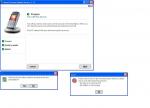
- The update web site (including all downloads etc). runs smoothly up to the point where you need to power off and insert the P900 into the sync station. At that point, the "Sony Ericsson Update Service 1.13" is launched in a separate window. See screendump. I Click Next and Yes, then the weirdest error comes up:
There was an error in the communication with your device due to one of the following reasons:
- the device is not turned off
- the battery is not charged
I can assure you, the device is off and the battery charged.
I have the feeling there might be a trick or a setting which I have overlooked. Otherwise it might be a bug in the SE software.
Any help... would be greatly appreciated. Koen.
Attachments:
Mate, I'm currently still a Nokia owner (will get P900 soon) and my only advice is the one I too was given for when Nokias have some battery/power related issues (or even just stupid software problems) - and it worked.
First let the battery completely discharge, until your phone no longer powers up. Leave it like that a while and then try powering it up again, to make sure there's no power left. Then do a full recharge, preferrably with it turned off.
I'm not sure if this helps you but I hope it does; one reason why I too will be purchasing a P900 is that it allows for firmware updates w/o going to a service center.
just try to take out the battery and reiinsert it to your p900 and run the steps to upgrade the firmware again ...
Last time I have the same problem.
To resolve it, i fully discharge my battery (play a video for 5 or 6 hours). And when the phone turn off, i fully recharge it.
The upgrade work for me after this operation.
If you are having problems with firmware update
Try disconnecting the SyncStation from the mains power supply
Then repeat the update, this worked for me.
koenkam wrote:Hi P900 owners,I definitely am running into trouble when I try to flash the P900 firmware:
- I currently run CDA162003/3 R3A05 and I would like to flash to CDA R4A06 (latest release).
- I just installed the latest version of the PC Suite software, 2.3.1 US
- The update web site (including all downloads etc). runs smoothly up to the point where you need to power off and insert the P900 into the sync station. At that point, the "Sony Ericsson Update Service 1.13" is launched in a separate window. See screendump. I Click Next and Yes, then the weirdest error comes up:
There was an error in the communication with your device due to one of the following reasons:
- the device is not turned off
- the battery is not charged
I can assure you, the device is off and the battery charged.
I have the feeling there might be a trick or a setting which I have overlooked. Otherwise it might be a bug in the SE software.
Any help... would be greatly appreciated. Koen.
😊
:? Still SEUS is not working on my system...
- I ran SEUS on 2 different machines (v1.16)
- I installed XP1
- I uninstalled the Zonealarm firewall and Norton anti virus
- I installed the latest JVM from www.java.com
- I updated the DSS 25 driver
- I asked the people at se what to do, they couldn't give me any new insights other than can be found in the SE knowledge base.
- I disconnected the power supply after fully charging the p900, then tried to run SEUS
- I even tried the recovery option, without any effect (negative or positive)
I think the p900 is responding to SEUS. The p900 is switched on when SEUS is running. However, SEUS at that point can't continue and displays the above strange message.
So... is there anything else I can try before giving up and bringing the p900 to a SE service center?
