Hi...
I live in Brazil.. and as you might know.. the worst problems here are related to security and I'm really afraid of having my n6600 stolen..
I want to ask you what do you recommend...
My intention is to use some lock, not locking the sim, but the phone itself!...
Use something to send me SMS with its location or to block the phone using SMS..
Is it possible to get the phone location using the GSM cells like "miniGPS" uses?
I saw a few apps about blocking the phone against thieves but I did not feel like trusting them..
Again.. what do you recommend??
Try anti thief.Not sure about the website.Search on google "anti thief 6600".It could be a great app for u.
To be honest, I don't think that's a very satifactory solution. My apologies to the developer if I failed to understand the description. Anti thief seems to run resident in memory. You turn your phone on and off and use the feature so it's always running as a daemon/startup/shutdown item. If someone steals your phone it apears all they need to do is a hard format (which means you don't need the phone on) and bye bye anti thief. I'm waiting for someone to correct me on this one if I'm wrong.
Yes, it's great if someone picks up your phone and turns it on pretty close to you or somewhere that good samaritans who have a clue might be, but if your phone is stolen the best thing is getting your provider to track it for you. Setting all the locks and autolocks can prevent you getting some hefty charges, but the best thing you can do is make sure you know your imei, sim code, and bluetooth MAC#. That way you can at least id your phone.
And you never want to underestimate what a street thief knows about things that are easy to steal...
all you said is true...
but let's begin thinking the thief is not a really smart guy..
let's think he doesn't even know the difference between a smartphone and a normal cellphone..
let's think he doesn't know n6600 can be formatted! 😉
he thinks he can swap SIM cards and says he owns the phone..
he thinks he can swap SIM cards and sells the phone to somebody else for a few bucks..
the point is.. my phone is mine!!
forgetting about format..
swapping SIM .. the phone has to send me his location..
is the phone sending me his location the best way to find it?
maybe I'll find the thief but I'll not fight with him..
swapping SIM .. is there a way to lock the phone remotely and put my name on its display? not asking for an app.. but asking if this is possible in someway.. or if this can be implemented.. can it?
here in Brazil the Providers do not seek for stolen phones..
anti-thief can lock the phone that way but.. I'm afraid of locking my own phone.. I'm afraid of having to format in case anti-thief hangs and not accepts my unlock code...
anti-thief is a proprietary application.. we can't see if the code really does what is supposed to..
for me it's a false feeling of security.. :frown:
If someone steals your phone it apears all they need to do is a hard format (which means you don't need the phone on) and bye bye anti thief. I'm waiting for someone to correct me on this one if I'm wrong.
Doesn't he need to know the lock code to format it?
GhostDog wrote:Doesn't he need to know the lock code to format it?
If you set the autolock and lock on startup and lock on sim changed,all of which are available in the security menu,then thats pretty much all you can do.
lock on startup? is it possible? it doesn't exist in my security menu..
is it possible to put a message on the display when the phone is locked?
I think it's not...
jtavares wrote:lock on startup? is it possible? it doesn't exist in my security menu..is it possible to put a message on the display when the phone is locked?
I think it's not...
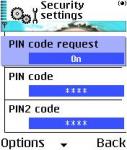
If you set "Pin code request" it will ask on startup for code.
Its not possible for message when locked.
😊
Ps: Ive thought of a new app, its called "Self Destructor" it works by simply dialing a pre set number (18 digits) into a specific telephone of your choice (to avoid unwanted explosions) this will set off a small amount if C5 explosives (which fits into the 1mm gap between battery and cover and hey presto!!! at least nobody else can enjoy your phone!
Attachments:
I'm thinking a lot of phone theft that I see, is opportunism. Someone sees a phone unguarded (or even left somewhere) and they take it. They don't necessarily 'steal phones' but some people cannot help themselves if the opportunity is there.
If you can send a text and lock your phone, giving them a way to return it, they might just return it, pretending they found it...
This Thief Alert was listed under 7650, would it work on a 6600?
http://allaboutsymbian.symbos.com/product_information.php?ApplicationID=452
AndyCr15 wrote:I'm thinking a lot of phone theft that I see, is opportunism. Someone sees a phone unguarded (or even left somewhere) and they take it. They don't necessarily 'steal phones' but some people cannot help themselves if the opportunity is there.If you can send a text and lock your phone, giving them a way to return it, they might just return it, pretending they found it...
This Thief Alert was listed under 7650, would it work on a 6600?
http://allaboutsymbian.symbos.com/product_information.php?ApplicationID=452
I have to seriously question the legal side of even selling an app which claims to be able to send you information on service provided by another party when a new sim in installed. Unless you have an unlocked phone, the app is breaking the simlock on the phone provider by your service provider. Normally you'd have to get the unlock code from your service provider (or however you want to LEGALLY obtain it) and plug it into your phone before you could use a sim from a different company. So either the app can't do it if you put in a different carriers sim, or it's breaking the simlock, or it assumes the thief is smart enough to unlock the phone in the first place (in which case the hard formatting would probably be done since the thief is probably smart).
GhostDog wrote:Doesn't he need to know the lock code to format it?
When I hard formatted my phone I just did the button press. I think you can do it from a power off state (I haven't checked). So theoretically all you'd need to do is turn the phone off or pull the battery. Have a reasonably charged battery (although the full format doesn't really use that much bat and you can charge the bat w/o ever turning the phone on). Then hold down the buttons and power on the phone. I think the entire purpose of the button press is to do a full reset when your phone is so messed up you can't do it by plugging a code in or using the menu settings. No phone boot seems to appear when you hard format w/ the button pushes, it just comes right up w/ the format menu. Since that zaps your phone memory all that's left is sim and card and we're assuming the thief is going to swap sims anyways. If they are going to format the mem then they're probably going to be smart enough to format the card externally. End of all aps. Now, you could be right and you need to somehow shutdown the phone while holding the right buttons before doing the button press format, but it makes you wonder why it's there if it's going to obey any locks it seems like it's entire purpose is kinda shot.
The 'hoping' someone says they are honest return routine seems the best way.
AndyCr15 is right...
Even here in Brazil, the guys that steal cellphones are not too smart and even doesn't have too much knowledge.. They'll not format the phone.. They'll just try to use their SIM on the phone...
I think the best way to have the phone returned is to run an app in the background broadcasting by SMS the new phone number after a boot with a new sim to a defined phone number...
It would be great is it was possible to lock the phone just sending a msg to it...
Locking the phone and putting a msg on the display offering money for the guy that returns it will be just ok...
jtavares wrote:AndyCr15 is right...Even here in Brazil, the guys that steal cellphones are not too smart and even doesn't have too much knowledge.. They'll not format the phone.. They'll just try to use their SIM on the phone...
I think the best way to have the phone returned is to run an app in the background broadcasting by SMS the new phone number after a boot with a new sim to a defined phone number...
It would be great is it was possible to lock the phone just sending a msg to it...
Locking the phone and putting a msg on the display offering money for the guy that returns it will be just ok...
Ok, lets go w/ them not being very smart. I'd make sure you can put another companies SIM in or there really isn't a way to send the message or anything else w/o them going to their friendly neighbourhood slicer. Of course if they aren't that smart and are just opportunistic they'd use your sim and run up your bill for a while so an app that used the scheduler/calendar and sent out some sms constantly (even while you use it) after a set amount of time would be a good idea.
When I think about it..one of the most devious ones would be to fake the keylock. Say you have your keylock on (left softkey star). When you try to use the phone it says "Press Unlock and the * (with a big green i). The left softkey also says unlock on it. Well...why not fake this w/ an app. You could have it so you 'normally unlocked' the phone by pressing the Unlock key and the pound/hash # key instead and if someone unlocked the phone by pushing the Unlock and * key then the phone would send sms and the thief would be none the wiser. Ideas?
Analysing all the situation I realized that the best thing to do is:
- print and put a note in the battery compartment with my name, phone and telling that the person who returns it will be gratified..
- activate "lock on SIM changed"..
Then, if the worst happens, I call the operator, they lock my SIM and the thief will have to swap it to use the phone.. Now, the phone locks.. 😊 This can be done easily..
The question that still remains: if the phone is locked, powering it off and trying to format it will ask for the lock code?!?! or it will be bypassed..?
JasonT, working on your idea, the phone can be unlocked by just removing the battery as you will not be able to press the button to power it off ..
Powering it on, your app can be autoexecuted .. A smart guy can enter safe mode and bypass its autoexecution .. and remove it 😊
So, my previous question remains .. if the phone is locked, do we need the code to format it??
jtavares wrote:JasonT, working on your idea, the phone can be unlocked by just removing the battery as you will not be able to press the button to power it off ..Powering it on, your app can be autoexecuted .. A smart guy can enter safe mode and bypass its autoexecution .. and remove it 😊
So, my previous question remains .. if the phone is locked, do we need the code to format it??
Why dont you test your idea?
I know its a bit of a bummer mission to go through but at least you would know for sure then,even if someone told you what their particular 6600 did,that doesnt necessarily mean yours will,as these phones seem to have their own personality Lol. 😊
jtavares wrote:JasonT, working on your idea, the phone can be unlocked by just removing the battery as you will not be able to press the button to power it off ..Powering it on, your app can be autoexecuted .. A smart guy can enter safe mode and bypass its autoexecution .. and remove it 😊
So, my previous question remains .. if the phone is locked, do we need the code to format it??
Ok, IIRC my last suggestion was an app that just disguised what the normal keypress unlock did. It would appear unlocked to anyone but be sending out sms in the background about it being stolen so you can get it back. This was based on someone just being the average thief who grabs your phone, wants to take advantage of your plan and starts pushing buttons to dial numbers, gets the normal press unlock then * message, does that and away we go. I already said that hard formatting your phone with button presses should erase anything on the phone memory w/o a lock code. I've hard formatted before, but as you know it's not something you want to just mess around with especially if your trying to see if it defeats a lock code.....
But...since I have a replacement phone coming to me..and I'll try to remember this.. I'll see if I can set a pin lock on my current phone then hard format it w/o using that pin lock. Any other things you want me to test if I remember to try this? 😉
tsc tsc symbian.. :icon13:
just another flaw in its design.. 😮
it should ask for lock code before hard format..
hey JasonT.. I realized that setting auto-lock to any time will make the phone ask me for lock code on every boot..
try setting this before formatting 😊
btw, why you got a new n6600?!
jtavares wrote:tsc tsc symbian.. :icon13:
just another flaw in its design.. 😮
it should ask for lock code before hard format..hey JasonT.. I realized that setting auto-lock to any time will make the phone ask me for lock code on every boot..
try setting this before formatting 😊
btw, why you got a new n6600?!
Ok, so set pin code request on and auto-lock to anytime... will try that.
I'm not sure it's a 'symbian' flaw. We are dealing w/ nokia phones and I'm sure you wouldn't have the same exact keypress combo on something like a p910. I would think the reason the button press is there is a last hope measure in case you get completely locked out of your own phone so in a way it makes sense, but it doesn't seem to have any security like requiring a puk 2 code after a full reset (I thought of invalidating the sim, but if you're the owner you don't want that...just your phone working. I believe it probably zaps wallet if you have that on and it's resident in the phone mem). Seems kinda like a half thought out security idea.
new (4th 6600) was because there was a flashing red pixel in camera, video, realplayer, helix, etc...anything w/ motion video had it flashing on and off all the time. not dead, not blurred, but out of control and it just developed. Either the screens and/or the graphics chip unless integrated to the cpu need to have MUCH better quality controls. It also seems to me that if nokia is aware of something that happens to their phones after a bit of use and isn't consistent they might want to try working on FIXING the existing problems in the firmware (graphics driver and some screen reset or something) instead of adding new features. We all know the 6600 isn't the most well thought out of phones, but going through 4 in 3 months for legitimate manufacturing or warranty defects is ridiculous.. I bought a 51xx when they came out in the UK and the US and they both still work perfectly. I have very little hope the 6600 will be around that long for me 😞.
Tested:
1) Turned on and set pin code
2) Turned on and set lock code for 1 (autolock and request)
3) As expected could not turn off w/o unlocking
4) Removed battery
5) Held Green, 3, and * after pressing the power button (battery was full)
6) After phone formatting booted phone
Results:
Phone boot still required pin code, but the lock code did not seem to be requested on boot.
So you're reasonably safe w/ pin request on, if it's off then the memory can be zapped along with any running applications.
It still leaves you with the problem of what to do when your phone is stolen and you want something reporting where it is or working in the background in some manner. If pin code is on then the phone won't be usuable unless someone either hacks that or gets a puk2 code for the phone. Even if the above is accomplished, a memory wipe can occur without pin or lock request so nothing would survive. Going on the 'average joe' thief situation I'd think chances of getting your phone back are better using a resident app that imitates the keylock and sends sms or whatever instead of using the pin lock.
I am going on the assumption that anyone who steals a phone that can be sold for around 400US depending on the vendor/location will want some money for it and will try to get it sliced instead of throwing it away.
It seems to me that the only safe resident security agent would have to reside in the firmware, so it either comes from Nokia or someone has to get some deep magic access from Nokia in order to distribute an app that patches the resident firmware; that or provide a mail in and return service since it costs money for the eq to flash (apparently) unless of course you live in a mobile developed country w/ full service centres all over.
Ideas/Comments anyone?
Here's mine (new phone number 5 had a flashing blue pixel on all the time so I sent it back and they are sending me a replacement again). The 6600 is a great phone, but Nokia has the worst possible display quality control/part vendor. I'm really not satisfied at all with this model right now.
And what's the difference between formatting and using this code?!
*#7370#
JasonT wrote:
Results:
Phone boot still required pin code, but the lock code did not seem to be requested on boot.
JasonT, after buying another SIM from other operator that comes with PIN request on, I realized that setting PIN code will just protect the SIM usage and not the phone... and that changing this setting will just change an entry in SIM ..
If you had formatted and inserted another SIM without this PIN code request set to ON, the phone would have worked .. 😃
