here's my first theme...family guy! enjoy
family guy theme
It could use a little work imvho, but keep at it, and welcome to the club 😃
Thanks I'm new to Series 60 and very much so for themes so any advice would be appreciated. 😊
Ok. On a practical level, I would insert a 'grid highlight', as this will make navigating the main menu much easier.
On an aesthetic level (hence, my own taste), I would try to deviate from default settings as much as possible. So you might want to change (or remove) the 'navi pane'. That's the blue bar near the top of the screen. Also I would change the 'battery/signal tabs'. You'll find a couple already in the components section, but you can change the colurs if they don't go with the rest of the theme. 'Tabs' also give the theme a different look, but there are a lot of these to change, so if your pc is on the slow side, this can be a pain.
I don't want this to sound like a rant or a lecture, because you're headed in the right direction :icon14:
One last thing... make sure you take a screenshot! If you haven't already got FExplorer, you can download it for free. Just search the forum.
Thanks, gonna take that advice and play around a little. By the way, awesome themes you got there man...that salvador dali one is sweet.
Took your advice...here's the revised work...although I haven't figure out how to remove the bar at the top yet....I'm sure I'll figure it out though:
One quick question...how do you make that bar fade? Is it a transparent gif?
Attachments:
FamilyGuyIV.zip (63 KB)
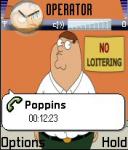

Firstly, thank you for your kind words about my themes :redface:
Secondly, well done on your improvements! I do like the 'List Highlight', nice touch :icon14:
Lastly, to remove the blue bar:- Select 'Areas' > 'Status Area' > 'Navi Pane Background'. Now open up 'Components' and you'll see 'none'. Voil�! I don't know how to fade them out, but you're probably right about the gif. My photo editor won't let me work with gifs :banghead:
All the images used in Theme studio are .bmp
What exactly do you want to fade and when? ( Navi pane side to side? Menu or idle?).
elton wrote:All the images used in Theme studio are .bmp
That's true for the Windows 2000 version, but the XP version accepts .jpg files.
As for incorporating .gif files, here's how you could do it...
In your photo editor first create a blank template of 176x208 (for idle and background).
Now scale down the image you want to use for the background and paste it onto your template just as if you were placing the image in Theme Studio.
So far, so good. Now the tricky part (and I've not done this myself because I can't use .gifs in my photo editor). Resize your semi-transparent .gif to 176 (or more) x15 and paste it onto the background exactly where it would appear in the finished theme (ie it should start 44 pixels down).
Save this as a .bmp and it it's locked and loaded for Theme Studio 😊 Just be sure to select 'none' for your navi pane from the components.
...Oh, and you'll have to repeat the process if you're planning on using different idle/background images.
Sandinista wrote:That's true for the Windows 2000 version, but the XP version accepts .jpg files.
As for incorporating .gif files, here's how you could do it...
In your photo editor first create a blank template of 176x208 (for idle and background).
Now scale down the image you want to use for the background and paste it onto your template just as if you were placing the image in Theme Studio.
So far, so good. Now the tricky part (and I've not done this myself because I can't use .gifs in my photo editor). Resize your semi-transparent .gif to 176 (or more) x15 and paste it onto the background exactly where it would appear in the finished theme (ie it should start 44 pixels down).
Save this as a .bmp and it it's locked and loaded for Theme Studio 😊 Just be sure to select 'none' for your navi pane from the components.
...Oh, and you'll have to repeat the process if you're planning on using different idle/background images.
The windows 2000 theme studio accepted .jpeg also...But compared to .bmp the quality is very bad.
Most modern paint programs will open a .gif (animated or not) but will only open the first page,so that could then be entered into Theme studio.
Anyway i think we are losing sight of the original question lol 😊
That's true 😃
xj911, I've just realized what the 'fading bar' is. I had Bluetooth on when taking all the screenshots, and this appears to be a transparent .gif, but it's not. It comes on by default for BT, locked keypad, incoming messages etc, and all you can edit is the colour of the icons.
Sandinista wrote:That's true 😃
xj911, I've just realized what the 'fading bar' is. I had Bluetooth on when taking all the screenshots, and this appears to be a transparent .gif, but it's not. It comes on by default for BT, locked keypad, incoming messages etc, and all you can edit is the colour of the icons.
I think he is talking about making the navi pane fade isn't he?
Like the default navi pane in menu view (image attached)
Attachments:


ya the bar with the bluetooth and messaging symbols...now that i've looked at other themes i can see that it probably comes that way with all the themes.
One last incarnation...changed up some things.
Attachments:
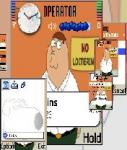 FamilyGuyX.sis (60 KB)
 FamilyGuyX.sis (60 KB)