When you use the built-in audio player (flip closed) and get a call while you're listening to a song you get the following screen (see attached image).
Now, that is nice but what can I do with it? :con? I mean if you want the music to resume, you have to open the audio player again right? There isn't an option to let the music resume from the main screen (see attached image) right? If this is not possible, then what's the sense of showing this data on the main screen?
Attachments:
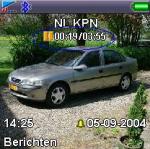
To resume Play, press the 'C' Key - "Desktop View" (Flip closed)
The 'C' Key toggles the Music Player between 'Pause' and 'Play' in the Flip Closed position.
Also works if the Music Player is the "Active Window" - same functionality as the 'OK' Key.
try it. 😊
That's great!!! Exactly what I was looking for! Thanx very much (Anymore quick keys for the mp3 player maybe??)
P.S. I just found out that the latest version of Unreal Player auto-resumes the music automatically once the call is ended, so that's even more convenient! But thanks anyway!
