Hiya, can anyone help me. I've recently bought a new 7610 and its great. The problem is even at the very highest quality setting the pictures come out very grainny when i view them on my pc. This happens when there's normal light conditions, but if there is VERY bright light then the pictures come out great. Is there something wrong with my camera? Please help. Thenkyou!
7610 picture quality
There's nothing wrong, mine is the same... No worry 😃
samzh wrote:There's nothing wrong, mine is the same... No worry 😃
Thanks! That saves me worrying. But i think that is a bit disappointing coming from a 1 mega pixal camera. I'm going to try some camera apps to see if they make any difference. What do you think? Will that help? Thanks!
well i tried both Camera FX and PhotoAcute, none of them made any difference at all. Is anyone else getting this grainny effect when the pictures are uploaded to the pc when taken in normal light conditions (eg. a standard room light bulb brightness)?? Thanks.
me too, so disappointed...
anyway you can't expect more from 1mp CMOS lens
also picture motion is horribly slow when activating night mode.
Why not upload a sample pic and we can tell you if it's 'normal' or not.
My pictures look fine to me - thou outdoors is always going to be better than indoor shots due to there being no flash.
Best
Will
willbrady wrote:Why not upload a sample pic and we can tell you if it's 'normal' or not.
My pictures look fine to me - thou outdoors is always going to be better than indoor shots due to there being no flash.Best
Will
There is actually an external flash available for the 7610. Although i haven't used it (yet) it would be interesting to here from anyone that has??
willbrady wrote:Why not upload a sample pic and we can tell you if it's 'normal' or not.
My pictures look fine to me - thou outdoors is always going to be better than indoor shots due to there being no flash.Best
Will
Thanks! I've attached what i think is the best indoor picture i've got (in terms of quality). Please tell me what you think in terms of its quality? Thanks!!
Attachments:


willbrady wrote:Why not upload a sample pic and we can tell you if it's 'normal' or not.
My pictures look fine to me - thou outdoors is always going to be better than indoor shots due to there being no flash.Best
Will
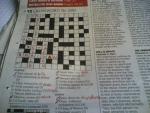
Heya! Just took another one just this minute while at work. Tell me what you think, is my camera ok? Let me know (also if you know what 4 down is!! :tongue: )
Thanks!!
Attachments:

Most digital cameras will give you a relatively grainy raw image. Even something like a 5.1mp Olympus I was using last year. All you need to do with your images is sharpen them a little and shrink them by 50%. They will still be big enough to see what's in the pic, and the quality is far far better.
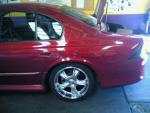
The pic below was taken with my 7610. It was shrunk by 50%, had a filter applied to make it sharper, and had brightness and contrast adjusted a little bit. Oh, and I reduced the quality a bit to make the file smaller.
Attachments:
.jpg)
MrPlow wrote:Most digital cameras will give you a relatively grainy raw image. Even something like a 5.1mp Olympus I was using last year. All you need to do with your images is sharpen them a little and shrink them by 50%. They will still be big enough to see what's in the pic, and the quality is far far better.The pic below was taken with my 7610. It was shrunk by 50%, had a filter applied to make it sharper, and had brightness and contrast adjusted a little bit. Oh, and I reduced the quality a bit to make the file smaller.
Thats great quality! How did you make the image sharper? What kind of software did you use? Thanks!
Yep - I'd say your cam is just fine AP_7610 and I'd agree 100% with what Mr Plow says.
The standard 'auto levels' 'auto contrast' in photoshop will normally do the job just fine and occasionally a manual tweek of the curves just to bring the white up a touch.
As for shapen, I normally use the standard photoshop settings.
The key is good lighting - try to have the sun behind you or at an angle so you don't cast a dark shadow on the subject, the more pix you take the better you'll get at it, in the end you'll be taking better pix without even thinking about lighting etc.. but don't expect too much indoors without the flash unit, which I can't wait to get my hands on, try taking pix near a window with natural sunlight shining thru.
Best
Will
willbrady wrote:Yep - I'd say your cam is just fine AP_7610 and I'd agree 100% with what Mr Plow says.
The standard 'auto levels' 'auto contrast' in photoshop will normally do the job just fine and occasionally a manual tweek of the curves just to bring the white up a touch.
As for shapen, I normally use the standard photoshop settings.The key is good lighting - try to have the sun behind you or at an angle so you don't cast a dark shadow on the subject, the more pix you take the better you'll get at it, in the end you'll be taking better pix without even thinking about lighting etc.. but don't expect too much indoors without the flash unit, which I can't wait to get my hands on, try taking pix near a window with natural sunlight shining thru.
Best
Will
Thanks Will, i think you're right. Indoors just isnt that great! Cant wait to get the flash as well.Thanks!
MrPlow wrote:Most digital cameras will give you a relatively grainy raw image. Even something like a 5.1mp Olympus I was using last year. All you need to do with your images is sharpen them a little and shrink them by 50%. They will still be big enough to see what's in the pic, and the quality is far far better.The pic below was taken with my 7610. It was shrunk by 50%, had a filter applied to make it sharper, and had brightness and contrast adjusted a little bit. Oh, and I reduced the quality a bit to make the file smaller.
Hi MrPlow! Would it be possible for you to post a guide as too how to make your pictures look as good as they do from once you upload them? What software do you use? Thanks alot!
AP_7610 wrote:Thanks Will, i think you're right. Indoors just isnt that great! Cant wait to get the flash as well.Thanks!
Here's your own picture back after a little tweek with the 'auto' settings in photoshop - looks much better I'm sure you'd agree.
Best
Will
Attachments:


willbrady wrote:Here's your own picture back after a little tweek with the 'auto' settings in photoshop - looks much better I'm sure you'd agree.Best
Will
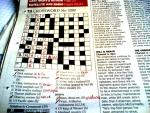
And here's the newspaper but without the re-sizing..
Attachments:

I'm going to buy the PD-2 Camera Flash.
You guys reckon it'll make any difference to the picture quality? Would there be a significant improvement?