Further to my last post which was closed by the moderator for some reason, when the question wasn't even answered in the link provided, I'm posting again.
The link to the following page http://www.allaboutsymbian.com/forum//forum/thread/29135/ didn't give me any help at all as the application 'Appman' doesn't solve my problem as is mentioned in the last post on the page by magnificus. All this application does it is add a link to the 'Appman' program to the 'Go to' menu
So here is my post again!:
I've followed the instructions in the manual but don't seem to be able to find the option on the menu to add things like bluetooth/contacts etc to the 'Go To' shortcut menu
Anyone any ideas?
Will I need a piece of 3rd party software to do this?
Thanks in advance
James
But the link you were given *DOES* answer the question: The application has to have built-in support for being added to the Go To menu. If it has such support, you will find it in that applications "Options" menu. If you don't find such an option in the application, then it cannot be put in "Go To". Not many applications have that option.
I think the link DOESNT answer the question, as the question was how to add various functions to the goto menu. Appman can only add a link to itself in the goto menu, and not any arbitrary function. You can add loads of functions to the MAIN left/right keys when in standby mode, but none of these can be assigned to the Goto menu. Why this is the case Nokia only knows.
By in large i think the goto app is very limited and almost worthless. by default it has Inbox, Calendar, and Notes in there, but i cannot see any option within those to add to goto, apart from the objects they create and not the app itself (ie. if you add a new note, the note can be added to goto, but notes in general (the app) cannot)
the function/application itself needs to have an "Add to Goto" feature. If it does not, then it cannot be added. I am not aware of any 3rd party apps that do this.
It is also a shame that the "joystick" keys cannot be assigned functions. Pressing the joystick "select" button opens contacts, but the u/d/l/r keys do nothing in standby mode, which is such a waste. (eg. left on a 7250 creates a new text message, right opens the calendar) Assigning to these keys would be nice.
I don't have my 7610 here so i can't check this, but has anyone opened up a shortcut in the "Goto" screen with a text editor (ie fexplorer viewer)? If it is simply a path reference you may be able to create them manually.
Just a thought...
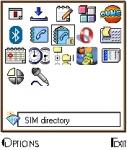
In Following Picture i am using Contacts, Bluetooth, Sim Dir, Themes, App Manger, Memory Card Option etc From the In built application and Fx Exp, Fscaller, Opera Are 3rd party application which i am using in Go-To with the help of Symbianware Appman
Ur Ques How do you add things to the 'Go To' menu?
I think it is been satisfed here.
Attachments:
Sorry Vicky, I see what you mean.
I have appman installed, please could you tell me how to add things to the go to menu from appman? Can't work it out.
Thanks for all the help so far guys.
Is it that the trial version will not let you add things as I'm only using an appmann trial so see if it does what I need.
Thanks
James
EDIT: when I go into appman and select to add an open app into the go to menu, all it does is put the appman app in the go to menu.
any ideas what version of appman you are running vicky? could it be a bug?
this has me flummoxed! :frown:
i certainly cant do that, not on the appman i have anyway (v 1.04)
all it can do is give you the option of adding itself to the Goto menu
hawkerpaul wrote:i certainly cant do that, not on the appman i have anyway (v 1.04)all it can do is give you the option of adding itself to the Goto menu
I'm using v1.04 of Appman too. Could this be the problem?!
What are you using Vicky if you don't mind me asking?!
Cheers
James
I am using the same version which is on www.symbianware.com
i think it is v 1.04
Here is the way
u can see in the following images.
The Frist images is when i start Appman.
The Second is of when i turn 4times Right.
After it is gathering info,then u can see in 4th image
After that u can slect ur application->press option and "Add To Fav"
Then it is done check in Go-To.
Vicky wrote:Here is the way
u can see in the following images.
The Frist images is when i start Appman.
The Second is of when i turn 4times Right.
After it is gathering info,then u can see in 4th image
After that u can slect ur application->press option and "Add To Fav"
Then it is done check in Go-To.
Thankyou so much Vicky, I was going down to misc in the options menu and clicking 'Add to 'Go To'
Didn't realise you had to clikc the add to favourites.
Thanks again!
I expect this is what you were doing hawkerpaul?!
Cheers!
James 😃 😃
Hi to everyone, i dont know why but i dont have that option in my AppMan v 1.04. I dont have the option to add itself to the go to menu, nor the option to add to favorites. Anyone has any idea?
hi vicky,
i downloaded the 1.04 version, but don't have the option i"Add to Favourite" in my application.
i am using 7610.
is it working with 7610.
can you just confirm me
or if poss send me the file at my address
[email][email protected][/email]
thanks in advance 😉
but, "is there" any manual way to do it on fexplorer?? eg i saw in favourite folder like after i install and i "add to go" in keylocker.. there's a *.lnk to that foler.. is there any "manual" option that fexplorer can do about that??
Please somebody Help me.. I am using Nokia's N72 and as noticed the "Goto" doesnt have any way to put in Applications except by Installing Appman.. I have installed that application.. However it doesnt seem to be compatible with the phone.. the Installed Applications tab is stuck on Gathering Info.. and the Options has View, Misc, More, and Exit. There is no option that says.. Add to Favorite or Settings.. Please tell me what I should do.. I have also tried installing Stacker but this software too gets stuck at the Gathering Info.. Screen.. I am sure these softwares are not compatible with my phone.. If anyone has these softwares that are compatible with the N72 phone.. I'd appreciate it if he/she would post the link from where I could download the file.. Any Help would be appreciated.. Thanks in Advance.. Also any other way of adding Bluetooth and Visual Studio to the "Goto" Menu would be appreciated..
Hey guys just after asking you guys to help me.. I solved the problem my self.. What I did was
1. I Installed FExplorer
2. Using Tools --> Installed Applications I got a text file "INSTAPP.TXT" which gave me a list of all the Apps installed on my phone.
4. Opened this file on the PC
3. Install SmartFileman
4. Using Misc-->Settings I turned "Show Rom Drives" on
5. I got the Path to the Bluetooth and the Visual Radio apps that I wanted to add to my "Goto" from the "INSTAPP.TXT" FILE. I browsed to that location using SmartFileman.
6. I had to then copy the Btui.app to my e: drive
7. The I highlighted the copied file and used Options-->Operations-->Add to Pinboard
And Voila.. I had a Shortcut for Bluetooth in my Goto..
The only difference here is that you might have to rename the file Btui to Bluetooth in the "Goto" and you might not get Icons as illustrated by Vicky However you will be able to put shorcuts in Goto without having to install Appman..
.jpg)
.jpg)
.jpg)
.jpg)
.jpg)
.jpg)