A new formatted 9500 with win xp and outlook 2003.
Calendar sync is good.
Contact sync is also good.
When I synchronize email with the default of only 1 week back, it works ok. When I change the settings to include 2 weeks back of email the synchronization fails. On the 9500 appears a window with the message: program closed, reason code: KERN-EXEC and reason number: 3
On the pc the report says:
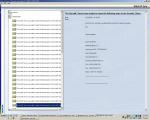
The SyncML Server was unable to insert the following entry to the SyncML Client.
To each one of the messages he did not sync.
I am attaching a jpg with the screen shot from the pc.
If any one had that problem, please respond.
Boaz Ordan
Attachments:
ordan wrote:A new formatted 9500 with win xp and outlook 2003.Calendar sync is good.
Contact sync is also good.
When I synchronize email with the default of only 1 week back, it works ok. When I change the settings to include 2 weeks back of email the synchronization fails. On the 9500 appears a window with the message: program closed, reason code: KERN-EXEC and reason number: 3
On the pc the report says:
The SyncML Server was unable to insert the following entry to the SyncML Client.
To each one of the messages he did not sync.
I am attaching a jpg with the screen shot from the pc.
If any one had that problem, please respond.
Boaz Ordan
How do you connect your 9500 to your PC?
I use the usb cable that came with the phone.
ordan wrote:I use the usb cable that came with the phone.
Make sure you connect direct to PC & not through any usb hub.
Hi, I am facing the exact same problem. Whether you connect through USB cable or Blue tooth, the problem is the same. The phone gives an error message that Msv Server closed & reason no 3 KERN-EXEC. If anyone has a solution, it will be highly appreciated.
ordan wrote:A new formatted 9500 with win xp and outlook 2003.Calendar sync is good.
Contact sync is also good.
When I synchronize email with the default of only 1 week back, it works ok. When I change the settings to include 2 weeks back of email the synchronization fails. On the 9500 appears a window with the message: program closed, reason code: KERN-EXEC and reason number: 3
On the pc the report says:
The SyncML Server was unable to insert the following entry to the SyncML Client.
To each one of the messages he did not sync.
I am attaching a jpg with the screen shot from the pc.
If any one had that problem, please respond.
Boaz Ordan
HI ORDAN. SAME PROBLEM! DID YOU ALREADY SOLVE IT?? I WILL APPRECIATE ANY HELP.... I AM GETTING NUTS HERE!
Hi Ordan. I Have The Same Problem When I Try To Syncronize. Did You Already Fix It? I Have No Idea How To Solve It And This Is Driving Me Crazy.
I Will Appreciate Very Much Your Help... Thanks In Advance.
Hi Boaz
It's Anton again. I have same configuration as you: XP and Outlook 2003. Did you realize that the synchronization with Outbox doesn't work either??? So sync works well only for 1 week sent e-mails. This is crazy. Any idea on how to handle? Can we put this issue thru anyone??? Looks like none can help us in the forum! 😊
ordan wrote:A new formatted 9500 with win xp and outlook 2003.Calendar sync is good.
Contact sync is also good.
When I synchronize email with the default of only 1 week back, it works ok. When I change the settings to include 2 weeks back of email the synchronization fails. On the 9500 appears a window with the message: program closed, reason code: KERN-EXEC and reason number: 3
On the pc the report says:
The SyncML Server was unable to insert the following entry to the SyncML Client.
To each one of the messages he did not sync.
I am attaching a jpg with the screen shot from the pc.
If any one had that problem, please respond.
Boaz Ordan
I spoke with Nokia dealer support here in Finland two weeks ago and after digging up deeply (ie. with USB monitor) they agreed to post problem to their R&D. Last week they confirmed problem is with the current PC-Suite versions
(although I'd think it more like an FW problem with 9300 and 9500 current FW's)
Symptoms are :
- Synchronization emails with long to: or cc: fields often crash
MsvServer on communicator
- MsvServer WILL come up again eventually, but any item synchronized
while MsvServer is closed will not be synced
Juhani Suhonen
Ei!
I have posted all the discussion we have had to the Nokia Support center too! Let's see how we get out of the problem! Thanks a lot!
Anton
Is there an update on this? We are getting the exact same error messages with a group of users on the same Lotus Domino Server. They are Syncing through the IBM Everyplace Client V5.0.0.
As soon as I put the users ID and details into my phone it will crash with the same error message when I try to Sync. Therfore it must be something to do with the users mailfile on the server. Known problems we have had so far are:
Everyplace Synchronization Server does not support synchronizing digitally signed e-mail or encrypted e-mails with devices
Synchronization Server does not currently support the synchronization of encrypted PIM data of any kind.
Synchronization may fail when synchronizing large amounts of data to a device
If you have a large of PIM data on the server and synchronize with a device, the device may run out of available memory and synchronization will fail. To avoid this problem, create filters in your device profile that limit the number and size of the PIM items that get synchronized to the device.
Device memory requirement for synchronizing PIM data
To successfully synchronize PIM data, the amount of memory available on the device (excluding any space available on a storage card) must be at least twice the size of the PIM data that is being synchronized to the device
If anyone has any clues then PLEASE let me know!!
Driving me nuts
😃
Is there an update to this?
I got that problem too,
After manualy placing an e-mail in the external-outbox I can't delete it, and it will not be sent / synchronised
When I put an e-mail in my outbox in outlook it is synchronised to my phone, but that is kinda useless. (Have to set it to work ofline, or it will alredy be sent)
BTW, is there any way to make it synchronise subfolders / sent items as wel?
