hi guys i just downloaded the lates pc suite for nokia 9500 and while installing it this error appears.. (see attachment) anyone know why this error pops up? any help will surely be appreciated..
Attachments:
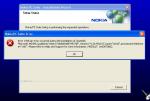

hi guys i just downloaded the lates pc suite for nokia 9500 and while installing it this error appears.. (see attachment) anyone know why this error pops up? any help will surely be appreciated..
Probably means that Windows cant write to the registry, try removing all keys that refere to PCSuite and raise the limit on the size of you registry ! 😊
bingy_bongy wrote:Probably means that Windows cant write to the registry, try removing all keys that refere to PCSuite and raise the limit on the size of you registry ! 😊
in layman's term please.. can you tell me what to do step by step please.. how can i remove all keys and raise the limit????
Ok .. sorry .. not sure how much you know etc 😊
1) remove any versions of PC suite that you have installed (Control Pannel -> Add or remove Programs)
2) Start -> Run and type <regedit> (without the <>😉 click OK
This will open the registy editor. The screen will be split into 2 panes. In the left pane you should see a tree structure with My Computer and a bunch of keys below it all starting HKey ...
Click the little + to the left of HKEY_CURRENT_USER
This will expand this key ..
Click the little + to the left of SOFTWARE
This will expand all the keys for all the software installed on your PC. On this list you should find a key called Nokia. If its there, click on the word Nokia once to highlight it. Then press the Del key on your keyboard to delete the key. Windows will ask if you want to delete it, say Yes.
Now we have to do the same for a different key
Click the little + to the left of HKey_Local_Machine
This will expand this key ..
Click the little + to the left of SOFTWARE
This will expand all the keys for all the software installed on your PC. On this list you should find a key called Nokia. If its there, click on the word Nokia once to highlight it. Then press the Del key on your keyboard to delete the key. Windows will ask if you want to delete it, say Yes.
Now close the registy editor
Right .. thats got rid of any of the old keys ...
Now .. try to reinstall the new PC Suite !
Have fun 😊
bingy_bongy wrote:Ok .. sorry .. not sure how much you know etc 😊1) remove any versions of PC suite that you have installed (Control Pannel -> Add or remove Programs)
2) Start -> Run and type <regedit> (without the <>😉 click OK
This will open the registy editor. The screen will be split into 2 panes. In the left pane you should see a tree structure with My Computer and a bunch of keys below it all starting HKey ...
Click the little + to the left of HKEY_CURRENT_USER
This will expand this key ..
Click the little + to the left of SOFTWARE
This will expand all the keys for all the software installed on your PC. On this list you should find a key called Nokia. If its there, click on the word Nokia once to highlight it. Then press the Del key on your keyboard to delete the key. Windows will ask if you want to delete it, say Yes.
Now we have to do the same for a different key
Click the little + to the left of HKey_Local_Machine
This will expand this key ..
Click the little + to the left of SOFTWARE
This will expand all the keys for all the software installed on your PC. On this list you should find a key called Nokia. If its there, click on the word Nokia once to highlight it. Then press the Del key on your keyboard to delete the key. Windows will ask if you want to delete it, say Yes.
Now close the registy editor
Right .. thats got rid of any of the old keys ...
Now .. try to reinstall the new PC Suite !
Have fun 😊
thanks for the tip.. i did what you've said but still it wont install.. the error still appears.. it appears when the pc suite is in the process of installing com adn apllications sofwtare thing... after that the error appears.. what will i do? do i need to reformat my pc or do i have to re install windows??? hmmmm.. so frustrating that i bought this thing so i can synchronize data on my pc and now i cant even do that.. i just bought thi n9500 and its pretty amazing what it can do but yah i still have to worry bout this problem... any help?
This might be completely unrelated with your problem but have you installed the USB cable's drivers first? I don't know what happens if you don't install them (i.e. if you plan on synching wirelessly) so I'm not sure this will help you. Does your comp have Win XP SP1 at least? (I assume you're running Win XP from the look of your installation screenshot).
There could also be some problem with your Win installation, maybe some file is missing/corrupted and the installation cannot happen. What you need to do is try a system repair using your Win CD.
Hope this helps, if I think of anything else I'll post. Good luck.
Neo9500 wrote:This might be completely unrelated with your problem but have you installed the USB cable's drivers first? I don't know what happens if you don't install them (i.e. if you plan on synching wirelessly) so I'm not sure this will help you. Does your comp have Win XP SP1 at least? (I assume you're running Win XP from the look of your installation screenshot).There could also be some problem with your Win installation, maybe some file is missing/corrupted and the installation cannot happen. What you need to do is try a system repair using your Win CD.
Hope this helps, if I think of anything else I'll post. Good luck.
ok guys thanks for your replies.. i figured it out.. and its pretty simple.. lol... i just turn the firewall off.. the built in firewall of microsoft.. and there it goes.. hehe... thanks for your help...
Should have known !!
SP2 strikes again 🙄
Glad its fixed ! 😃
damn. my bet was on security permissions.
close but not quite. 😃