Hi Folks
I need your help badly. At the end of a slightly painful Optus experience i have but one last thing to do. I am now happy and stoked with Vodafone and i desperatelh need to remove the Optus Zoo graphic that acts as a menu icon on my main screen of my Nokia 6600. Please see my pic below 😊
I have tried all the > remove operator logo options with no luck
I have formatted the phone a few times which i really did most enjoy. Seeing that big wave of black wash over the screen made my heart glowed in the hope that i would never again be faced with those terrible words (optus zoo) but alas on each phone restart there it was
I even downloaded and installed FExplorer a great tool and browsed my phone for all the optus pics i could find and tried to delete them. I went to:
c:\system\apps\phone\oplogo delete any file in this directory then restart the phone
but this didnt help.
I tried browseing and deleting from the z(rom) drive and deleted any optus pics from there but this didnt work. And so on and so on all with no luck.
Please oh Please help !!
I know someone out there must know how to rid this vermin from my very technical expensive software drive smart phone.
Thanks and peace
SectioN
Attachments:
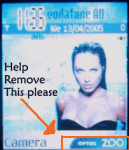
That's part of operator customization in ROM (Read-Only Memory). You can't change it without reflashing the phone with a firmware release without it.
No way. How do i do that. I knew it would not be easy. Ive been at it for weeks and knew it would be sneaky. It sucks. I paid for this phone and its mine and i cant change something like that which i find quite offensive. Forced advertisiment on a phone i paid a $1000 bucks for.
How can i flash the rom. I can browse to it with FExplorer but it dosnt seem like i can delete anything from there.
Thanks so much for your reply but it cant stop here. There must be a way....Tell me i need to know how to chip it out of there :_)
.:section:.
Take the phone to your nearest authorized Nokia service center for reflashing: http://www.nokia.com/nokia/0,8764,71518,00.html
Oh really. Cool now i understant. I couldnt do it cause its not possible for someone to do it at home. I got to take it to a Nokia shop to get the rom flashed. Ill give it a go. Ill refuse to pay for the job and be happy to tell them why.
Ok ...well thats that i gues.
Cheers and thanks for the swifty reply. This here is a nice forum 😊 Well done
James
there something in the settings that allows you to change what shortcuts are on the idle screen i have bluetooth and camera set as my default shortcuts
make it so. tell me how because ive been looking at settings for weeks and doubt there is such a simple way 😞
section wrote:Hi Folks I need your help badly. At the end of a slightly painful Optus experience i have but one last thing to do. I am now happy and stoked with Vodafone and i desperatelh need to remove the Optus Zoo graphic that acts as a menu icon on my main screen of my Nokia 6600. Please see my pic below 😊
I have tried all the > remove operator logo options with no luck
I have formatted the phone a few times which i really did most enjoy. Seeing that big wave of black wash over the screen made my heart glowed in the hope that i would never again be faced with those terrible words (optus zoo) but alas on each phone restart there it was
I even downloaded and installed FExplorer a great tool and browsed my phone for all the optus pics i could find and tried to delete them. I went to:
c:\system\apps\phone\oplogo delete any file in this directory then restart the phone
but this didnt help.
I tried browseing and deleting from the z(rom) drive and deleted any optus pics from there but this didnt work. And so on and so on all with no luck.
Please oh Please help !!
I know someone out there must know how to rid this vermin from my very technical expensive software drive smart phone.
Thanks and peace
SectioN
If I understood you right,you are trying to remove an operator logo (such as Vodafone etc).It CAN be done by yourself.I am new to all this (AND a woman!) and I surfed loads of sites for "easy to understand" instructions.This link (copy&paste if necessary) is to a site where you are guided step-by-step (with pictures).You have to "import" a clear/transparent logo...all available from this source.
Hope this is what you are looking for...it's GREAT to be free from advertising brands!
http://www.symbian-freak.com/tunning/oplogo2.htm
No, he's not trying to remove an operator logo, but operator customization for the right softkey, which can be replaced with operator graphics and link to an operator specified application (or a WAP/web portal through the browser).
Also, some operators have also prevented the replacement of the operator logos, and even without looking I can say that no instructions on symbian-freak.com can help with that either (unless the advise there is the same as here: have the phone reflashed with retail/generic firmware instead of operator-specific firmware).
yeah nice. Thats what i fugured. He you reckon they will try to charge me for the reflash or they will do it for free ?
Jimbo
...am i an idiot...nothing is for free.....so could i bargin with them about fairness and authenticity to their product ? :😊
You can use SELEQ to delete oprator logo from 6600 in C: look for logo related files it very easy just find the file oplogo and similar ones and delete the file and restart the fon
and hey to go back in seleq you can use #4 key
section wrote:make it so. tell me how because ive been looking at settings for weeks and doubt there is such a simple way 😞
Settings > Phone > Standby Mode > Right Selection Key
