Hi folks,
Just when I thought a firmware upgrade would solve all my problems, it creates a few more!
Since my firmware upgrade to generic software from the hideous '3' variant I have been unable to access several of the network settings in my N70.
Specifically, the option to enable/disable delivery reports has gone also the option to manually select network has disappeared also.
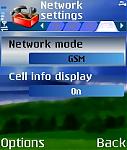
In pic 1, the option to manually select network would be here, but again has disappeared.
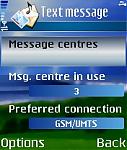
Similarly in pic 2, this is where the delivery reports option usually is, but note there are no scroll bars, these are all the options I get for text messages.
Has anyone else experienced such a loss? It happened to my friend who did a similar upgrade.
Any ideas on how to fix it?
Attachments:
Seb,
Sorry no idea on your problems, but how is the sending/receiving of multimedia messages now you have gone to Generic. Reason i ask is that when i went from 3 firmware to generic firmware on my 6680 (had no choice as the 3 firmware was so buggy) and i lost the ability to send/recieve picture messages (so then i blagged a brand new n70 out of 3 for free, hehe).
Cheers in advance
Hey Stokie, took me bloody ages to sort it out but I finally managed to get the MMSs working, I'll post the access point settings if you want.
Thing is there is an advanced options menu which is sort of 'hidden' that the people at 3 Customer Services don't seem to know about, so they don't give you the right settings. But I worked them out for myself!
hi, ive had problems, only the media key not working if you activate the security lock timer, its taking the piss but im not majorly bothered, i gues wel have to wait till v4, v3 has some bugs, it wnt let you access the main menu sometime, then you have to wait until it automatically security locks then unlock it, then the menu pops up, or you can reboot the phone, i h8 these dumb a** programmers
SebBelcher wrote:Hey Stokie, took me bloody ages to sort it out but I finally managed to get the MMSs working, I'll post the access point settings if you want.Thing is there is an advanced options menu which is sort of 'hidden' that the people at 3 Customer Services don't seem to know about, so they don't give you the right settings. But I worked them out for myself!
Seb, i had the settings ok i think, it connected to the packet data server no problem whn i tried to send/recieve, but the connection just went inactive, didnt actually send anything, but if you have actually managed to send a photo, then you are sorted. To be honest i dont mind the 3 firmware, apart from lack of active standby, the actual branding inside the phone is far from obstrusive, may just wait till the 3 varient of firmware 3 arrives at the service centres.
my unbranded nokia n70 with firmware:
V 3.0546.2.3
18-11-05
RM-84
it does not give me option to sort contacts by first name 😞
sToKiE wrote:Seb, i had the settings ok i think, it connected to the packet data server no problem whn i tried to send/recieve, but the connection just went inactive, didnt actually send anything, but if you have actually managed to send a photo, then you are sorted. To be honest i dont mind the 3 firmware, apart from lack of active standby, the actual branding inside the phone is far from obstrusive, may just wait till the 3 varient of firmware 3 arrives at the service centres.
These settings work for me, try them, you need to set up 2 access points, one called '3' and the other '3mms'.
BASIC Settings for '3:
connection name: 3
data bearer: packet data
access point name: three.co.uk
user name: none
prompt password: none
password: **** (none)
authetication: normal
homepage: http://mobile.three.co.uk/
now click OPTIONS/ADVANCED SETTINGS
network type: IPv4
phone IP address: automatic
name servers: automatic
proxy serv. address: none
proxy port number: 0
BASIC Settings for '3 MMS'
connection name: 3 MMS
data bearer: packet data
access point name: three.co.uk
user name: none
prompt password: none
password: **** (none)
authetication: normal
homepage: http://mms.um.three.co.uk:10021/mmsc
now click OPTIONS/ADVANCED SETTINGS
network type: IPv4
phone IP address: automatic
name servers: automatic
proxy serv. address: mms.three.co.uk
proxy port number: 8799
Lastly, there check message settings.
go MENU: MESSAGING. then click OPTIONS/SETTINGS/MULTIMEDIA MESSAGES
choose image size: LARGE (if this doesn't work, try small as there is a 100KB maximum on MMS messages)
Access point to use: 3 MMS
.jpg)
.jpg)