I am trying to use Disc2Phone, included in the suit, to transfer songs and possibly see the functionality of the software but it apparently does not recognise my Phone.
Everytime I open the software and try to locate my phone it says:
'You must Insert Memory Stick or Connect your Phone with USB"
Anyone else having problems with it? If so, any suggestions?
Many thanks,
M
======
P.S: Just downloaded Google Maps for M600i and it ROCKS!
Have you changed your USB setting to 'File transfer'. From the main screen go to: More - connections - USB and then select 'file transfer'. I think you need to disconnect the phone from the cable before you are able to make this change.
Good luck:icon14:
For some reason I cant find this setting that you mentioned. Is it in Disc2Phone or m-Router?
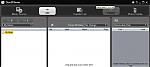
In Disc2Phone, all I see is 'Music Source' (Greyed Out), 'Add', Transfer List icons.
This is how it looks (See Attachment), I dont see any other toolbar:
:con?
Attachments:
The menu I was referring to is on the phone.
Thanks for the answer. It seems like this forum work better and faster then waiting reply from Dsik2Phone, or either SonyEricsoon Website.
Thanks for this.
A help function/instructions would be useful.
That said it works well once in place, with superb sound quality through bluetooth stereo headphones.
