Hi,
I have N73 and on the other forums, many user had the same problem i.e. with many themes installed, some are missing and you can't install more than 20 themes. Reinstalling those that are missing will yield error.
Does anyone have experience this in E61?
I found with my E61 that I can't delete some installed themes. Thre's no delete in the themes area, and they don't appear in installed applications list. So they just sit there sucking memory. Anyone know if this bug is fixed in firmware v2?
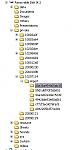
I installed extra themes on the SD card, but like you say they are not deletable via menu. The only way I managed to delete them was to go into Windows Explorer (in File Transfer mode on the phone) and search for them manually. In order for this to work you must have the option to "view all file types" activated in Windows, because the theme files are in a hidden folder called "private" on the card. Each theme resides in its own alphanumerically-named subfolder inside "private". By searching each of the "private" subfolders you will find the name of each theme; to delete it simply delete the entire subfolder for that theme. Once you've done this it will no longer appear on your themes menu. See the attached screenshot for clarification, in my case I have 6 add-on themes, each with its own alphanumeric home folder.
Attachments:
Brilliant alphasports, I'll have a go at killing them this way... would love to free up the phone memory.
Don't think this will get to the themes that were installed into phone memory, and the phone OS won't let you access private, will it?
So by the looks of it we are waiting on a file mgr that gets in to C:\private.
