I need help guys......
Sice I upgraded to V4 I have had no ends of problems trying to connect to wifi (I know somewhere here its been discussed), but would like to know if anybody else has, and if you found a solution.
My probs, I can connect to home network, I get tivi to work fine via wifi, but when I try to browse internet I get can't connect, and sometimes unable to find network, this is when I am sitting next to my wifi router.
secondly this just doesnt happen at home, I tried several of my usual wifi hotspots today and get exactly the same thing.
So I came home, did a hard reset to see if that would help, and still the same problems...
Mac filtering is all set up ok, I have disabled all encription for now, and no good.
Does anybody know why tivi would work over wifi, but I cant browse the web ??..also I cant update progs like my weather prog.
Also sometimes the web browser will connect, the screen stays white, the progress bar doesnt move and 0kb remains in the top right corner, and after a couple minutes I get one of the 2 messages above......
Any help, advice or solutions would be greatly appreciated, its driving me mad because I use wifi alot..
Cheers..
Cash,
sorry mate I cant help... Im in eactly the same boat as you... Im trying now to send a mail but cant see my home network. The weird annoying thing is that I can see other networks?!?! These fade in and out...
Sometimes my home network will appear and I;ll try to connect and get the same blank screen on no connection message...
Its fricking crap.... Im not happy about it. Its been fine the last few days actually... but stopped again today! I shoulda stayed on v.3 😡
Its really anoying because it was working perfect before 😞(....I am tempted to take it back to the shop in the next few days because I bought it for the wifi.
Like you sometimes it will work fine, but most of the time now I get nothing, I cant understand why Tivi works via wifi, but nothing else does ...I just made a call and it worked perfectly.
But no web browsing, orb, updates of my apps or anything else 😞(..
Id take it back if I could get a different phone with camera and wifi that was small...
I dont get why you should be able to see other networks tho and not a home one... and I know the home network it fine as I have other Pc's using it.
Its clearly something NOKIA NEED TO LOOK AT.
I dropped my WPA_PSK key down to 13 chars from 19 chars and that seemed to make a difference... but Im now thinking that was just co-incidence.
just out of COMPLETE COINCIDENCE....can you connect now cash??
21:48
I've upgraded to 4 and have just tried Web via wifi and no problems. Works fine on my home network, with Wep and Mac filtering. Sent and received mail with Profimail too. Downside is I can't get Handyweather to update over wifi though, and I'm sure I used to be able to, but it's been a while since I tried, so maybe not.
I used the Nokia Wifi wizard, it found my network and then asked if I wnted to connect. Seemed easy.
chrsfrwll wrote:I've upgraded to 4 and have just tried Web via wifi and no problems. Works fine on my home network, with Wep and Mac filtering. Sent and received mail with Profimail too. Downside is I can't get Handyweather to update over wifi though, and I'm sure I used to be able to, but it's been a while since I tried, so maybe not.I used the Nokia Wifi wizard, it found my network and then asked if I wnted to connect. Seemed easy.
its like a love relationship... It was like that for me too in the beginning! 😉
Hi Cash, i had this problem too, i fixed it by reinstalling the nokia Firmware with the Nokia Software updater and now i had no problems with it, give it a try it should work with u too. let me know if u fixed it.
cheers 😃
Dx
_Dx_ wrote:Hi Cash, i had this problem too, i fixed it by reinstalling the nokia Firmware with the Nokia Software updater and now i had no problems with it, give it a try it should work with u too. let me know if u fixed it.cheers 😃
Dx
Cheers DX .. will give it a go tonight 😊..will let you know what happens
Hi DX..how did you re-install..when I tried it says I have latest firmware and no update needed..
Cash wrote:Hi DX..how did you re-install..when I tried it says I have latest firmware and no update needed..
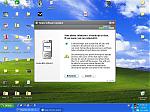
I just open NSU and follow on screen steps until it says looking for updates, then i get this screen (Attachment)
hope this helps
cheers 😃
Dx
Attachments:
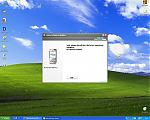
I dont get option to re-install.
Attachments:
I resorted to reflashing and reseting my wireless modem/router and disabled all encription and mac filtering and now I can connect at home sometimes...but not all the time
Did anybody else manage to get the screen on the NSU that Dez managed to get asking to reflash...I cant seem to get it with my NSU...
Update..
I just turned on MAC filtering and I can still connect sometimes...so at least this is better than not at all...will go out tomorrow again and check some hotspots..
Cash wrote:I resorted to reflashing and reseting my wireless modem/router and disabled all encription and mac filtering and now I can connect at home sometimes...but not all the timeDid anybody else manage to get the screen on the NSU that Dez managed to get asking to reflash...I cant seem to get it with my NSU...
Update..
I just turned on MAC filtering and I can still connect sometimes...so at least this is better than not at all...will go out tomorrow again and check some hotspots..
Yep I got it a while back despite running the latest firmware - I suspect this was because I didn't bother setting my product code when flashing the first time using Phoenix.
yeah, I have the reinstall option screen when I initally had that problem where I couldnt connect to anything and my memory card kept installing stuff that seemed to stop wifi...
After upgrading to V4 my wifi seriously degraded (not that it worked perfectly with V3). I can connect at a few spots still, but many other spots I used to connect at no longer work. The messages are "Wireless network not found" -- even though it shows a strong signal or "No gateway response."
I tried to reflash but, as with you, it says I'm up to date.
Frustration. Certainly this is a product that does not work as advertised. I'd take it back but I'm in Florida and the phone is from the Middle East. BTW- back before the online firmware upgrades I tried to get Nokia USA to flash mine. So much for worldwide support. They dissed me.
Ok, i found the problem, i had V4.0623.0.41 thats why it allowed me to reinstall it, but since i upgraded to V.42 trought FOTA it just says that im up to date, the only way to reflash ur phone its using phoenix, PM me if u want the files

