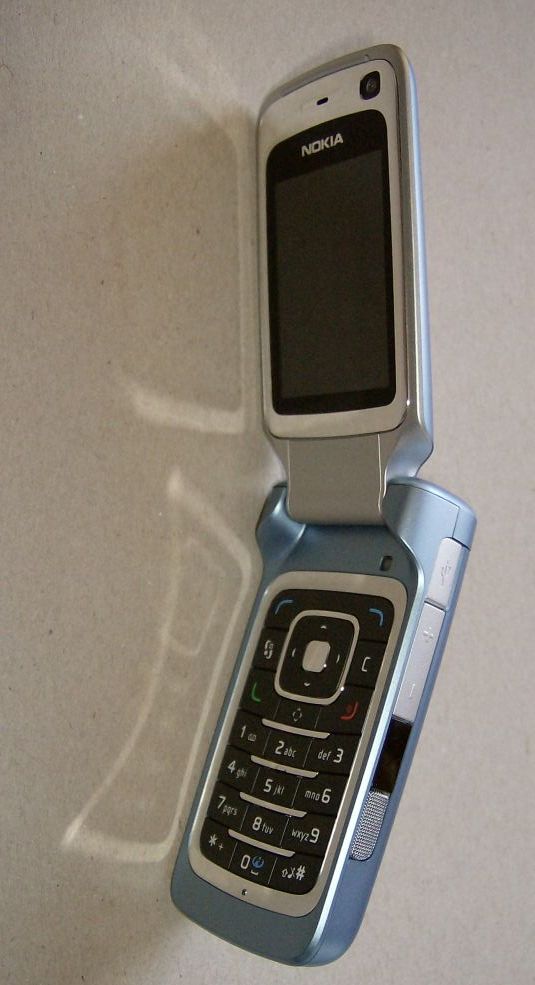
Krisse gets the hardware honours this time around, with an unboxing and first comments on the Nokia 6290, the brand new S60 3rd Edition, Feature Pack 1 clamshell. Full review to follow next week, of course.
Read on in the full article.
Krisse gets the hardware honours this time around, with an unboxing and first comments on the Nokia 6290, the brand new S60 3rd Edition, Feature Pack 1 clamshell. Full review to follow next week, of course.
Read on in the full article.
I should also add that I didn't write too much in this unboxing preview because Rafe already covered things with his excellent prototype preview from last December:
http://www.allaboutsymbian.com/features/item/Nokia_6290_Preview.php
I'm concentrating on the review, which should hopefully appear this coming Monday.
Hey Krisse,
Couple of questions
1) How is the sound through the speakers?Is it as good as the 6233?
2) Does is support A2DP +EDR (Stereo sound over Bluetooth)
3) How heavy is it?
4) The second picture shows what i think is a 2.5" jack?Does it have the pop-port connector as well?
thanx
ravis
Ravis:
> How heavy is it?
115 g
> The second picture shows what i think is a 2.5" jack? Does it have the pop-port connector as well?
2.5mm jack (and mini-usb), no pop-port
"1) How is the sound through the speakers?Is it as good as the 6233?"
I don't have a 6233 so I can't compare them directly.
This was actually the first phone I've used that has built-in stereo speakers so it's a bit difficult for me to judge how good they are as phone speakers.
They're certainly better than the mono speaker you get on most phones, and there are some very interesting 3D sound effects that the 6290's audio software allows you to do, such as stereo widening (where the music sounds like it's coming from around you), many types of echo (which simulate being in places like large rooms, alleys etc) and 3D ringtones (where the ringtone seems to float around you. You have to be in the right position to appreciate these special effects however, just like you do with full size hi-fi speakers.
However, speaking personally I've never really seen the point of expensive built-in phone speakers. Built-in speakers are never ever going to be as good as separate speakers, and if I'm at home I usually just plug the 6290 into my hi-fi or computer speakers instead of using the built-in ones. If I'm not at home I listen through the headphones. I guess I'm not the target market for built-in stereo phone speakers! 😉
"2) Does is support A2DP +EDR (Stereo sound over Bluetooth)"
According to the official tech specs, yes, it supports the bluetooth 2.0 headset profile. However, I haven't had a chance to test it with bluetooth earphones yet so I can't comment on how this works. I'll try to test this feature in the review.
"3) How heavy is it?"
As stated above, it's 115g.
In human terms, it feels very light and easy to hold when open, and it's very useable in the closed position too if you just want to use it as a music player. This is a good general design for music phones IMHO, simple external controls mean you can operate the music player without taking it out of your pocket or bag.
"4) The second picture shows what i think is a 2.5" jack?Does it have the pop-port connector as well?"
I'm not quite sure which picture you're talking about, but there's a 2.5mm jack at the back of the 6290 (I didn't take a picture as it's covered by a spring-loaded panel when not in use), and there's also a recharging jack at the back too (again, covered by another spring-loaded panel). I'll do some photos of these in the review.
There's no pop-port, all PC connections (PC Suite, Data Transfer etc) are handled by the mini-USB port under a panel on the right side of the phone. You can just about see the USB logo in this photo:
http://www.allaboutsymbian.com/images/features/1article6290side.jpg
For those who don't know, Mini-USB cables have a normal-size USB connector at one end (which plugs into your PC or whatever), and a smaller USB connector at the other end (which plugs into your phone or whatever).
Personally I think this move to the USB standard is a really good thing, USB cables are so much easier to plug in than pop port cables, and you can use standard USB cables even from non-phone devices such as digital cameras if you lose the one that came with the phone.
Obviously people who have already bought pop-port accessories are going to be annoyed, but I think it's worth it overall, just as the migration from MMC to miniSD and microSD was worth it.
how do you copy and paste without the edit (pencil) key?
You use the hash key (works in exactly the same way).
"how do you copy and paste without the edit (pencil) key?"
As Rafe says, the # key now has the pencil key's functions. It works absolutely fine, I have had no problems using it. The pencil key clearly isn't as needed as I thought it was.
If you look closely, you can see a shift symbol (an arrow pointing upwards) on the # key.
just got mine at www.popularelect.com very nice phone looks good too
Hi,
Great review. Its a great help.
In the 6290 review there is written that 6290 does not have push email but on the technical specifications page http://europe.nokia.com/products/phones/6290/6290-specifications it says it has.
Sorry but I have to ask, does it have push email?
Thanks for your help
mm
mm,
The only mention of push email in the official specs is this: "Push email with dedicated key and support for attachments (PDF, PPT, Word, and Excel)"
There's definitely no dedicated key at all for push email anywhere on the 6290, so I assume they've accidentally taken that line from the specs of a totally different phone. I also can't find any reference to push email in the phone's settings.
However, the 6290 does come with Adobe PDF and Quickoffice file viewers, so you would be able to view those file formats. And the POP and IMAP email software has full support for all types of attached files, including the ones mentioned above.
There is a "push to talk" dedicated key on the left side of the 6290, but that's a voice messaging feature rather than an email feature. Perhaps that caused a mixup with push email?
Hi,
thanks for your reply.
If possible I would like to know if the 6290 has full screen caller id. What I mean is, does it have this feature or do I have to buy an application to have this feature.
Thanks for your help,
mm
The 6290 doesn't have it built-in, if it is like other S60 phones, which also do not have it.
Hi,
I know other S60 phones don't have full screen caller id but 6290 has feature pack 1 and somewhere I read that due to feature pack 1 6290 has full screen caller id and would like to know if its true.
mm