I have two Quistion:
1- I found in an Arabic web site a way to enable arabic reading on phones using the Symbian OS UIQ. it is by just changing the fonts and rerouting them to another folder. Can that way be used on the N95 to change the font which will automaticly enable arabic ?if yes Can any one upload the fonts of Tahoma.ttf and the way to add them?
2- can we change the font on N95 ? How?
Yes we can 😊
Jump over to darlamack.com , she has it on her blog.
Regards,
PM
PMitchell wrote:Yes we can 😊
Jump over to darlamack.com , she has it on her blog.Regards,
PM
i tried it but it did not work could you tell me about your experience
thecaptin wrote:i tried it but it did not work could you tell me about your experience
did u put the Fonts folder in E/resource folder? also the 4 fonts must be nemed as follows:
nohindisnr60.ttf
nohindissb60.ttf
nohinditsb60.ttf
S60ZGIGI.ttf
name 4 fonts as above and then drop them into a folder named Fonts and move to E/resource..... u need a pc to do this, then restart the device.
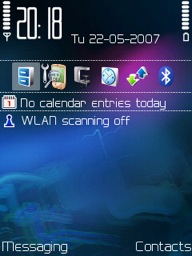
heres a pic of my n95 fonts........
Attachments:
Biggzy wrote:heres a pic of my n95 fonts........
That looks pretty damn cool, what font is that, and exactly how did you do it?
Thanks in advance
S
sToKiE wrote:That looks pretty damn cool, what font is that, and exactly how did you do it?Thanks in advance
S
not sure what font is called lol, as iv had to change the name of them to work in my n95, but if u want them then let me know and ill post a link with instructions
well. i tried this one.. but it didnt work. after i restart my phone, it is still the original fonts.. 😞
help me please..