Hi,
The power saver values have changed not allowing display for longer than 90 seconds?
I use the 'music stand' as default with a home made kit in the car and version 26 allowed power saver to kick in after an hour with lights on or off. The new version 13 seems to have no option to display the standby screen or music player for longer than 90 seconds.
Also in Navigation, the display also drops with the power saver options making this now useless in the car unless you keep waking up the display. In Maps/options there is a lights setting to change - 'On during navigation or Always on' but this defaults back to 'On during navigation' everytime you exit.
I know Nokia are trying to preserve the battery length and possible LCD life, but for car users with power attached, they have crippled the option to display for more than 90 seconds. I would go back on this release and live with a few crashes amongst a few other issues if it were a possibility.
The GPS is super fast now as is the system.
BestProfiles has option to change backlight status for any profile to ON or ON on charger.
very usefull.
That's odd. I have the light setting in maps set to 'Always On' and it stays that way after I exit the application.
[Edit] I mean that the setting remains, not that the light stays on when I exit the app.
Thanks Halon,
You are right - Now retains the light settings in MAPS. Not sure why it didn't on 3-4 tries originally.
I am gutted that the power saver now limited to 90 seconds when in standby or Music standby screen. If you select a visualization in music player the power saver stays on??
Within the audio enhancement settings, there is option for lights always on for the music stand which I am using for hands free and music through the car stereo but this just lights up the nasty power saver or chosen animation.
Bring back a decent power saver value option pls nokia.
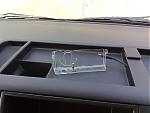
Also, the 95 sits in my home made cradle landscape - not pretty when the screensaver kicks in. Editing screen savers not my strong point.
See my car kit in the attached (hopefully). Less than a fiver for the cradle and cable and an hour to fit all.
Attachments:
I've been looking at 'Best profiles' and 'Lights On' Applications.
Does anyone know if you can stop the power saver Screen Saver kicking in with either of these.
My concerns are such;
The Maps stay on maps when lights option set to on - GREAT as the option is at least there and works to keep the power saver off!
The Media player does not stay on when lights are set to 'on' in audio stand settings only replaced by the screen saver. NOT GREAT just lights up the power saver when i'm trying to look at the music player. Waste of time having a lights on option in the music stand set up of audio enhancements.
It would be great if either of these apps allow the music player and the standby screen to stay on as it did before the software guys decided to write unacceptible values in for the power saver - Thanks Nokia. The button issue missing presses really starting to frustrate also.
I tried PhonePhrek LightsOn and S60SpotOn but neither kept the backlight on in Music player; they just went to screensaver and then darkened 😞
Edit: Just tried Best Profile and it works! Thanks to mwice for recommending it. The keypad lights still time out but I can live with that.
millski wrote:I tried PhonePhrek LightsOn and S60SpotOn but neither kept the backlight on in Music player; they just went to screensaver and then darkened 😞Edit: Just tried Best Profile and it works! Thanks to mwice for recommending it. The keypad lights still time out but I can live with that.
The version of LightsOn that I purcahsed/downloaded did not work correctly. However, I was very quickly provided with a patch (v1.04) that works fine. When you enable "Charger Control" the backlight will stay on as long as the phone is connected to a charger. This works fine for all programs as far as I can tell, including media player.
Note "Charger Control" is not enabled by default, you need to open the program and edit the settings...
