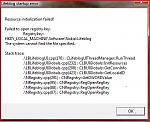
I have a new Vaio Laptop running Vista Home Premium. I have installed Lifeblog and transferred all my old data from my old computer without problems. However, when I restarted the new machine and went to open Lifeblog I got an error message and it refused to open. I uninstalled Lifeblog then reinstalled it and got the same message. I then did a system restore to when LB was working and Bingo it works fine but if I undo the restore it goes pear shaped again. The complete error message is on the attached image.
Is this a known problem and is there a solution?
Cheers
Attachments:
Hi Bullroar
Try running it from the "nokia nseries software launcher" not from the desktop shortcut. I have a similar message to yours when run from the shortcut. Another way is to run it as administrator by right clicking on it and selecting run as administrator. you can also set this in the properties of the shortcut but it always asks you to allow or cancel it before starting up.
P.S. You may have a similar problem with the launcher so try that as administrator as well I believe it's because there not digitally signed so vista doesn't trust them.
Cheers, the run as admin does the job. I can do this from a desktop shortcut or start menu so thats fine.
