I found that internet tel. that come with nokia n95 only work with wlan connection and can't see the internet provided from the cell phone service provider, is that correct ?
Internet Tel.
Wirelessly posted (Mozilla/5.0 (SymbianOS/9.2; U; Series60/3.1 NokiaN95/12.0.013; Profile/MIDP-2.0 Configuration/CLDC-1.1 ) AppleWebKit/413 (KHTML, like Gecko) Safari/413)
If you set the default connection in your SIP settings to your network access point you will be able to use it with int.tel. Better have a flat rate data though....
Any idea how much data it would use just being on and available to receive calls?
I think you didn't get what I mean, I put in the settings of SIP to use the connection from the service provider (not the WLAN that I have) but when I go to run the internet telephone (GIZMO) it search only for available WLAN, so is that mean I can only use this service whenever there is a WLAN available !!
I suggest you look at "truphone", a way more polished bit of software than that gizmo crud (anyone actually get that running on a pc for more than a day?). It has free calls till the end of the year or something similar if you sign up now too.
tonymy01 wrote:I suggest you look at "truphone", a way more polished bit of software than that gizmo crud (anyone actually get that running on a pc for more than a day?). It has free calls till the end of the year or something similar if you sign up now too.
^^ This ^^
Truphone is excellent. I've made a few calls to the US recently on my N95, all for free. Sound quality is great, too (much better than Fring).
Thanks tonymy01 , this is great ... it's what I was looking for , now it let me choose to connect either through available WLAN or the operator access point.
justnew wrote:I think you didn't get what I mean, I put in the settings of SIP to use the connection from the service provider (not the WLAN that I have) but when I go to run the internet telephone (GIZMO) it search only for available WLAN, so is that mean I can only use this service whenever there is a WLAN available !!
I think I've understood you correctly and my "solution" will fix this at least on my device it does. A more detailed expl just to be sure that we are talking about the same setting:
..\tools\settings\connection\SIP...\Gizmo VoIP\ => scroll down to default connection... => Select your any of your defined GPRS IAP's (which isn't a WLAN IAP)
=> Start the Internet tlf program => "..looking for services.." => Your prev. selected IAP will be selectable with a "3G" symbol beside it (in addition to any WLAN's in range!).
Works for me.
Thanks for the tip on Truphone boyz 😊
Tried it myself. Great and free for landlines (..so far..).
Seams good but a little bit unstable (sometimes locks up my phone and having some trouble disconnecting service, it keeps on 'popping up' again...).
I had trouble with counterpart not hearing me and found out that it was related to sec. settings on my WLAN (which was WPA/WPA2+AES). Disabled WPA2 and it all works fine now.
:icon14:
There is wide range of VoIP clients on Symbian they use different codecs and consume various traffic. You can try some other of them. List of almost all VoIP clients for S60 here.
Has anyone managed to configure a voip.co.uk account to work using the N95's sip client?
nashmills wrote:Has anyone managed to configure a voip.co.uk account to work using the N95's sip client?
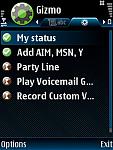
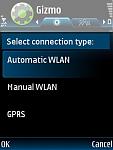
I've been using Gizmo for 2 months now, here and abroad, with no problem. It operates both on WiFi (Wlan) and GPRS. I can also select Automatic, Manual or GPRS connection.
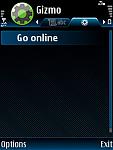
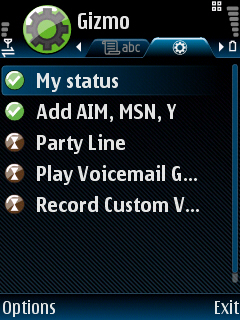
I like the way that it is integrated with the N95, it adds a tab between Contacts and Groups, and utilizes the existing Contacts list on the N95 as well. Prefer it to Fring's setup. I can choose to have Gizmo on 24/7, so long as I'm in range of WiFi or select connection.
Setting up the account with Gizmo was easy. I downloaded a prog to my PC that I log into which shows how much money in credit I have left, my call history and allows me to top up in multiples of $10 online.
http://www.gizmoproject.com/index.php
You can either download the phone software from here or use, as I did, Download > Gizmo on the phone.
I've used about $20 in calls which cost about 10p a minute to mobiles and less than 1p a minute to landlines for UK customers.
I did fiddle with the Wlan settings on the phone as follows:-
Menu > Tools > Settings > Connection > Wireless Lan > Otions > Advanced Settings (ignore warning).
Then changed
Automatic Configuration to Disabled
TX power level to 100
Power saving to Disabled
I should point out that I do not personally have WiFi at home but use a Public Access one nearby so maybe the TX level could be lowered otherwise.
Hope this helps.
HOWEVER! There's always a however, I've just tried to connect via Wlan and GPRS and instead of taking 3/5 sec's I'm getting "Network error!"
Attachments:
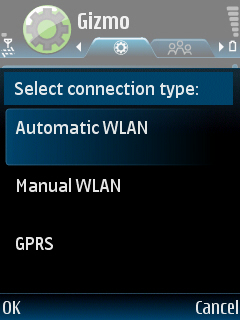
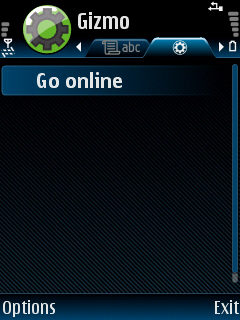
Thank you for that, it looks good but I already have a voip.co.uk account for my home phone and I would like to be able to receive my home phone calls while out.
I wouldn't use it to dial out as I have loads of free mins. on my mobile, except the occasional freephone number.
I also have Gizmo installed but I don't understand where youre bitmaps are from... I don't have any "Gizmo" tab between contacts and groups. Neither do I have any "Gizmo" application available anywhere in the menus where I can change the settings (...apart from the settings which can be changed in the SIP profile of course).
Thought you maybe had a never version so I went to "Dowloand" => "Gizmo" but since it's already installed (with firmware) it does not provide me the option to either download or upgrade when selecting the "Gizmo" icon here, simply shows an "Info" page.
superswede wrote:I also have Gizmo installed but I don't understand where youre bitmaps are from... I don't have any "Gizmo" tab between contacts and groups. Neither do I have any "Gizmo" application available anywhere in the menus where I can change the settings (...apart from the settings which can be changed in the SIP profile of course).Thought you maybe had a never version so I went to "Dowloand" => "Gizmo" but since it's already installed (with firmware) it does not provide me the option to either download or upgrade when selecting the "Gizmo" icon here, simply shows an "Info" page.
I have to confess Superswede that I'm not a technical genius so all I can tell you is what I did on my Euro1, unlocked V12.
I went to Download on the phone, you know, the one that has Catalogs, Sports Tracker etc. on it and selected Gizmo and downloaded it that way.
I went to the Gizmo site and downloaded and installed a plug-in. (this is what I think you may be missing)
http://www.gizmovoip.com/site,nseries/learn/
I then found that a Gizmo tab had been inserted between Contacts and Groups. If I select Options > Settings I get my profile, password, Allow GPRS, Gprs access point, Auto-accept invitations, Show call status, Message tone, Message tone volume, Roaming notice.
My other settings are in Internet tel > Options > Settings > Gizmo V... settings
Does this help at all?
Attachments:
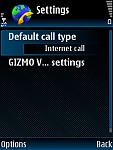
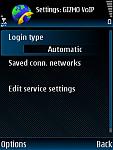
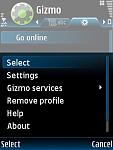
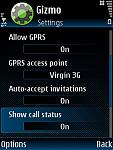
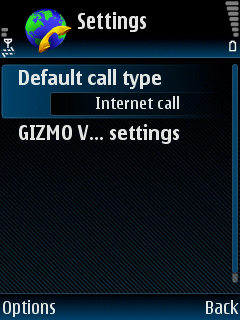
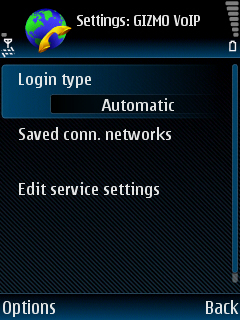
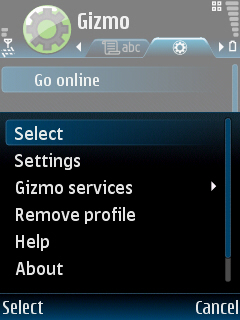
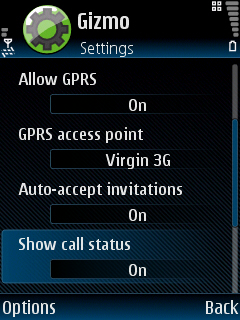
Ok, thanx. Might help somehow, cause I've done the same. My guess is that it's related to the fact that I've Windows Live Messenger installed which also adds a tab to address book. Could be only one extra tab is supported in N95.
Have to try and uninstall WLM and then re-install v.xx.20 of Gizmo.
My Gizmo VoIP is Version 2.20(0).
The plug-in is version 1.26(0).
IMHO I would try downloading and installing that before deleting Messanger.
Good luck!
Gizmo works only with its service?
Mikeln wrote:There is wide range of VoIP clients on Symbian they use different codecs and consume various traffic. You can try some other of them. List of almost all VoIP clients for S60 symbiancorner.blogspot.com/2007/08/symbian-voip-sip-applications.html.
I've read here about Fring it can work with SIP services. Does it work with VoipDiscount?
is that mean any VOIP account with any company can work with N95 or there should be some special extra service provided from that company in order you can use it with N95 ?
I notice skype isn't mentioned here....
Now i'm fairly new to voip.
But my N73 from three had skype pre-installed and it worked great, what do these other programs have/do that skype doesn't.....Also i'm on Three Xseries so get unlimted voip and unlimited internet access😊
ANY VOIP account/service which uses SIP will work on N95. You don't need to download any client either (...even though many service supply their own..) since N95 has a built in one.
All you have to do is to configure a SIP profile with the provider and your account settings. It's also possible to have multiple profiles configured and enabled.
Which Nokia phones support SIP natively?