Ive got this issue with my N95...
When I apply a theme, usually from the beginning the menu view appears like this

with the black bar on the top stating 'Menu' appearing..
But I dont want that..
From time to time,(might be a setting that I play around with without knowing) the menu view appears like this

which is how I would prefer it to look and is also the way I customized it in the Carbide Theme Studio..'
My question is how do I get it to remain the way it is displayed in the 2nd screenshot..?? Is there some setting for it..?
Thanks
SNAP SNAP SNAP.
Im using one of the default themes with the phone, however the menu did this to me as well yesterday!
However, Im not sure how i made the "Menu Thumbnail picture" show?
I do prefer it like that thou! Can you toggle it on by a button combination or settings?
Or is it just random?
Glad I'm not the only one finding this. Have been working on the problem for 3 weeks on and off with no solution in sight.
cocaine wrote:Have a reply and a possible solution here
http://forum.mobilethemes.com/showthread.phtml?p=10725&posted=1#post10725
Doesn't help me I'm afraid. It does it on the Nokia default themes as well as the one's I've downloaded. Just seems to come and go, sometimes for weeks on end. I thought it was just me until I read this post. Please! can anyone help!
Yea for me it just randomly ( at least I think its random) switches from one mode to the other..Rather annoying
IT'S BACK!
I don't know why, or how, but my Menu Icon has returned this morning. Since this post has started I've tried to monitor the menu icon after most actions on the phone.
However, yesterday was an all day village "do" which involved several drinks and I didn't pay my usual close attention.
Apart from a couple of calls, I took a dozen photo's and a couple of short video clips. I've only noticed the return of the icon this morning, whilst waiting for my two lightly boiled asprins to take effect, I decided to add some effects to one of the photo's I'd taken and make the end result appear full screen on the phone. It was after this that I noticed the icon had returned. Will try and replicate this later when I can see shapes and colours!
Attachments:
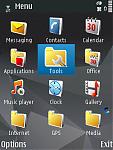
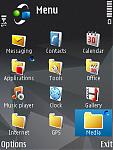
Now the asprins are kicking in I've noticed, by placing the screenshots side by side, the following:-
1. The Menu icon is back.
2. The dark bar at the top has disappeared.
3. The signal and battery bars are larger.
4. The word Menu is larger.
5. The menu icons themselves seem slightly smaller.
I don't know if this gives anyone out there any clues as to the problem/solution. As I said before, the fault appears on both the default and down loaded themes.
I know in the scale of things that this may not seem important but it is blooming annoying.:con?
[email protected] wrote:Now the asprins are kicking in I've noticed, by placing the screenshots side by side, the following:-1. The Menu icon is back.
2. The dark bar at the top has disappeared.
3. The signal and battery bars are larger.
4. The word Menu is larger.
5. The menu icons themselves seem slightly smaller.
I don't know if this gives anyone out there any clues as to the problem/solution. As I said before, the fault appears on both the default and down loaded themes.
I know in the scale of things that this may not seem important but it is blooming annoying.:con?
As you see in my first 2 screenshots on a personalized theme, all five points noticed by you are also present with me..except for the fact that currently its the black bar appearing at the top of the menu and not the icon..
What a shlep..Just looks crappy with it..:frown:
I have not yet tried using default themes for any substantial duration, so I cant comment if it happens on default themes or not in my case..
IT'S GONE AGAIN!
I spoke too soon! The menu icon has disappeared again. All I did was to send, after previewing, an MMS.
What I should have checked was if the Menu icon shows up in landscape mode as I know the black bar and battery/signal bars change in landscape.
Oh well, back to the drawing board!
Am seriously thinking of offering a prize to anyone who can solve this permanently like a Bluetooth headset or multi phone charger as it's driving me nuts. :con?
In landscape mode,as far as I know, the "black" bar is non existant...
Only the text "Menu" appears
Apologies, yes you're right about the black bar.
Now, is there anyone out there that can solve this problem PLEASE! :con?
The other thing I've just noticed is that the lack of a Menu icon and the size of the font is exactly as it is in landscape mode!
Therefore is it a fault of the phone rather than that of a theme I wonder. Perhaps the phone doesn't recognise itself as being in Portrait mode.
Perhaps someone can assist us..Cant believe no one knows the solution..:icon13:
We are not alone!
I just checked out another thread concerning themes on this site and found that the disappearing menu icon affects:-
Sicjoke
http://www.allaboutsymbian.com/forum//forum/thread/63529/
yade and milski
http://www.allaboutsymbian.com/forum//forum/thread/63529/&page=2
bartmanekul
http://www.allaboutsymbian.com/forum//forum/thread/63529/&page=3
The more screenshots I see, the more I now notice how widespread this is.
A pity really because I like the larger font and signal/battery bars.
I dunno, I dont see any relevance to those links personally..I browsed through them and nobody had complained about this issue we are having.
Might I be mistaken ??
No, they're not complaining. I was using them as an example.
If you look at their screenshots you will see that their Menu icons are missing, reduced fonts and signal/battery bars.
I wonder if N95 owners even notice this is happening as it seems to be widespread.
True..The menu icons are not displayed, but it may be also because these screens, or at least some of them, were taken from the Carbide Theme Studio as opposed to being taken from the phone..Im pretty sure that the Theme Studio only displays a screen of the menu with the Status Bar and not an icon..
Is there any Nokia people or something that that to pose this query to ??
400+ views and no responses is not giving me much hope here :icon4:
I bow to your knowledge on the Theme Studio point as I have no experience of this. However, I've been using a Nokia default theme for a couple of days now and I still have the same problem, even after rebooting.
As you say, it would be good to get some feed back from other users, perhaps one's that use only default themes.
Perhaps if this thread was retitled something like:-
"Menu icon improves sex life" or
"Free beer"
We might get more response. Come on people, one of you might just have the answer or has this one beaten the forum?
Sorry Cocaine, looks like we're flogging a dead horse on this one. I've just seen some photo's of the new N95 8GB which show the Menu screen and guess what!
http://www.nokia.com/A4136017?category=n95_8gb#
That's right! The Menu icon that we sometimes see with the larger font and battery/signal bars appear to be a glitch and not the norm.
Oh well, we tried.
Seems the case..for now at least..I'll never give up trying though..
N95 8gB looks sic in the black colour.. :icon14:

