Nokia E90 Product codes: Keyboard configuration and languages on the firmware update.
#0544351: EMEA 5 - German mocca..........QWERTZ....(English/Deutsch/Turk)
#0544355: EMEA 6 - Switzerland mocca.....QWERTZ....(French/Deutsch/???)
#0548314: EMEA 6 - UK mocca..................QWERTY....(French/English/Deutsch/Italiano)
#0548316: EMEA 6 - France mocca............AZERTY.....(French/English/Deutsch/Italiano)
#0544354: EMEA 7 - France mocca............AZERTY.....(French/English/Deutsch/Italiano)
#0544356: EMEA 8 - Spain mocca..............QWERTY....(English/Espanol/Portugues)
#0544357: EMEA 8 - Portugal mocca..........QWERTY....(English/Espanol/Portugues)
#0544383: EMEA 11 - Greece mocca.........QWERTY....(English/greece)
#0544384: EMEA 13 - Poland mocca..........QWERTY....(English/Polski/Deutsch)
#0544403: EMEA 15 - Italy mocca.............QWERTY....(English/Italiano/Deutsch)
I'm a little confused with the product codes.
My E90 is a mocca one purchased from Movistar in Spain.
The product code is 0553841
In the previous listings, the only Spanish entry is this one:
#0544356: EMEA 8 - Spain mocca..............QWERTY....(English/Espanol/Portugues)
When I go to the firmware update page on Nokia, it says that for my real product code, I am stuck at version 07.40.1.2.
If I enter the one listed above, it says the latest version is 210.34.75
What is the recommendation? Change the product code and upgrade to 210.34.75? Would this keep my current (Spanish) keyboard?
Thanks in advance...
I've received my E90 from Hong Kong, with English, Chinese, Melayu and Indonesian languages. I've changed firmware to Portuguese but the keyboard layout is different.
Do anybody know if there is any version with the international keyboard that comes with portuguese language?
Thanks in advance
emm3t wrote:I'm a little confused with the product codes.My E90 is a mocca one purchased from Movistar in Spain.
The product code is 0553841
In the previous listings, the only Spanish entry is this one:
#0544356: EMEA 8 - Spain mocca..............QWERTY....(English/Espanol/Portugues)
When I go to the firmware update page on Nokia, it says that for my real product code, I am stuck at version 07.40.1.2.
If I enter the one listed above, it says the latest version is 210.34.75
What is the recommendation? Change the product code and upgrade to 210.34.75? Would this keep my current (Spanish) keyboard?
Thanks in advance...
I have the same problem. Nokia/Movistar has not released yet the lastest firmware for Movistar-locked E90s.
You can go both ways, wait for the release of the new firmware or change the product code to 0544356 and update the FW. The Spanish keyboard will work.
i just bought E90 from o2(london), but youtube is not running on o2 internet but its working on other connections. can somebody help me? Same problem with other video sites as well as for live streams, waiting 4 ur reply. Thanx
I've received my E90 from Hong Kong, with English, Chinese, Melayu and Indonesian languages. I've changed firmware to Portuguese but the keyboard layout is different.
Do anybody know if there is any version with the international keyboard that comes with portuguese language?
Thanks in advance
I've got a strange issue about the E90.
To make a long story short, I got an E90 with dutch software on it (I'm from Belgium), I don't know the product code anymore but there was a hardware issue with it, so I brought it to a Nokia Service Point and after 3 weeks I got it back, but they gave me a completly new one also with Dutch software.
But the weird thing is that with my first E90 I could install v210 flawlessly and check movieclips on youtube directly.
With my new E90 I connect it to the NSU and it says that v7.40 is the most accurate version... and I cannot check flashmovies.
Do you maybe know whats wrong or where the difference will be between the two phones for the Belgian market
And the best will be to go back to the Nokia shop instead of changing the product code myself or will it not affect the waranty?
Tr1gg3R wrote:How to (re)flash your Nokia E90 with a different firmware/language pack.Because I see this question popping up more often and I now even got a PM about this subject, I decided to post a quick How-To about reflashing your Nokia E90 to a different language version.
--snip--
If you have any questions, advice, comments or just want to flame.... let me know 😃
Greetings fellow E90 users! 😊
I just upgraded from a 9500 to a UK O2 E90 and within hours of opening the box, successfully performed my first unbranding, with ease, thanks to this very informative thread!
Thank you very much Tr1gg3R!! This thread should really be made sticky.
On my first attempt, the firmware update went through fine, but the O2 branding remained. I was sure I entered the correct Product Code (0553342) and definitely clicked the Write button.
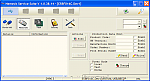
So I ran Nemesis Service Suite (V 1.0.38.14) again which reported it still had the original Product Code. I then realised there were partially obscured Enable checkboxes (see screenshot) to the right of the Product Data Edit fields. After ticking this option everything went through perfectly. In hindsight, I really should have read back the values after the initial write. 🙄
I'm guessing that these extra checkboxes have been added since the version available at the time of the original post.
Still can't believe how much better overall the unbranded and obviously original version is.
Attachments:
Do anybody know if there is any version with the international keyboard that comes with portuguese language or what would be the diference between the language packages 0544356 and 0544357?
Thanks in advance
nokia.e90 wrote:I have the latest firmware, but I need to change the region. But the Nokia Software Updater doesn't do it because it says I have the latest firmware... What can I do now??
i have s imilar problem now with version 210.34.75, does anyone have the solution for this?
TIA
it works on my N93 too. Thanks 😃
Is there any way of resetting the default 'boot' language to English?
I'm in the Netherlands, and even if i change the product code. the phone boots up in Dutch.
sorry.. buthow do i know wat product code shall i put in
VladE90 wrote:Hello. All works. Perfectly, but what code Baltics?
there is no separate code for language pack as i understand?
for estonia (baltic) worked:
0545807: EMEA 3 - Scandinavian2 mocca
0545988: EMEA 3 - Scandinavian2 red
then will the NSU (re)load new software with languages.
(my previous was 0533332: EMEA 1 - UK mocca)
NSS worked fine, thank you.
----------------------
NSS.exe Beta 1.0.38.14 - 05 May 2008
- New future - ability to retrieve original product code and
warranty data from our server. Should be helpful when restoring the
phone in original condition before flashing in NSU
-----------------------
i had some problems with NSU, at the beginning the battery was too low,
then it downloaded new pack with 76mb
while the battery went low again.
then, after charging, it showed 16min, then 15min and "lost the phone, remove usb charger and battery, replace and power on".
meanwhile computer started to search "bb5 adl loader driver", could not install it.
maybe the problem was, i uninstalled PCsuite and other cable drivers, then reinstalled PCS, without reinstalling NSU.
then it showed 10min and again "lost the phone..."
then 5min and again "lost..."
then 28sek and again "lost.."
then i tried in different computer, and it went further, asked time zone and...
but still "lost the phone..."
i got advise to "restore factory settings" and the new language was there 😊
merci a vous j ai r�ussis a flasher mon E90-1 RA-6 APAC D-Rouge indon�sienne 0546004
😊
:icon14: VER :icon14:
😊
0548314: EMEA 6 - Royaume-Uni mocca .................. QWERTY ....( fran�ais / anglais / Deutsch / Italiano)
au d�but je les acheter il �tait an fran�ais mais le clavier �tai configurer azerty alors que mon clavier a moi �tai qwerty donc je veux faire une mise a jour et la surprise il revient an anglais se cous si mais la langues fran�ais avais disparus le clavier luis par contre �tai revenu juste donc je suis rester un moment avec la langues anglaise et clavier qwerty javais d�ja regarder au par avant mais je n'avais rien trouver � pare des forums qui disait qui fallait retourner dan un point de vente nokia mais pas n importe quelle magasin je devai me taper 60 ou 70 k m et an plus il fallait payer antre 30 et 40 euro pour repasser an fran�ais donc javais abandonner et la je vient de r�ussir a repasser an fran�ais avec clavier qwerty fonctionnelle a 100 pour 100
fonctionne
:icon14: merci pour les code
sorry, I`m maybe off the line but are there the same codes and the same steps for the nokia E55 ? I jus want spanish and english on my phone ...
Thanks !
I just got this phone for my mum but there is no Chinese language pack. There is only English, French and Korean.
