Hi folks,
Just wondering, how do I convert a video to play in full widescreen on the internal screen of the e90? The link below shows MI3 playing in widescreen but I can't seem to encode my videos to play like this.
Hi folks,
Just wondering, how do I convert a video to play in full widescreen on the internal screen of the e90? The link below shows MI3 playing in widescreen but I can't seem to encode my videos to play like this.
Looks cool, I'd like to know too.
I've been using MediaCoder, which is free tool, and had very good results:
mediacoder.sourceforge.net
You can get a "preset" file that is optimised for the E90:
www_bitburners.com/Software/Download/Video_Codecs_and_Encoders/MediaCoder_preset_for_Nokia_E90/
Change the first underscore to a "." (dot)
(Sorry about the links, but the forum software won't let me post web addresses) 😡
Although the output is great, I must say that the encoding is very slow.
I hope this helps.
Irregular
MediaCoder is awesome!! I wish I should have found out about this before buying ImToo software. I could have simply donated what I paid for it to Mediacoder. Now I can play movies in FULL WIDESCREEN!!
Irregular wrote:I've been using MediaCoder, which is free tool, and had very good results:
mediacoder.sourceforge.netYou can get a "preset" file that is optimised for the E90:
www_bitburners.com/Software/Download/Video_Codecs_and_Encoders/MediaCoder_preset_for_Nokia_E90/
Change the first underscore to a "." (dot)(Sorry about the links, but the forum software won't let me post web addresses) 😡
Although the output is great, I must say that the encoding is very slow.
I hope this helps.
Irregular
Trying it now, see if it works.
Well got it working, took over 3 hours to convert a 30 minute episode of South Park, quality is very good though, but it doesn't half take it's time converting!!!
Well I have MediaCoder installed and working but I have to say that it is really CPU intensive. I have a 2.93 GIG Qual Core with 4 GIG of RAM and it has all 4 cores peged and my RAM at 50%! I'll report back here at to how long it takes. I have also used the Media Converter from Rock-Your-Mobile and while it doesn't give you the full screen as shown on the youtube video, it does a pretty good job and will convert an hout long TV program in about 30 minutes.
Mark
I'm now converting The Simpsons movie. 5 hours in and still more to go. This is getting silly for a 700MB file!!!
OK, Simpsons movie is done. 8 hours conversion time all in, crazy. However the finished product works great in the E90 screen. 700MB original file down to 480MB for the converted version, I'll need a 4GB SD card now!!!
divx player (0.89) plays my 700mb avi files fine with no transcoding necessary. Does drop the odd frame but very watchable!
True, but the finished article on the media coder once done is very nice and clear.
i'm soo past transcoding 😊 especially if you have to wait that long!
Hi!
I use CloneDVDmobile from SlySoft. Costs $39. Fast easy fullscreen optimized for E90...
there's a lot of links about this topic on my-symbian.com in their e90 forums.
I would post a link, but it won't let me 'cause I haven't posted 10 posts yet...
but soon, and very soon
two more posts!
okay last one
How should i use MediaCoder's E90_preset_v1.00.xml file?
I did a conversion from with the E90 xml file, the conversion really to very long.
Now it has become a MP4 file but when I open divx he cannot find it. Is it because it doesn't support MP4 and only avi?
And when I run the videoclip in RealPlayer it is very slow :s
DivxMobile is free and mediacoder aswell but I more like the Smartmovie app, it comes with his own converter and is fast in converting the video the the requested screensize.
I've been following this thread and decided to try to put a full lenght DVD on my E90 using MediaCoder and the E90 presets. The first thing I did was to rip the DVD into MP2 format and then I put it through the conversion process.
When I was finished I had an MP4 video of the movie. It plays fine but it still doesn't fill up the whole screen. I was playing it back on the Real Player app. that that came with my divice.
Can anyone explan why the video doesn't fill up the whole screen? Should I be using a different player? I'm at a loss:frown:
You need to download and install the preset E90 XML file to configure it for E90.
I'm not on my pc right now so I can't show you how.
Eugene
---Pushed from Nokia E90 Communicator---
Hi,
Can anyone post the details of the video settings during encoding?
as in width/height of the video
fps etc.?
thanks
macmon wrote:Hi,
Can anyone post the details of the video settings during encoding?
as in width/height of the video
fps etc.?
thanks
Maybe this will help.
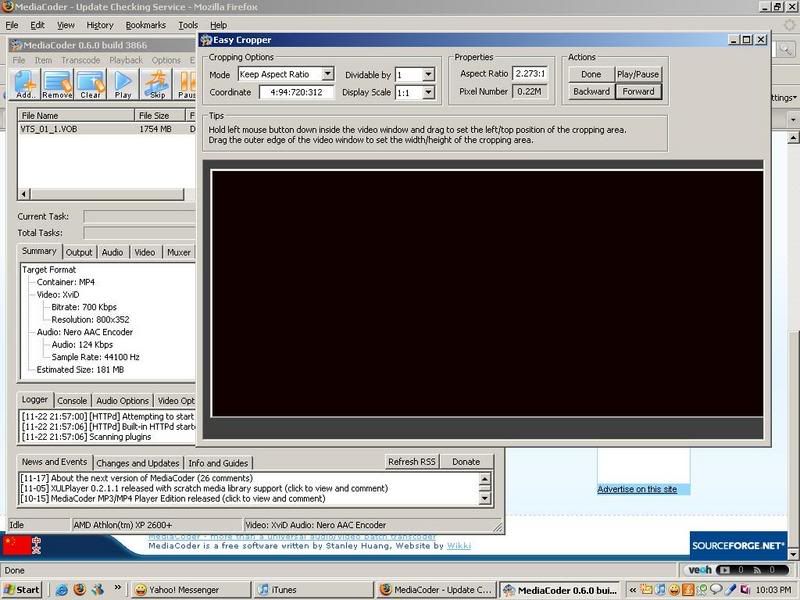
And here's a video.
http://s96.photobucket.com/albums/l162/khoolhandz/?action=view¤t=100_1032.flv
Hi Khoolhandz and Hi everybody.
this will convert the movie in full screen even there is a black bars on the lowest and highest part of the original movie...if it doesnt then whats the difference between all the software and setting mentioned here and the Total Video Converter i use??...it also just change the resolution which if we havethe option in real player to Strech the Video to full the screen will make any converter useless...
I dont have E90 but am only interested so sorry if am asking stupid question.
I use HandBrake which converts DVDs to play perfectly on my E90 using the built in RealPlayer (hit key 2 to play fullscreen). The settings I use are as follows. The E90 screen is 800 x 352 = a ratio of 800/352=2.27 so if your DVD source is for example 720x576 set the size to 720/2.27 = 317, 317 is not a selectable option but the closest setting in handbrake is 320, so the size becomes 720x320. I keep handbrake on automatic crop which in this case is top 74 pixels and bottom 76 pixels. Other settings include:
Encoder: FFmpeg
Target Size: 1Gb which gives an Average bitrate of 1119 kbps
it will convert a DVD in about 30 to 50% of the length of the DVD, so about 40 minutes.
Nick