I have a new PC with Vista and trying to get my 9300 to connect with PC Suite. According to the Nokia web site 6.84 is the most current and compatable with Vista. I attempt to connect my 9300 and it says looking for drivers and says it can find drivers but some kind of error exists. Has anyone had this problem and are there drivers out there somewhere. My E62 works fine but not the 9300.
Any advice please???
Thanks,
Bobby
I don't know if this going to solve your problem but i think that is a problem of vista.
I had the sam problem with my 9500 and also other hardware.
Vista just can't find the drivers even if they are located inside the windows folder.
All you have to do is to show vista where to find them.
The installed drivers are here;
Windows/system32/driverstore/filerepository
just pint here when you install a driver.
I solved a lot of problems with that folder.
Interesting, that vista can not find them!?!??
good luck!
Swingerman
Thanks for the info I will check it out. My E62 works fine must be a 9300/9500 problem with Vista.
Thanks,
Bobby
I just tried my E62 and now the same thing is happening as the 9300. When plug in a new device like my phone is says looking for drivers. It then gives you a choice of Windows looking for it and some other choices. This one is recommended. How do I point it in the direction of that driver store. I have been there now but not sure how to point the "looking for the drivers thing" in that direction.
Thanks,
Bobby
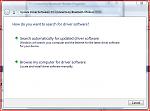
When it asks for device cd choose "locate driver software manually".
Or "Browse my computer for driver software.
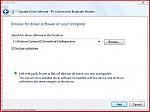
On the next screen browe the folder:
"C:\Windows\System32\DriverStore\FileRepository"
Check the "inlude subfolders" checkbox
I've attached the screenshots
Attachments:
Thank you for the information. I understand how to do that now. Since I have attempted to install the phones, 9300 and
E62, and it gave that "drivers found" but can't install them now the connect new hardware doesn't come up again. I have restarted my PC and am going to pull the batteries to see if it makes the phone connection look new again. I don't know if there is a place to bring up the that new connection that asks for the drivers to be installed.
You have been a real big help and thank you very much.
Thanks,
Bobby
ok,
Make sure you plugged in your device you want to install.
Then click start menu and right click on computer and select properities.
In the upcoming window there is a quick menu bar under the address bar (near to the top of the window) Click device manager.
In device manager the devices wich are not correctly installed are shown automatically. Find your device and right click on it, choos update driver...
Then follow the steps I wrote you before.
Thank you for your patience. I have done what you said and it said drivers installed and showed my 9300 where the questionable device was. It still won't connect and it says"there is no available connection type and therefore connection to the phone cannot be established. Wizard will exit."
You have got me in the right direction and I know much more than before. I will see what I can do by playing around. I don't want to take up the groups time with me asking you and you answering so many questions.
Thanks for your patience and your great advice.
Thanks,
Bobby
I will just give a follow up from my conversations with the Nokia technical support people. After all your great help it still didn't work so I called Nokia to see what they could tell me. The main thing she asked me if I had the cable connected through a hub or directly to my PC. I told her a hub and she said that is the problem. According to her you can't use a hub for connecting with Vista. And it should be a connectd to the USB connection on the back and not the front of the computer. I did all that about ten times today and used my bluetooth as well and it still gives me the same thing about "no available connection..............." as shown in my earlier messsage. The only thing that I can think of is that it might be there is no com port shown available or identified for the connection. I will try to find out what com ports are being used and what is available and see if I can make sure that the correct com ports are available.
I will let you know what I find as it might be useful to others.
Thanks,
Bobby
When I used to have problems with pc quite connection I did the following.
- uninstall pcsuite
- uninstall pc connectivity cable driver(from control panel>appliactions)
- uninstall all other things that belongs to pc suite(from control panel>appliactions)
Now reinstall PcSuite.
Thanks again my friend. I agree with your comments and I did just that last night. I uninstalled everything in the control panel that looked like anything Nokia and reinstalled it all again and nothing has changed. I have been doing this stuff since my early Psion days and this seems to be one of the tougher problems that I have had. It does the same on bluetooth and cable. Its as though the computer is showing that there is no phone connected. I am going to call Nokia again to see what they say and will let you know. I can hook it all up to my laptop with Windows XP but my new on is my primary computer and would like it to work on here.
Thanks and talk to you soon,
Thanks,
Bobby
This is a follow up and I am still trying to get connected with Visa and my 9300 and E62. I have spent hours on the phone with the Nokia help people and after about almost two hours today my phone disconnected. They were very kind and helpful but its still not connecting. I have done everything they have said like don't us a hub and plug in to the USB slot on the back of the computer, we went to the Nokia site together and downloaded the drivers and installed them on my phone, unistalled all the PC suite and its attendent programs, rebooted, downloaded with virus protection and firewall disconneded per Nokia help people and installed again. Hooked everything back up and I am still at the same place as I started. They ever got the cable numbers and made sure they were good and like I said we downloaded the drivers for the cables. Same responses on Bluetooth also. They also said turn off all the Bluetooth on my PC as it will sometimes get conflicts with the Nokia Bluetooth and supposedly can affect the cable connectons also. Also, every time I try to connect it says installing drivers as though we have never done it before. This same message as shown before still comes up "no available connection..............." Its as though nothing is connected to the computer and apparently there isn't.
It all still connects great on my Windows XP laptop.
I just don't know where to ge from here?????
Any advice please?????
Thanks,
Bobby
Hello again,
Your problem is really tough and I am wondering. As I remember my 9500 was woeking at the first time on vista.
Just try this please;
In the control panel, user accounts check if the User Account Control (UAC)is on or off. If it's on then turn it off and try to reinstall pc suite.
As I remember this very useful feature sometimes gave me hardtime and error messages during installations.
Hi Miklos,
I did that as a matter of fact it is now still off. I get exactly the same result. Every time I plug in my E62 or 9300 it askes to install the drivers all over again like it was never plugged in before. It gives me Com port #9 so I guess that is working.
I can usually figure this out but I am about out of ideas on this one. I wonder if I have some setting somewhere that stops devices from installing the drivers or the installations files some how.
Thank you for the help.
I will just have to use my memory cards for now and my laptop to sync for my schedule until I find some way to see what is going on. Like I say according to the dialogue boxes for some reason the machine just doesn't see it, its not connecting up.
Thanks,Bobby
and there is no help so far....read and looked allover the web for a solution....but no help on this....
vista does not recognise the driver and although I can connect the phone through the PC Suite, I can't connect it as Hard drive to drag/drop the files to its hard disk :frown: :frown: :frown:
Peter
Thanks Peter. It sounds like some on this forum can make it work but I sure can't and I have been doing Psion/Symbian stuff for almost fourteen years and this is the first time I couldn't figure it out. Might have to send a note to Nokia to see if they have had many questions on this subject. Like I have mentioned it I get to were it says "Do you want to connect" and I then try to connect and that is were it looks like the Machine and Phone does see each other.
Thanks,
Bobby
Hi,
You now what, your problem happened with me today. Yesterday was everything OK and today when I connetcted my phone vista started to install driver and did not find. After I've used the technique - what I suggested you before already - ,it found the driver but said unable to install because the system cannot find the file specified. excellent!
After two hours I solved easy way. First you have to connect your phone and wait until vista shows you the driver problem.
After that click on: ask me again later.
Then go to the device manager and you will se the Nokia 9300 usb phone parent with a problem icon.
Click on it and choose update driver.
Choose to browse your self for the driver.
Set the path to c:/program files/Nokia/Nokia Pcconnectivity driver - or something like that -/
Of course PcSuite should be installed on your Pc
Cheers,
Thanks very much. Yes its kind of weird. I am still working on it. I will take you advice and see how it goes. I wil let you know.
Thanks,
Bobby
Well, I followed your instructions and when I clicked on the driver within the folders specified it said the best driver for the E62 is already installed. I had previously installed it form the Nokia Web Site. I still think its the com port. According to the device manager it should be on com port 8. I don't know how to find out what comport it is actually seeing on the machine and if its pointing to a different one how to change it to 8. It the old Psion days you could very easily find out what com port you were on and if you wanted, you could easily change it. I am not sure how to do it with the newer stuff.
Thanks,
Bobby
Oh, I forgot on my last message to say thank you for the help, its very much apprecaited.
Thanks,
Bobby
I did it. Thanks swingerman.
http://myvisatovietnam.com

