Hi,
Hope you guys can help, as this is really bugging me. If i haven't explained it well enough, please let me know!
Problem 1,
I have a portable dvd player that has only one AV in socket. It came with a lead that converts the red/yellow/white leads into one lead, which plugs into the socket, and i get a really good picture, made even better by displaying the screen in landscape mode, which is great for emtube and keyboard use. HOWEVER i cannot get any sound out !
If i remove lead from phone it is nice and loud, and i have played a dvd in the player, and that is loud too!
(ps, when i use the dvd player supplied leads with any other source it works fine, loud and clear)
Problem 2, Nowhere near as important, but when i'm using the tv out on my porta ble 14 inch tv, why doesn't it recognise when i turn my phone into landscape view? Making all videos are played the wrong way round (sideways on)
are you using the cable supplied with the n95 to play it on the TV? if not try that, it could be the headphone jack that is differnet
Hi
Yes i am.
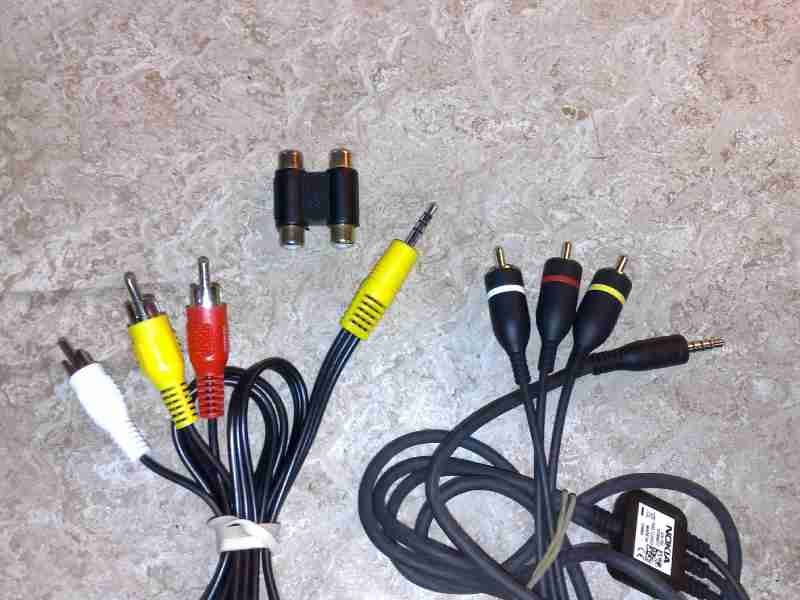
I plug the nokia cable into N95 and select TV out, the (and here is where i think the problem stems) then into alittle pass through that connects the Nokia OUT cable to the dvd IN cable .
I'm wondering (as the Nokia end has one connector) wether the Nokia cable is taking a single signal, and converting it into three signals (video and two audios) and then my dvd lead is for taking three signals and converting it into one,.
Perhaps the signal is getting lost due to getting split?
Sorry I can't help with the second part of the question, but the first I might be able to.
I noticed before that when I tried to connect my phone to my home theatre receiver for sound that if I didn't plug in the video (yellow) cable as well as the two audio cables (red and white) that I wouldn't get any sound. So I played around and noticed that you must have all three cables connected to an external source in order for your phone to send out the proper signal. I assume that is how the phone recognizes whether you have headphones or TV stand connected etc. Now this comes into play because you are using a splitter that converts all three (or so it says) into one jack. But it's really only converting the yellow (video) and one audio channel, not both giving you mono sound through the one speaker on your portable dvd player. Because of this, your phone cannot recognize what is connected to it and isn't sending the right signals and thus probably causing your irregular playback.
I hope this helps.
Yes, i'm sure it has something to do with the splitting of the signal, can you suggest a workaround or a different cable i could buy (from Maplins etc)
Cheers
Sorry, I didn't experiment enough with that to have found a workaround, i simply just plug in my yellow cable as well when listening to music through the stereo.
I hope someone on here might be able to give you a bit more info.
Another thought i've had is, the lead out from the N95 is a single one (before it goes into the little Nokia box) and the end of the lead that goes into the dvd player is a single lead.
So i was wondering if i could just get ONE LEAD, no splitting at all.
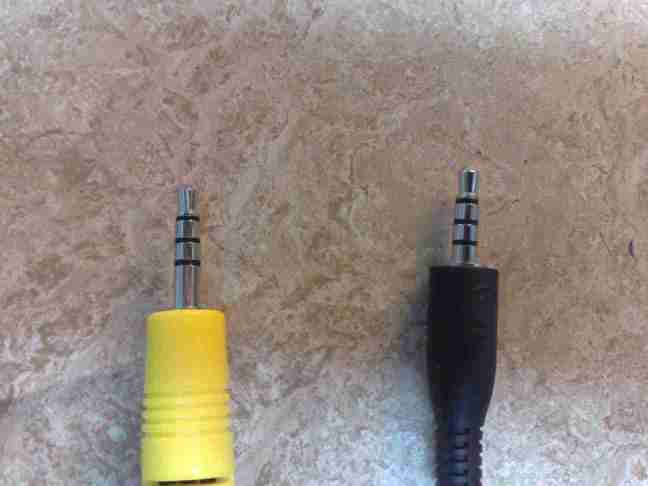
I'm sure you could but you'd have to make sure that it's sectioned off like the nokia one is. The single jack has three seperate parts that make contact inside the jack housing with three seperate pins and the other end that would go into your dvd player would have to accept the same match up. IE: section one is video, section two is right audio and section three is left audio channel ( example purposes)
Yes, on looking at the lead, i can clearly see that.
When you say example only does that mean you're not sure weather the video is the LAST signal on the jack?
picture is just the end of the leads,
Nokia one on the right
Attachments:
Correct, in my example I'm not sure where the video or audio channels are on the jack.. I'm sure someone could find the schematics for it online.
Best of luck.
This image, shows the complete set of leads and the pass through i'm using.
It's a shame as the set of leads supplied with the dvd player work with all my other bits of kit.
Attachments:
theoretically, everything should work. Maybe you should try a single cable like you were saying earlier...
If you can find one that works, let us know incase anyone else has the same issues in the future!
Good luck.
what about the nokia leads INTO a scart lead, then scart lead into my dvd lead then INTO dvd player?
I think this might work, do you?
As long as the scart takes the signals properly then it should work, especially if it's not a passive lead.
Take your phone and dvd player to an audio video shop and have them try a few different configurations.
well i'm off to Maplins after work to see if i can find a lead, not sure if i can take the DVD player, but i'm going to buy a selection of connectors.
I'll post result (if any) tomorrow !
Just one thing, i've turned both the dvd player and the phone up to maximum volume, i can VERY slightly hear music, does this mean anything?
very strange, try this... on the dvd player, slightly pull the jack out a bit and try different positions, maybe it's a case of the jack not lining up properly inside the hole.
You can try this on the phone and at the splitter as well.
Just assure that you've turned down the volume! lol
Lol
That was the first thing i tried
Damn, i was hoping that was it!
I guess, taking it to a audio/video store is your best bet then.
Well i have been in the shop for about 30 mins. But despite trying about 10 different leads and a set of scart connectors we couldnt get it working. Again picture great but no sound.
Try connecting the phone straight to a tv and check the connection of the original nokia cable.
Have checked in on two tvs both worked fine. Stumped now. Am going online to see if i can find a cable makes locally
Well I don't know if this helps at all, but yesterday I went to connect my original nokia headphones to the computer to listen to something while at work. I had the headphones connected to the multimedia extension (the thing that you use to control your media player and has the clip on it) and it wouldn't play the sound, the volume was really low and muffled. I had to strain to hear it even with all the volume controls turned to max on the computer and video player.
So maybe it's something in the cables, like a fuse or resistor or something that stops you from using these components on other electronics? Who knows, but now I see your frustration first hand because the computer I'm trying to listen to is under a desk and the nokia headphones themselves aren't long enough if I don't use the extra extension.