OK, probably opening myself up for loads of "Didn't you know that?" abuse but no, I didn't, so here goes....
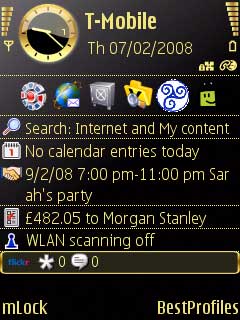
Just updated Share Online to v3 and noticed that it now displays an icon or two on the bottom of my Standby screen. Can't seem to find a way to get rid of it and was wondering whether anyone else had.
Screenshot to show what I mean (the Flickr bit at the bottom)
Attachments:
You can't get rid of it, its annoying because there is no warning that it will be installed when you update to the latest SO v3, not even mentioned in the release notes.
It is not possible to uninstall, so the only way to downgrade to SO v2 is to format your phone.
They should have made it optional or at least have an option to switch it off, but no they choose to force the active standby plugin on us, just like all the others on N-Series.
Why you can choose which active standby plugins you wish to display on E-Series devices and not on N-Series devices I don't know, just plain stupid.
yeah, thats pretty opressive... surley only use to someone who constanly hammers their flickr / vox blog
Oh bottoms. Nothing like cluttering up my screen with rubbish. I only upgraded to try and integrate the new Share Ovi option (which it doesn't do yet anyway).
Glad I'm lazy and haven't yet upgraded now! Incidently, I quite like your theme, which one is that!?
The N95 8GB already as SO v3 as part of the firmware but does'nt display on stand by screen like that .
i did'nt know i already had v3 and updated and got it stuck on stand by screen.
forgot how i got rid of it but i did'nt reformat
if you try and get the proper download from nseries site, when it asks for phone model it will tell you that it is already part of 8gb firmware
so if you have a 8gb dont update b/c we already have v3 built in without the standby icon
dmcconachie wrote:Incidently, I quite like your theme, which one is that!?
It's Gold by Pizaro. A nice black and gold theme. Sadly not all icons are able to follow the theme but the system apps and folders are. I like it though there appear to be a few bugs that some have found (like the Web application will crash out from the bookmark page after a time). But nothing too troublesome for me, so it stays.
I didn't know there was a new version until I saw this thread. Now I've installed it and it works fine, but one thing puzzles me: how the hell does it know who I am!? There doesn't seem to be anywhere to set a username/password, just a screen name.
I managed to get rid of the standby display icons by uninstalling the SOV3 and then reinstalling it.
I don't know if I was just lucky but after uninstalling V3, restart your phone. Then a few days later reinstall it from Download!
I sounds like I just had pot luck but that's how i'm on V3 with the strings!
I'm sorry I can't be more helpful :frown:
ccraig wrote:The N95 8GB already as SO v3 as part of the firmware but does'nt display on stand by screen like that .
i did'nt know i already had v3 and updated and got it stuck on stand by screen.
forgot how i got rid of it but i did'nt reformat
if you try and get the proper download from nseries site, when it asks for phone model it will tell you that it is already part of 8gb firmware
so if you have a 8gb dont update b/c we already have v3 built in without the standby icon
The version built into the N95 8GB is V2, and until a couple of days ago the nseries site only had V2, but now has V3
Plus the old version of V3 doesn't have the standby plugin, the version released on the 25th jan does.
how come i dont have the icons on my active standby screen? i upgraded to v3 last week, yes i have no icon like that on my home screen. weirdness.
RogerPodacter wrote:how come i dont have the icons on my active standby screen? i upgraded to v3 last week, yes i have no icon like that on my home screen. weirdness.
I think the icon will appear when you get to upload something via shareonline flickr thats what hapend to me and its damn anoying to say the least
V3 is already on N95 8GB try downloading it for 8gb it tells ya its preinstalled
Ratkat wrote:The version built into the N95 8GB is V2, and until a couple of days ago the nseries site only had V2, but now has V3Plus the old version of V3 doesn't have the standby plugin, the version released on the 25th jan does.
try downloading it for N95 8GB then it tells ya its preinstalled and it was very recent when i tried it
i just tried looking for it on Nseris site and they've removed it,i think i may of got it from nokia so i'll check there
the download on NOKIA does'nt say its preinstalled but i still dont want it,it looks a mess on the stand by screen