Hi can you tell me why my videos do not play full screen when I xfer them through Super? I have tried all different variations of the settings and have attached pic. What am I missing or doing wrong - thanks
Attachments:
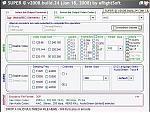

Hi can you tell me why my videos do not play full screen when I xfer them through Super? I have tried all different variations of the settings and have attached pic. What am I missing or doing wrong - thanks
Output container - MP4
Output video codec - H.264/AVC
Output audio codec - ACC
Video scale size 320:240 - This could be where you are going wrong
jstockda wrote:Output container - MP4
Output video codec - H.264/AVC
Output audio codec - ACC
Video scale size 320:240 - This could be where you are going wrong
have you tried to set the format to mp4 and the aspect rartio to 4:3
try the select ouput container to mp4 rather than 3gp
these are the settings i use and they work perfect.. also what format are you changing from
the-stig wrote:have you tried to set the format to mp4 and the aspect rartio to 4:3
try the select ouput container to mp4 rather than 3gp
these are the settings i use and they work perfect.. also what format are you changing from
ok here is an updated pic of the settings suggested - but still does not play full screen even when i select it. Should I be selecting stretch image? The video is from youtube - i have done this many times and it used to work fine. Also when I drag into Nokia phone it asks me if I should convert the file - please help, it's now driving me crazy

Try 640 x 480 with mp4 as output codec too, leave aspect with what it gives you and ditch the top quality tick also drop the bitrate to around 500 to keep the file small. worth a try.
This is crazy - 4 weeks on and I still cannot play videos from YouTube in full screen on my N95. I just get a window with black bars at the top and bottom. Can someone please tell me what settings they use in SUPER to convert videos. I know that it can play FULL SCREEN but I'm BLEEPED if I can find out how. I just want to know:
OUTPUT CONTAINER
OUTPUT VIDEO CODEC
VIDEO SCALE SIZE
APSECT
and wether I should be selecting STRETCH IT from the OPTIONS
Thanks
do the source videos have the black bars at the top and bottom.
hi I'm not sure - i'll have to check when I get home as I can't access YouTube whilst at work. Will that make a difference then?
theres already a thread about best settings for super, try a search under my username mate
Liam
Changing the aspect ratio from 4:3 to 16:9 should allow for widescreen playback with black borders top and bottom and if you want videos to play full screen you should enable the stretch it option. judging by your video bitrate verses video scale size I would say the video bitrate is a bit high lowering it to say 800Kbps will have hardly any hit on overall video quality at the video resolution you've set eg:320:240.
ok but can anyone else tell me if they get black bars when converting youtube videos via Super?
i've never tried converting a youtube video specifically. however when i watch youtube videos on my phone with emtube, the videos are completely full screen with no black bars. if you are pulling down youtube videos, they are 320x240 in size, and should convert exactly the same and not show any black bars on the n95 screen.
when i convert widescreen movies using super, the black bars are there. when i convert full screen movies, the black bars are gone. so basically all youtube videos i think should not have any black bars.