I need to move an email in my inbox to store it for so when i delete my inbox i still have it, how can I move my email
E90 moving emails to a stored box from inbox
in your email settings just choose to delete from phone only rather than phone and server.
it is item specific and the delete setting if for all, and its to hard to bounce betweeen changing settings, is there no way to set up a folded and start storing them
captainstarwars wrote:it is item specific and the delete setting if for all, and its to hard to bounce betweeen changing settings, is there no way to set up a folded and start storing them
I don't understand the nature of your problem: are you saying you want to save selected emails on a storage card? Or are you saying that you want to tell your email client not to delete selected messages permanently but have them accessable again should you ever need them? If you download the free email client called Emoze it gives the oprion of a 'delete policy'where you can choose to havve the client delete the emails from your phone's inbox for good, but the message will still be on the main email server when accessed through the url. Alternatively you can just move the email to a different folder.
I just want to move it to a different folder, but can not seem to find our a move option, where - how can I move it please
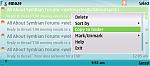
If you highlight the message and press the 'options' button there should be a move to folder option if you scroll down. Failing that i recommend downloading emoze. It integrates tightly within the nokia messages folder like the default email client but has a lot more options, one of which is definitely to allow the moving of messages. It's also free.
I do this
"If you highlight the message and press the 'options' button there should be a move to folder option if you scroll down"
and I agree it should be there but unless i am going mad it is not there.
I can't beleive it is not an option, We both must be missing something
Give Emoze a go if you want the move to...option. it's better than the built in Email client anyway and its also secure AND free to private users. Check out the picture
Attachments: