Ok ok ok...
Yes I'm 33...a bit old...but somehow even at my age, this technology seems too complicated for me! Ahhh! Am I already turning into my dad?!
I've recently recieved my Nokia N95 8gb...and am wanting to install applications...especially, for starters, the Light Saber app! (My mate is a right Star Wars geek...and to have this on my phone would really get on his tits!)
Could someone please take the time to give me the most straight forward and easy guide to how to get it...
I've got a mac, so is it available?
Please be as basic as possible. eg:
'Plug lead into phone, and the other end into your mac...' etc!
Thanks...hopefully with your help I can enjoy this phone to its true potential real quick.
Thanks in advance
Robstene
33 aint old man, 😊
install nseries pc suite which probably came on the cd in your box.
Now download the light sabre app and in pc suite click instal applications, follow instructions from there.
Is there a version of the PC Suite available for the Mac? I didn't think there was.
Still, another option would be to download the Lightsabre app from here, unzip the contents of the file somewhere on your computer, then send them (the SIS and/or SISX files) over to your phone.
I can see two ways you could do this with a Mac:
- Making the phone appear as an extra drive on the Mac by plugging it into one of the Mac's USB ports and choosing the "Data Transfer" option on the phone's screen.
- If your Mac has built-in bluetooth, send the files over to the phone via that instead. They will appear in your phone's inbox, just select them and install.
Note: For the lightsabre app to work, I think you have to install it on the phone memory, not on the 8Gb part.
Or failing that, you could simply connect the phone to the PC/MAC using a cable or via WIFI, transfer the file to the E: drive under shall we say 'installs'. Then disconnect the phone, browse to E:\Installs, select the file and it will install.
norfi1983 wrote:... you could simply connect the phone to the PC/MAC using a cable ...
That's what I meant when I said "plugging it into one of the Mac's USB ports and choosing the 'Data Transfer' option".
norfi1983 wrote:Or failing that, you could simply connect the phone to the PC/MAC using a cable or via WIFI, transfer the file to the E: drive under shall we say 'installs'. Then disconnect the phone, browse to E:\Installs, select the file and it will install.
wi fi wouldnt be easy to do for transferring files though would it.
thanks chaps...i'll try these tips and see if its any clearer!
why dont you just go directly to the site on your N95....instead of wasting time on your mac.
kontraband wrote:why dont you just go directly to the site on your N95....instead of wasting time on your mac.
That's a good point, actually. Hadn't thought of that :redface:
i think you need to install accelerometer plugin on your phone to use apps that work with the motion sensor like light saber it's only a few kb
ccraig's right. Thankfully Graham (who makes the app) made a zip file of the lightsabre app and the plugin together.
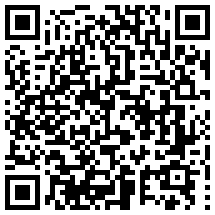
Here's a barcode for your phone to read to get the zip file.
REMEMBER: Install the Accelerometer Plugin first, then the LightSabre S60 app, BOTH on your phone memory.
damn this forum is ultra helpful!! 😊
WAHOO!
robstene , you sorted??