Remote S60 allows you to control your Series 60 device (Nokia 7650 or 3650) from your PC. You use the PC keyboard to navigate around (and can obviously use the full keyboard). The software displays the contents of the screen of your S60 device in a window on your PC.
I'm not sure of how much practical value this is, after all its meant to be a mobile device, but it is clever technology. It also represents a very easy way to sned SMS messages quickly from your PC. It would also be good for typing conacts into your phone if you dont sync with a PIM.
You can try the software and buy the software via Handnago.
Author Notes:
Remote S60 - Operate your phone from your desktop PC
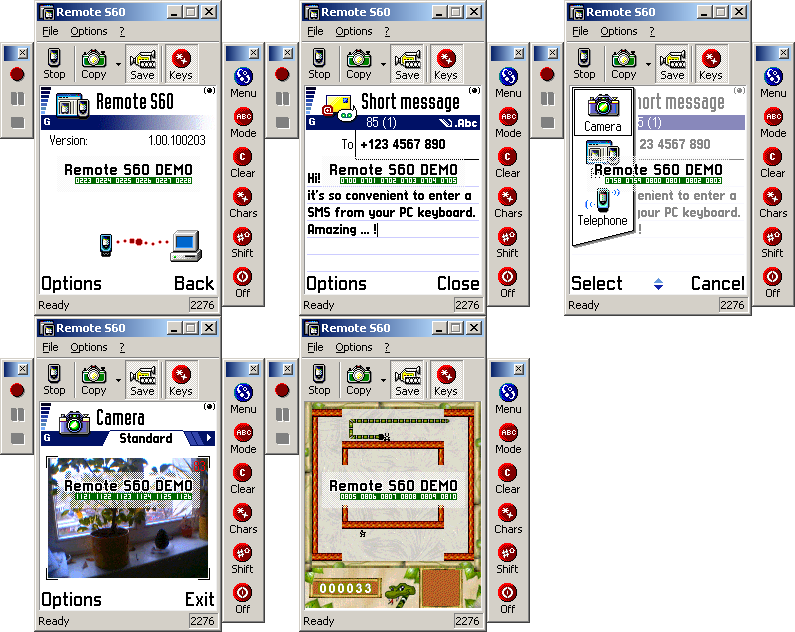
With Remote S60 you can operate your Series 60 compatible phone from your desktop PC! Just use your PC keyboard to navigate on your phone. You could start the Messaging application to quickly enter an SMS. You could also watch your phone's camera on your PC. Why not trying to beat your highscore for "Snake" using the cursor keys of your desktop keyboard? You want to show your skills to your friends? Well, just let Remote S60 record an AVI movie while you're busy playing.
To connect your phone using Remote S60 you will need an appropriate Bluetooth- or Infrared-adapter. We suggest using a bluetooth connection as it delivers the best response-time. Please test Remote S60 on your Windows PC before purchasing it!
Features of Remote S60:
* View your phone's screen on your PC
* Operate your phone remotely from your PC
* Use your keyboard to enter SMS, contacts or other data
* Make screenshots, copy them to the clipboard or save them to your PC
* Create AVI movies while navigating on your phone
* Connect via Bluetooth Serial Port, Infrared, TCP/IP or TCP/IP Relay Proxy
* Reduced color modes (256 colors or 16 shades of gray) for increased response-time
* Jpeg color mode for better performance when using the camera application
The evaluation version of Remote S60 has a large "DEMO"-tag floating on top of all application windows. You can test Remote S60 for 14 days.
Really nice app. 😃
A must buy!!
That TCP/IP connectivity option looks very interesting indeed. It opens up the opportunity for even greater user support. Imagine being able to take over someone's phone when they have problems!
That would be cool!
been weiting for somthing like this for some time
good stuff
I just think it should include a besic help.
Anyone know 1 is higher compress ratio or 5 is higher? 😃
BTW, I think BT is a must if u like this program, I tried use Ir the result is extreme delay response. Wanna early back home and try the performance using BT. 😮ops:
Remote S60 + MSI BlueTooth = How tune?
Hi,
I downloaded and installed this app and I can connect the mobile with my pc but the remote s60 soft on my pc does not see the mobile. I�m running WinXP pro sp1 in german.
THX for your help
Greets
Tazz
Ok the secret is that you have to disable the PC-Suite mRouter. Otherwise the mobile conects to it and the sRemote app won�t find a thing.
Tazz
Just want to confirm
Apart from Nokia 6600 and 7650 and 3650, is theere any other device of S60 that has been tested with RS60 and its working?
Tks waiting for reply
EEEE wrote:Just want to confirmApart from Nokia 6600 and 7650 and 3650, is theere any other device of S60 that has been tested with RS60 and its working?
Tks waiting for reply
On the 7610 works flawlessly with bluetooth. Just bought this app and I just cant live without it.
Leave your phone on your bedside table, go to ur computer and use it from there. Or very helpful to use ur phone at work if they dont allow u to use it, u can have it hidden anywhere and use it from ur PC.
One of the best apps around. A must-have.
Can u please explain to me how to connect 7610 via bluetooth.
Hi guys,
Can you please tell me if this product works with 6680/6681? And if so, how? (I could not make it work 😞 ).
Or maybe there is another software like this for 668x? Thanks!
if ya facing the problem while connecting the remote s60.. use this guide.. after install the bt software.. u must create a virtual connection at the any port do u want.. after that at the properties of the mroute u can select the virtua port that u have created.. n then done!! its simple.. 😊
tazz-devil wrote:Ok the secret is that you have to disable the PC-Suite mRouter. Otherwise the mobile conects to it and the sRemote app won�t find a thing.Tazz
how come u said like dat?? a registered member said like that? better make some research before type it.. 😊 u should on the mroute before use the remote s60... 😊 think about it back.. 😊
i have pc suite , remote s60 pro , MSI bluettoth and 6630..
someone please show me step by step how to connect and whether i need another software
does the remote S60 works on a nokia 6630? if yes how do i make it work, i use a bluetooth device. it kept on saying that the device is currently in use...when i click on start...i have the mrouter installed already...it just kept on saying it's in use...