Read-only archive of the All About Symbian forum (2001–2013) · About this archive

To Touch or not to Touch?

42 replies · 5,661 views · Started 25 February 2009

Antoine of MMM wrote:Wait, so the author uses an OS that is not designed (optimized) for touch interactions and then states that users don't want to use touchscreens because of issues related to this lack of attention to dev/design/detail...

...uhmmm

But it has been adapted for touch screen, there are new touch interface features that are very nice. I think all but the most anally retentive are happy with these devices, sales tell their own story.

I've been a UIQ user for about six years now - first on the Motorola A920, then on the Sony Ericsson M600i, which I still use. I'd have to say that after the A920 I'd never go back to a full touch-screen device again. While I love the flexibility of touch, messaging was always a two handed and fiddly affair. From what I've seen of the iPhone (I've yet to see a Nokia 5800XM), it's still too fiddly. The M600i and P1i give you the best of both worlds - the flexibility of a touch screen and the practicality of a QWERTY keyboard and scroll wheel. I'd consider the N97 because it has a physical keyboard, and so far Android also looks very promising, particularly on the HTC Dream. I've even considered (horror!) a WinMob device, but we'll see.
As for resistive screens, I've always found them fine - I use a fingernail very effectively on the M600i, and have never had problems with scratches. Capacitive is fine if the UI is designed for it, with big buttons, like the iPhone and Android - I'll have to see touch S60 for myself though!

Unregistered wrote:But it has been adapted for touch screen, there are new touch interface features that are very nice. I think all but the most anally retentive are happy with these devices, sales tell their own story.

Sorry but this is a total diversion attempt. You dont have to be "anal" to see where the OS is not up to par.

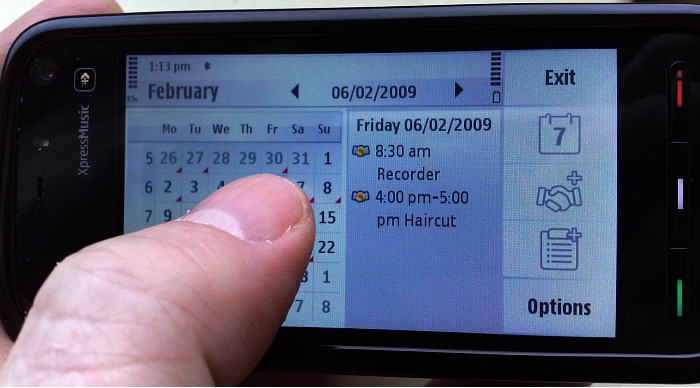
In fact the picture used in this article is the perfect example of how it has NOT been tailored:
User posted image
Now that screen above with the calendar days was actually designed for non-touch screens the E71, which has that exact calendar. Yoo navigate it by a directional pad, so the small size of each day is of no consequence.

However, in touchscreen world, those days are just too small. And the stuff on the far right size with huge buttons has been pasted on to the touchscreen format - yet the old tiny spaces are not adjusted in size.

Sorry but this is kluged together. It's quite blatant. It is far from optimal and its insulting to call people "anal" for pointing out that Nokia is really out of order to be selling what is clearly sloppy and unfinished work.

Touch screen is a good idea - but you cant half-## it. You need to put a proper interface together to make it really since. And this is where I fear Nokia is not up to the task. They are more interested in releasing a million semi-disposable devices every year, instead of a few, really well-put-together ones that customers will cherish and enjoy. Its the wrong mentality in this day and age.

Nokia would not be the first to fail on this count. I had the M600i, which was also a poor touchscreen interface, half thought out. And Windows mobile, whicheven till this day does NOT get it. I mean try to click on the most basic fucntions that they put at the top of the screen ie on-off and to turn the flight mode on - without a sharp fingernail, good luck. You will hit the wrong symbol hal the time. Ditto for the idea of the tiny"windows" key at the bottom. It maybe as okay on a computer with a mouse, but you cant tell me that is the optimal size and location for your HOME key on a touchscreen device. Its just pathetic.

So its a path with a lot of failures and Nokia is not looking like they will fare any better.

Unregistered wrote:Nokia an hardly fail with the 5800 considering how many are already out there. I absolutely love it, and my huge fat thumb picks out those days in that calendar 100% accurately with ease. It accepts the input from the centre of the contact, and it takes about 5 seconds to get used to it unless you have some kind of motor problem, in which case use the supplied stylus.

One the most anally retentive nitpicker with an axe to grind can suggest that this is somehow a flawed offering because it's not perfect. Show me perfection?


You argument is full of holes
1) There is a difference between expering better and expecting perfection
2) You fail to provide any support for your claim of "anal", which is a vague and meaningless term

Most of all you fail to identify yourself, preferring to cowardly post anonymously. But no surprise, there - the statements you are making are shame-worthy. Who would want to put their name to that?

At the end of the day if your looking for a serious message device as I am at the moment you would never consider a TS device.

Super Chimp wrote:It's funny seeing people singing the praises of keypad phones and then mentioning the N82 which whenever I tried it I found to have one of the poorer keypads in the N range of phones.

use it for 3 months with clipped nails. I bet I can type on it as fast as anyone else on their preferred keypads.

Its just the matter of you. whether you WANT it to work for you or not.

Let's get the "swearing" out of the way first: when my Psion 5mx died (there, I think I got away with it), I got a Pocket PC because I didn't fancy the Palm interface. At that time pretty much every PDA was touchscreen. (Psions weren't being made any more, and Smartphones hadn't quite arrived on the scene.) I stuck with it because there was no alternative, but I hated it. QWERTY on-screen keyboards were fiddly and took up too much of the screen. Handwriting recognition was hit-and-miss. When writing anything, punctuation was a nightmare whatever input method was used. I tried a number of innovative input methods, but never found anything I could get on with. I swore that buttons in general and QWERTY keyboards in particular were for me.

I switched to an E70 (with the fold-out gull-wing QWERTY keyboard on either side of the screen) as soon as it became available, and then an E90 within weeks of its initial release. The E90 is still the device I use. However, there are some things (web browsing in particular) that simply work better with a pointing interface (generally implemented using mouse on a PC or touch on a phone). On a PC in most cases I'd much rather use the keyboard shortcuts than the mouse wherever possible and sensible, but there are still things where a mouse is more appropriate - web browsing being the most obvious.

The issue with most hand-held devices is that because of restricted space, manufacturers have to try to force-fit one or the other input method for all types of interaction, i.e. using a D-pad / joystick for things that would be much easier with a pointing device (such as a mouse, finger or stylus), or on touchscreen devices using on-screen entry methods for things that would be so much easier with a physical keyboard.

I'm holding out for the N97. My requirements are more geared to N-series than E-series machines (heavy Podcast downloading and listening for the daily commute, occasional music listening, and who'll deny it's always handy to have a camera and video camera about your person). I also want a wide screen for comfortable and natural e-Book reading and web browsing. I do occasionally use my E90 for email (I use the Google Mail app for access to my gMail account) but in reality it's rare that I need to get access to email when I'm not near a computer. I have been happily using Goosync for Calendar syncing with all my Google Calendars for quite some time, and have just (yesterday) synced all my contacts using GSync (now that Gmail finally has the capability to merge contacts!)

So far, there has been no machine that meets all my needs (basically multi-media, with a large portrait/landscape screen and QWERTY keyboard). I haven't had an opportunity to try out an N97, but I do plan to get one when they're released, purely because it's the best fit for what I want out of a smartphone. The lack of the Podcast app on non-Nokia phones makes anything other than a Nokia a non-starter for me for now. I'm apprehensive about how many of my numerous 3rd party installed apps on the E90 will work with S60 5th edition, but looking forward to finding out. Hopefully the 5800 will help the list of fully compatible apps to increase by the time I get my N97.

Maybe a capacitive screen would be better, but the slow typing speed on resistive will be offset for me by the qwerty keyboard anyway. My E90 is an expensive device, and as a girlie I often don't wear clothes with suitable pockets to keep a phone in, even if I wanted to. I'm used to keeping my E90 in a case, and I fully plan to do the same with my N97 when I get it.

It'll be interesting to see whether the arrival of 5th edition will prompt a revival of the old UIQ Sony-Ericsson P9xx (?) style phones with the flip keyboard partly covering a large screen, or perhaps N95/N96 style sliders with a touchscreen and slide out numeric and / or multi-media keys. For the mass market, that's possibly a more popular combination than touch + QWERTY. I happily admit I'm probably in a minority wanting QWERTY, after all.

I'm looking forward to getting my hands on the N97. For me, touch + qwerty sounds like a good combination.

Julie
Erm, I know phone designers don't seem to be able to see past the end of their nose but having a phone with both a dpad, and a touchscreen sounds like a good solution (T9 on a full-screen dial pad should be large enough for texting one handed blind). They're not mutually exclusive and in fact complement each other - shame there have been but a thimbleful of these phones (eg. a1000) in the past.

My first TC phone was an LG viewty and I've used it for one year.
First I was amazed by the TC, but a few week laters I changed my mind : TC phones have a lot of constraints :
- difficult to use with one hand
- impossible to use without looking at it.
- TC is not acurate so sometimes you have to click several times

I've decided to change my phone, and bought a N95 8 Go which is far more easy to handle.

TC UI is not ready, the only interesting system I've seen (but not tested) is the blackberry storm with it's "clickable" screen

Unregistered wrote:TC UI is not ready, the only interesting system I've seen (but not tested) is the blackberry storm with it's "clickable" screen

I thought it was a good idea till I tried one. You have to really 'click' to do it, and it just doesn't feel right.

I don't know, but the impression I have is that once with a touchscreen device, you want no one else. "Browse in mobile internet with a non touch device is like bronwse in a PC without a mouse", said Cesar S. Cesar. We should wait and see.

Kind regards!

I've had an N95 and E50 plus I've used a lot of different N-series and E-series phones plus all the Communicators... Nowadays I have the 5800 (for 3 months now) and I have to say that it is the best phone I've ever had. The touch UI makes things much more straight forward and with the big screen and easy-to-scroll web pages my mobile Internet use has increased dramatically. The phone can also be easily used with one hand and I actually think my texting is faster with the 5800's alphanumeric keyboard and the qwerty works great on URLs.

I think the 5800 gives you, by far, the best value for money you can have. The phone has also had quite a good reception so new application support is steadily increasing.