Greetings all,
New member here and glad to be a part of AAS. Salute you all.
2 years with my N95...what a great piece of tech it is. But as many of you updated the firmware to V30.0.015....goods and bads in my opinion.
Cutting to the chase, I'd like to know where is the GPS data icon that used to be @ menu>apps with the compass icon, really liked it and would love to get it back, can I download it from nokia.com?...really missing the Position, Navigation menues.
V30 seems very good managin maps and stuf, but fun-geotracking is my likes and kind of hate my v30 now:icon4:. Also, is there a users manual...all I found are for the v20 tops.
Besides that, loved it to slide the display to open de Music Player, it doesn't work anymore.:icon13:...now I'm forced to press a button instead.
Also, could'nt find the way to change/customize the icon menues in the main screen. Used to have the calculator, GPS and converter icons. Now I have the profiles and web icons instead.:icon13:
So if you pals have any comments on these matter, I appreciate very much getting the good news.
Cheers and best regards.....
The GPS data and (compass) icon is still there on unbranded (generic firmware), even on V31.
Since Auto rotate was added to firmware the opening of the slide does not open Music Player.
To change front screen icons/application, see page 80 here:-
http://darlamack.blogs.com/NokiaN95usermanualUS.pdf
he GPS data and (compass) icon is still there on unbranded (generic firmware), even on V31.
Since Auto rotate was added to firmware the opening of the slide does not open Music Player.
To change front screen icons/application, see page 80 here:-
WOW....as expected.....fast response....btw thanks for the link.....
Still cant figure out the GPS data icon maneuver...all I see is Maps, & under Maps nothing looks similar, provides data or else like the old compass icon...where to now....thanks for taking the time....:icon14::icon14::icon14::icon14::icon14::con?
voyportodo wrote:
Cutting to the chase, I'd like to know where is the GPS data icon that used to be @ menu>apps with the compass icon, really liked it and would love to get it back, can I download it from nokia.com?...really missing the Position, Navigation menues.
..
Did you perhaps run a Restore operation after the FW upgrade?
Many users have experienced changed/hidden Nokia menu contents and missing functionality when RESTORE is used after a FW upgrade.
If this is the case, you should be able to get the default Menu contents back by formatting the handset's internal memory (*#7370#)
but please note you might then have to manually reinstall some apps, and Re-Sync your contacts, etc.
Hope this helps?
dez_borders wrote:Did you perhaps run a Restore operation after the FW upgrade? Many users have experienced changed/hidden Nokia menu contents and missing functionality when RESTORE is used after a FW upgrade.
If this is the case, you should be able to get the default Menu contents back by formatting the handset's internal memory (*#7370#)
but please note you might then have to manually reinstall some apps, and Re-Sync your contacts, etc.
Hope this helps?
I Did restore only Contacts. Also formatted the internal memory as suggested. Still cant find the compass icon neither the compass functions under Maps.
Is there any user/owner with V30 that actually has these compass menu options? is it only me?
voyportodo wrote:I Did restore only Contacts. Also formatted the internal memory as suggested. Still cant find the compass icon neither the compass functions under Maps.Is there any user/owner with V30 that actually has these compass menu options? is it only me?
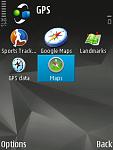
I also have an N95-1 with V30 firmware and that has the GPS data icon. I can't tell you where to find it as I created a folder and moved Maps, GPS data, Landmarks, Google Maps and Sports Tracker into it.
I think it may have originally been in either Tools or Utilities. I seem to remember it was not with Maps.
Here is a screenshot of my N95-1, V30, GPS folder that I created showing the icons.
Attachments:
Try menu>tools>connectivity>gps data hope this helps
voyportodo wrote:I Did restore only Contacts. Also formatted the internal memory as suggested. Still cant find the compass icon neither the compass functions under Maps.Is there any user/owner with V30 that actually has these compass menu options? is it only me?
On my N96, several of the GPS apps are in Tools->Connectivity
mark2 wrote:Try menu>tools>connectivity>gps data hope this helps
right on!!!! THANK YOU ALL, finally got it....so easy that makes me look kind of dumb....
mark, ian, dez much appreciated help. BTW, ....don't mean to push it.... how can I pick/select the icons to include in a new folder like ian's and have them all together..., but would love to have gps, maps, calc, agenda, contacts and bluetooth as my 6 main screen icons....
Once again thanks....
Oh dear...
Some of the answers are in your User Manual that came with the phone. See here, pages 77-80. :-
http://darlamack.blogs.com/NokiaN95usermanualUS.pdf
Changing front screen icons
Menu > Tools > Settings > General > Personalisation > Standby mode > Active standby apps. (just choose which apps. you want and in which order)
Creating Folder
1. Options > New folder > (input name for folder)
2. Go to prog you wish to move to folder. Options > Move to folder > (select the folder you wish to move it to).
Moving Prog's/Folders
If you then wish to move the folder or prog's around on the screen.
1. Options > Move > (Use the NAV key to select a new location) > OK
Moving installed folders, Media and Office
If you wish to move a Folder such as Office or Media out of Applications (and still retain its icons), see here:-
http://www.fwrnando.com/2007/n95-menu-in-v20/


