I've managed to get Gmail's POP and IMAP services to work fine with my 5800's Messaging application, including notification of new e-mails when they arrive (or within a few minutes).
However, if you are having problems here are some possible solutions:
- Set up your phone's Gmail mailbox correctly. Click here to see our tutorial on using e-mail on the 5800 and follow its instructions exactly.
- Make sure you have activated POP or IMAP on your Gmail account. You can do this via the Gmail.com website on your PC, log in, go to "Settings" and then select the "IMAP/POP" tab. When you've chosen your POP or IMAP settings, select the "Save Changes" button at the bottom of the screen.
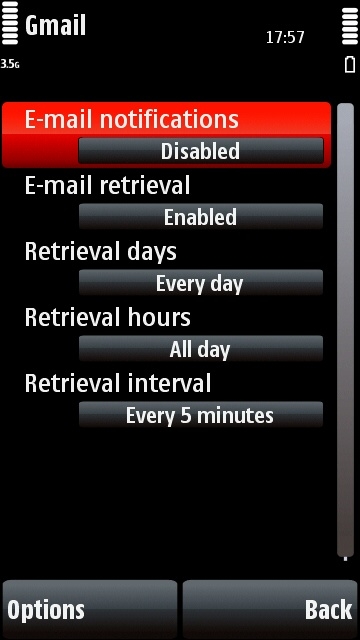
- If you're using automatic retrieval, make sure you've set it up correctly using the tutorial link above. Note that the "E-mail Notification" option should be DISABLED if you want to be told about new e-mails automatically Yes, DISabled. I know that sounds back to front, but that's how it works.
Here's what the settings page should look like if you want to set up automatic retrieval (obviously you can alter the retrieval interval if you want):
I use the Java app (v2.00).. what's wrong with it? OK half the screen is taken up by the navpad... but otherwise its OK..
also, I get a vibrating alert every time I get new email... not sure where I control this though? I looked in the settings in Application Mgr but nothing there in the GMail settings
I just can't get automatic retrieval to work properly on my 5800.
I've set it up exactly how it's meant to be done, as per these instuctions using IMAP, however, whenever I setup auto retrieval, my phone then proceeds to download ALL my gmail emails which takes forever and causes the phone to crash. It's imposible, and all me emails when downloaded (over 9000+) cause memory full warnings to appear and also don't appear in their original chornological order.
It's extremely frustrating, it used to work on my N95 a treat. However now I have to use manually retrieve my emails instead.
I've set it up exactly how it's meant to be done, as per these instuctions using IMAP, however, whenever I setup auto retrieval, my phone then proceeds to download ALL my gmail emails which takes forever and causes the phone to crash.
Hmm... if you're using Gmail, you might want to try POP instead. That easily lets you make the phone only download new emails, and ignore existing emails.
Basically:
1. Go to your Gmail account on the gmail.com website, go to the settings section and choose POP, selecting the option for only downloading new emails from now on.
2. Set up the Gmail POP account on your phone using the tutorial's instructions.
That should solve your problem, and there's not really any practical difference between using POP or IMAP on the 5800. POP accounts work fine with the email alert system too.
what's wrong with it? OK half the screen is taken up by the navpad... but otherwise its OK..
Google's email java app isn't yet optimised for touchscreen phones, so there's a virtual keypad displayed by default.
also, I get a vibrating alert every time I get new email... not sure where I control this though? I looked in the settings in Application Mgr but nothing there in the GMail settings
I don't know how the Gmail app controls ringtones etc. Presumably Google's support site might help?
But like I said, the app really isn't optimised for the 5800 yet. I would strongly recommend using other email methods until a proper 5800 version of the app is released.
You don't want to use POP as this removes the messages from your inbox on the web GMail. I find that GMail works with IMAP IDLE which means just connecting to the mail box is enough to be alerted on new messages... no need to set automatic retrieval. If you set auto retrieval then it has to download all the messages. Just set automatic retrieval off and then set the number of headers to get to 30 or something, and it will always get your most recent 30 messages per mailbox.
Thanks for the help guys 😊
rgj79 wrote:I just can't get automatic retrieval to work properly on my 5800.I've set it up exactly how it's meant to be done, as per these instuctions using IMAP, however, whenever I setup auto retrieval, my phone then proceeds to download ALL my gmail emails which takes forever and causes the phone to crash. It's imposible, and all me emails when downloaded (over 9000+) cause memory full warnings to appear and also don't appear in their original chornological order.
It's extremely frustrating, it used to work on my N95 a treat. However now I have to use manually retrieve my emails instead.
Unfortunately Nokia seem to have broken this functionality, like you I had it working fine on my E90 until they released a firmware update which made it the same as the 5800 is now. Now on either phone if I set automatic retrieval it will try to download every mail on the server until it's too many and the whole thing crashes. Using auto-notify partially works as it lets you know when the mail comes in however unlike auto-retrieval the mail client will not reconnect itself if the phone goes out of range, is switched off or loses the connection the mailbox.
I've yet to try the v21 firmware but I really wish you could have an imap connection where it simply downloaded new mail.
John
waqyum wrote:Will it work with yahoomail as well?I have my account in Yahoo.
You can set up any email account that provides SMTP and POP3 or IMAP servers. Yahoo doesn't offer this on standard accounts in many countries but in UK they do.
BTW I read there's a limit of 10 accounts but I can't get more than six, anyone else?
Also 5 checking mail every minutes is a bit excessive. What do you use on your PC? I check mine every hour that should be often enough unless you have an unlimited data plan or are always using wifi. Else your monthly charges will go out of sight quickly.
Hy Steve, hy fellow readers,
please help me: Does the new Ovi Mail/ Nokia Messagin 2.4 on the newer phones C6 and up support multiple IMAP-(sub-)folders? How many letters can I use for a signature?
I tried the Msg app on the 5800 and despite looking good, supporting html and such, it was not capable of directly connecting to the server and fetching other folders than the INBOX. Does the new email app finally fetch the whole message or still only the headers? Thank you.
I am really dependant upon a good and reliable email transfer, what phones could you suggest with this feature?
phoneguy: I am getting around 5-15 emails per day. These are partly with big attachments, still I am around 300-500MB per month - with 5 minutes email retrieval and a constant IMAP-connection. On my PC its even worse: every minute for my business account, still nowhere near 1GB. You should set up filter mechanisms to block spam-mails from downloading to your PC and capping at 10kb to download only important emails.
And yes 6 is the most I can get on S60 5th:con?:con? as well.
My Wife filed for divorce and I counter-suited due to her unfair conditions in trying to labor me with all of her debt, including what she had amassed during our past 10 month seperation.