A couple more S60 5th Edition tutorials from myself and Tzer2, looking at How to Sync music from Apple iTunes to the Nokia 5800 and Shooting, editing and sharing videos. And, again, here's the full Nokia 5800 XpressMusic tutorial index [insert para on "building into a treasured resource that your kids will love for generations"...!]
Read on in the full article.
Just wanted to mention, for those using Windows who aren't playlist luddites 😉; i.e., they really use playlists and want to crete them once on the computer and have them on their 5800, the free version of Salling Media Sync is quite wonderful for syncing with iTunes.
Thanks, a good tip. As a side note, I tend to listen to albums one at a time rather than mixing them all up, which is why I've never got into playlists.... Bring back cassettes and vinyl! [ducks]
I'm trying to manage podcasts between Itunes (Mac) and my 5800 using Nokia Multimedia Transfer. First, it only syncs between a folder called ThePhone (my phone's name) and the 5800. Secondly it doesn't update the play count on Itunes. The first is not a problem but I really wish it would update the play count. Then management of the podcasts would be completely automated.
@Steve,
Quick correction. iTunes is now DRM free. If your lib had DRM material, you still can not play it on the 5800XM or for that matter transfer them with the NMT. There is a piece of software (drm dumpster) that will remove the DRM of your music. It is not bad.
@jmurthy,
If you use create your playlists and use Automator, you can sync your playlists of Podcasts automatically. I create or subscribe to a podcast. I create a Smart Playlist in the 5800XM folder. When the podcast downloads, it moves to the folder. I create via Automator a task to perform (in this case sync iTunes) at 0700 daily. I put the task in iCal as an event and it does this everyday until I tell it to stop. Works fine without a hitch. The entire process took me less time to set up than it did to write this post.
Sapporobaby, I thought only the more expensive versions of itunes tracks were DRM-free, with the cheaper versions DRM-locked?
Jmurthy, I know this isn't exactly what you're asking for, but have you tried using the 5800's own Podcasting app? You can add any podcast to it and have it automatically update by downloading podcasts directly to the phone. If you're worried about data costs it can be set to only use wi-fi:
http://www.allaboutsymbian.com/features/item/How_to_download_and_subscribe_to_podcasts_on_the_Nokia_5800_and_you_dont_even_need_a_computer.php
Hey Tzer2,
All unlocked dude. I have US account so I can not speak for European or other area accounts. There are higher priced as well as lower priced songs. iTunes is now variably priced.
The Podcasting application is not that good if you are a paid subscriber and the podcasting app does not seem to work on many sites. I use iTunes for podcasting.
All unlocked dude. I have US account so I can not speak for European or other area accounts. There are higher priced as well as lower priced songs. iTunes is now variably priced.
Is the variable pricing is based on content (i.e. popular content costing more) rather than DRM-locking?
In any case, as long as there's a chance that some people will have DRM-locked iTunes tracks, it's probably worth mentioning how these differ from DRM-free ones.
The Podcasting application is not that good if you are a paid subscriber and the podcasting app does not seem to work on many sites.
Could you give an example of a free podcast which doesn't work with Podcasting? All the ones I've tried have worked, though I've sometimes had to input the feed address manually.
Tzer2 wrote:Is the variable pricing is based on content (i.e. popular content costing more) rather than DRM-locking?In any case, as long as there's a chance that some people will have DRM-locked iTunes tracks, it's probably worth mentioning how these differ from DRM-free ones.
Spot on. Newer content is more expensive. Movies and TV shows still remain DRM'd though.
Could you give an example of a free podcast which doesn't work with Podcasting? All the ones I've tried have worked, though I've sometimes had to input the feed address manually.
Go to podcast.msnbc.com. Select either the: Countdown (video), or Rachel Maddow (video), or either of the same two but audio this time and please tell me how to get them to work. I have tried all for links and it still did not work.
Sapporobaby, just tried one of those podcasts at random (countdown audio) and it works for me on Nokia Podcasting.
What you have to do is get the feed's addresses from the web page's "POD" link, for example:
http://podcast.msnbc.com/audio/podcast/MSNBC-COUNTDOWN-NETCAST-MP3.xml
and then enter it into the Podcasting application (from Options > New Podcast).
You can find out more in our 5800 Podcasting tutorial.
I'll now try the video feed using the same method to see if that works, will post the results later.
Sapporobaby, the Countdown video feed is working too, just watching it on my 5800.
Excellent picture quality, works absolutely fine through the Podcasting app.
If you're having trouble with entering the feed address (it's pretty long), you can save the feed as a bookmark in the phone's web browser, then copy and paste the URL into the phone's Podcasting application.
One thing that might throw you if you're trying to enter the address totally manually is the case-sensitivity, part of the address is upper case while the rest is lower case.
EDIT: Some proof this works 😉
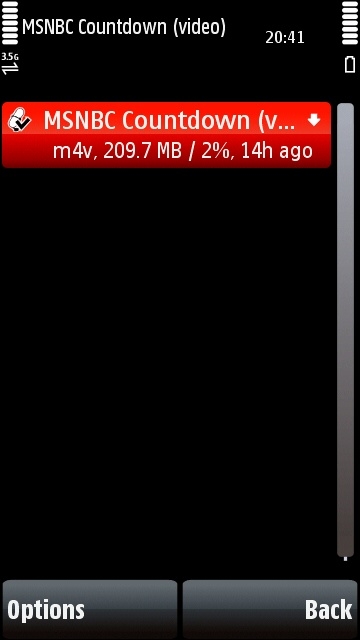
Being a MSNBC video podcast junkie for over one year now 😊, let me tell you how things are. Until last week, all video podcasts from MSNBC worked flawlessly. Over the weekend, they've changed the format for some of them from 320x240 (4:3) to 428x240 (16:9). For sure this is the case for Meet The Press and Nightly News. For some reason, the builtin video player of the 5800 is not capable of playing video at 428x240, so for the two podcasts mentioned above, it only plays the audio part. Countdown and Rachel Maddow for the moment remain at 320x240, so they still work fine.
Rvirga, thanks for that!
I wonder if they've done more than just change the video resoution?
If it was the same format/codec but switched to 16:9 aspect ratio it should still play on the 5800, the 5800 has more than enough resolution to play a 428x240 video and I've played higher res vids on the 5800 (including higher res video podcasts).
However, if MSNBC have also changed the way the video is encoded that might stop the picture appearing...
Whatever the case over video formats, the actual feeds do definitely work with Podcasting.
Tzer2,
You are a gentleman and a scholar. I will try your method and see if it works. You are pushing me back into good graces with Nokia. I was hard against the N97 and its specs but after looking at the phone and my uses more and more I realize that the N97 might end up being a colosal success.
sapporobaby:
If you use create your playlists and use Automator, you can sync your playlists of Podcasts automatically. I create or subscribe to a podcast. I create a Smart Playlist in the 5800XM folder. When the podcast downloads, it moves to the folder. I create via Automator a task to perform (in this case sync iTunes) at 0700 daily. I put the task in iCal as an event and it does this everyday until I tell it to stop. Works fine without a hitch. The entire process took me less time to set up than it did to write this post.
But won't this update the entire playlist? That will work fine as long as you play all the podcasts on the 'phone. I think I tried this and it will delete unplayed podcasts on the 'phone because the play count is not taken from the 'phone.
Tzer2
I was quite happy with the podcasting on the 'phone except for the clumsy way to enter new podcasts. But I had (have) to keep resetting my 'phone because of the "Expired Certificate" error that I cannot get rid of. Everytime I reset the 'phone I would lose my hard won podcast list. I finally decided it was easier to update from the Mac.
Don't know if this is the right place for this question, but is there anyway I can use smart playlists for the phone? Like I can do on my ipod, I can make a playlist with tracks that haven't been playes for the last 3 weeks.
When I do a playlist like that now, and sync the phone with my PC, using itunes och media monkey, the phone won't transfer any data to the pc, so the playlist won't change....
Unregistered wrote:Don't know if this is the right place for this question, but is there anyway I can use smart playlists for the phone? Like I can do on my ipod, I can make a playlist with tracks that haven't been playes for the last 3 weeks.
When I do a playlist like that now, and sync the phone with my PC, using itunes och media monkey, the phone won't transfer any data to the pc, so the playlist won't change....
Salling Media Sync will let you. Link in post #2. 😊
I did try the free version of sailing media sync, and that won't work, the playcount dosen't transfer from the phone to the pc, so tha playlist won't update.
Does it work in the pro version?
Or is it possible to transfer playcounts and that kind of info to mediamonkey instead and create the smart playlist there?