Solving a charging problem chez Litchfield, I was struck by the realisation that all chargers are not made equal. If this seems obvious to you then feel free to skip this chatty tutorial, but otherwise you might like to read how I sped up the charging time on my Nokia N86 by a factor of almost four simply by using the (ahem) right mains charger. Item of trivia: mains charging of a modern smartphone can be up to twelve times faster than microUSB trickle charging - quite a difference.
Read on in the full article.
Excellend article.. I noticed this quite often since I also possess lots of Nokia phones..
Is it a problem that i keep the nokia charger on plug switched on for many days.
FYI
"Avoid frequent full discharges because this puts additional strain on the battery. Several partial discharges with frequent recharges are better for lithium-ion than one deep one. Recharging a partially charged lithium-ion does not cause harm because there is no memory.
Slower charging is also less harmful to the battery."
Source: http://batteryuniversity.com/parttwo-34.htm
An interesting article (and in my case quite timely). Last weekend I was in Ireland for a few days with the in-laws. Wanting to travel ultra-light I just packed my N97 and the micro-usb adapter thing (plus a few clothes obviously. Wasnt just me and and N97!) on the basis that there were bound to be a heap of Nokia chargers scattered around.
First night all seemed fine, found a charger, plugged in adapter, left to charge. All looked ok until about the next afternoon when my phone went totally dead, dead, dead. Every charger I found (with the adapter) wouldnt wake my poor N97.
It wasnt until I went out and bought a cheap micro-usb mains charger that it came back to life, ie one that didnt use the adapter.
Moral is that despite what it says on the tin, you still need a mains charger and cant rely on a usb cable for a full charge (which is kinda what Steve said so i guess my post is irrelevent!).
slitchfield wrote:Item of trivia: mains charging of a modern smartphone can be up to twelve times faster than microUSB trickle charging - quite a difference.
The reason for this is because by default without a proper driver, Windows will not allow more than 10% of the full output power on USB ports, to prevent damaging the device. A driver can tell Windows the power requirements of the gadget you are connecting and correct the output.
That's why when you connect a Blackberry to a new machine via USB, the BB complains that it's not getting enough power - after installing the driver from Windows Update, charging is almost as quick as a mains charger.
Now that Nokia et al are switching to microUSB connectors, perhaps they need to start doing the same if they haven't already done so.
Good article and worth highlighting. You are correct about the USB charging being much slower, it took an age for the charging LED to go out first charge for my N97. An observation using my charger adapter, CA-146C, for use with non mini USB chargers. The mini/standard charger input block gets red hot during the charging process. Have you had this experience?
It's funny, for the last few years the main power-related gripes of Symbian users have been about batteries being too small and not being able to charge through a USB cable.
Now that the N97 provides both a huge battery (1500mAh) and USB charging, it turns out that USB charging is a bit rubbish as it takes many many hours to fill a large battery using this method.
Thankfully the N97 also comes with a normal charger that has a USB plug on the end of it, so you can charge directly from the mains, but it does sort of prove these USB charging evangelists wrong.
The official USB specifications have to allow more current if USB charging is to be a realistic prospect in the future. Devices with batteries of 1000mAh or more would take many hours to charge through a compliant USB cable, and battery capacities seem to be getting bigger all the time (the 5800 has a 1300mAh battery for example).
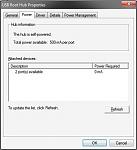
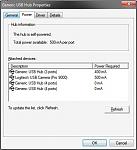
I'm no "USB charging evangelist" and agree that the correct mains charger is the best way to go. The spec for microUSB maybe 100mA, but Windows says otherwise for self-powered hubs:


Perhaps the "100mA" is the most a device will get without a driver - goes back to what I wrote earlier.
You can actually get more to a device by daisy-chaining the ports - with a lot of these 2.5" hard drive caddies you get a double-ended USB connector where one of the ends is power only. This delivers enough juice to power the drive without the need for an external power supply. Something like this would be ideal for the current high capacity batteries.
Attachments:
What about car chargers? Are they kinda lagging too like the Micro USB chargers?
Thanks
rajkanneganti wrote:What about car chargers? Are they kinda lagging too like the Micro USB chargers?Thanks
Good point, I must check mine
The USB spec for a port on a powered hub is 500mA per port, it may well be lower if you have daisy chained through unpowered ports.
As noted above USB is potentially quite smart and the device can tell the host how much power it needs. Many computers, especially laptops, limit the current to preserve power and prevent excesive currents on short circuit unless they have the right driver. If PC Suite/Ovi is not installing a driver that's an issue - Steve did you have one of those installed?
Even with the driver installed my Blackberry charges much slower off my desktop as it's mains charger has a much higher current rating.
I've given up on chargers, I just have a variety of mains or 12v to USB adapters all off which provide 800ma or more "out of spec" current on the USB socket, much more convenient and keeps the berry, nokia and ipod allive.
It's a good idea to keep a mini to micro USB adapter in your travel kits as micro USB chargers are the de-facto Blackberry charger and will happily charge Nokias.
Hey! Was there supposed to be a 2mm to USB adapter in my N86 box?!
Tim
rajkanneganti wrote:What about car chargers? Are they kinda lagging too like the Micro USB chargers?Thanks
My car charger (the official Nokia one with a microUSB ending) is rated at 550 mA - whether you cars plug provides that may be open to debate. Either way its likely to be slower than a mains charger.
timsalmon wrote:Hey! Was there supposed to be a 2mm to USB adapter in my N86 box?!Tim
Nope, you only get that in the N97 - you can buy one as an accessory though.
Rafe wrote:My car charger (the official Nokia one with a microUSB ending) is rated at 550 mA - whether you cars plug provides that may be open to debate. Either way its likely to be slower than a mains charger.
Considering many car batteries are rated at 12v around 50-90Ah, I don't think the limitation is with the car plug, or for those that smoke it would take an awfully long time to light the cigarettes 😉
Oh, I would certainly recommend searching around for mini-to-micro USB converters for re-using all those old USB chargers many of us have lying about.
I snagged about 10 off eBay for around $20 - very handy.
I think an average car battery is usually rated at about 12v 300A at least.
Total is around 3600W which is close to what comes out of a power socket and is why you can use use an inverter to power mains devices.
Typically though the fuse (and the cable) will limit your cigarette lighter to 10A or around 300W so I don't think your lighter will have issues providing 6W 😉
Taomyn wrote:Considering many car batteries are rated at 12v around 50-90Ah, I don't think the limitation is with the car plug, or for those that smoke it would take an awfully long time to light the cigarettes 😉
Heh good point. Just don't know about the efficiencies of the various bits (in the charger too). Maybe I'll do a test on the next long car journey.
I had almost the opposite experience.
I used the Nokia mains charger that came with my 9300 quite happily then bought a cheap second mains charger (from Amazon, I think) that I kept at the office. This charged my phone noticeably quicker - taking roughly 75% of the time the Nokia one did.
Hi Steve, could you please check how many miliamps N86 will use for charging on classic PC? There is available 500mA per port, so N86 can use 500mA instead of 100mA that is default value for USB. But it must have a special driver for this and it must tell the computer that it needs 500mA. What power supply does actually N86 use on classic computer (not an apple)? Thanks. JKA
I had a good read of this and it is useful to read but it shows evidence that there isn't much happening in the mobile world at the moment.
I might connect a charger to a hamster wheel and see how long the hamster will have to run for to fully charge my phone :biggrin:
When is the next firmware for the 5800 coming along??
I thought it was obvious. The fastest Nokia chargers are the AC-5. Everything else is slower. Tested on my E71 and N82
I always rely on the mains charger for changing my phone majority of the time. The USB charger is only and only for top-ups / emergency charges when I seem to be low on charge and there is no mains charger available..
Hi All!
You might look into the related very recent "USB Battery Charging" spec:
http://www.usb.org/developers/devclass_docs/batt_charging_1_1.zip
You've technically several options:
- Dump USB-charger, not USB spec compliant:
. Some provide >>900mA, but phone uses only 100mA
. => Why: HW-damage (by arcing) avoidance!
- USB2.0 Port: Initial 100mA, if negotiation ok 500mA
- USB3.0 Port: Initial 150mA, if negotiation ok 900mA
- USB BattCharging compliant, USB ACA: upto 1800mA
The maximum current (100, 500, 900, 1500, or 1800 mA) is state & data speed depending (Figure 4-3) to avoid disruptions or damages!
The old chargers may burn the plug over the time due to arcing. Therefore the difference between old USB-cable chargers & spec compliant is the D+&D- line <200 Ohn short respective the right protocols to recoginze the correct pair and protect your HW.
Cheers!
I did notice a long time ago that charging via usb either directly with usb to microusb / usb to 2mm took longer time. I actually concluded that with the chargers having higher efficiency myself, which wasn't too far fetched.
However I was wondering what was essentially the main differences between the Nokia chargers like the "high efficiency" and "travel" chargers?
I was browsing through them and the only difference I could find regarding this was that the "travel" chargers used a bit more energy than the "high efficiency" ones.
Most importantly I was wondering if it was best to use a travel charger or the high efficency one (2mm) and then connect the Nokia Charger Adapter CA-146C.
I then only need one charger to charge my N82 and the N97.
Which is best in this case?
Interestingly, I got a 350mA output charger with my Nokia E71, which has a 1500mA battery. Did Nokia supply me with the wrong adapter?
Very good article which cleared doubts about different charging times with different chargers.
Hmm. Maybe my little USB charger adapter has some chip in there to talk to the computer. I have charged (N95-8) using that from dead to full in about an hour, several times.
Li-ion batteries has no memory effect from the way it's being used, as previous battery technologies featured. Instead they have a chemical memory which slowly lowers it capacity in four or five years from the time it was manufactured (hence, you shouldn't buy replacement batteries in advance). As to maximize the battery life, it's being charged to about 40% of it capacity in the factory, and if you wont use a battery for a long time, it's better to leave it with about half of a charge.
In the other hand, those batteries become unstable when overcharged: they may produce enough heat to melt down the device or even blow up. It's because of this fact that the last 10% of the charge takes longer.
The charger have protection filters and requires some logic circuit assembled inside the device or in the battery itself. Measuring the current battery charge isn't accurate enough to prevent an overcharge, so the logic circuit keeps statistical records of consumption and the time being spent charging the battery. Since those records may become inaccurate in the long run, risking an overcharge, the upper boundary for the charge is being slightly reduced for every charge, and during the last 10% of the charge the process is slow because it's being paused to measure the charge step by step in laps that shortens as the current load approaches the upper boundary.
Notice that this 10% doesn't refers to the real battery capacity but to the artificial upper boundary imposed by the logic, with time it actually represents a larger percentage of the real battery capacity.
But, another feature of those batteries is that there's a floor for the charge, when the battery charge falls under that floor, it requires a boost of energy to be charged above the floor, hence the "main" charging method is unable to do the trick. During the charge, the logic circuit makes pauses to measure the current load, if it doesn't change between measures, the load is under that floor and the charging method is switched. This new process is stepped as happens with the last 10%, but it allows the logic circuit to safely reset the statistical records form the scratch, increasing the upper boundary again.
Hence, it is advisable to let the battery discharge from time to time (once a moth or every two months would be fine, or as soon as you notice your battery is drained too fast), as to reset the logical circuit memory... and not the battery one.

