Read-only archive of the All About Symbian forum (2001–2013) · About this archive

Monkey Island on N97

4 replies · 9,265 views · Started 25 July 2009

No, sadly I don't mean the new Special Edition version with new graphics and speech. iPhone owners have been lucky enough to get this version but as far as I know there are no plans to port it to S60v5...

However, with the help of ScummVM, you can still enjoy the 1990 classic on your N97! ScummVM, if you didn't know, is a virtual machine that runs (mainly) games that were written using SCUMM (Script Creation Utility for Manic Mansion), such as many of the early LucasArts adventure games like Monkey Island.

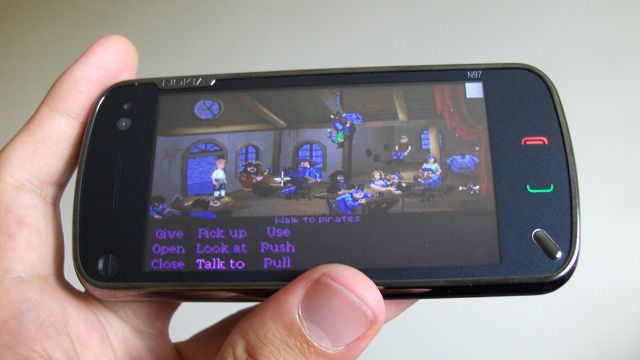
There isn't a "proper" S60 v5 version of ScummVM out yet but it installs perfectly fine on the N97. However, because it was made for S60 v3, there are a couple of issues. Firstly it's designed in landscape mode for phones that don't have screen auto-rotation, so I had to turn off screen auto-rotation on my N97 otherwise it would rotate the screen again and it'd be unplayable. Secondly, there is a little grey box in the top-right corner that is always there. Pressing this opens up a simple onscreen keyboard (and cleverly squishes the game screen to one side so you don't miss anything). This is useful for most other phones, but I would like to see a native v5 version come out that supports the N97 keyboard.

Nonetheless, it works fantastically well! You can download ScummVM completely free, but you need to own the games if you're gonna use them on your phone. Thankfully I'd bought the Monkey Island 1+2 PC CD-ROM years ago so I copied the necessary files from that to my phone. Sadly the music didn't play but that's because the music was actually burnt as audio tracks on the CD. Bummer!

The touchscreen works very well. Wherever you touch, the mouse cursor appears and makes the character move to that position, and you can simply tap the on-screen buttons to select them. I would like a new version of ScummVM to replicate pressing the right-mouse button by maybe double-tapping the screen, but you can still play the game without it.

I've got other titles on CD that would work with ScummVM, so I'll be trying those out in due course.

Anyway here're a few photos I took for you all to see:

User posted image
The main ScummVM screen. This is where you load your games.

User posted image
Game starting up...

User posted image
Monkey Island Title Sequence

User posted image
The Scumm Bar

User posted image
Talking to a pirate

User posted image
The back room of the Scumm Bar

UPDATE: For anyone who wants to try it, I sorta fixed the auto-screen rotation issue. Open the virtual keyboard (via the grey box) and press CTRL, 2, CTRL, and this will rotate the screen. Now I can play with the phone open. Much more comfortable! 😃

[EDIT] Now with the keyboard open and the screen rotated properly, I can use the D-pad instead of touching the screen if I wanted to 😃

monkey island 1 and 2 work fine on the n97. But have you had any luck with monkey island 3? I can't get it to work with sound for more than 5 seconds.. it works fine with no sound though. I tried posting on the scummvm forums but haven't had much luck..

Curse of Monkey Island? I have that somewhere. I'll have to dig it out.

I'm also gonna try DiscWorlds 1 and 2, as they're rumoured to work with ScummVM too.

OK I've tried a few more games with this:

Monkey Island 2: LeChucks Revenge - Worked perfectly, complete with all the funky plinky-plonky music and effects!

Curse of Monkey Island - Sound and GFX worked fine until the gameplay actually started. I experienced the same problem as bacardiandwater reported. Turned the sound off and subtitles on and it worked fine, but it's just not the same without the speech (It's a different matter, however, when there's no speech included ala Monkey Island 1 & 2). There are quite a few different sound/gfx options so maybe tweaking these might solve the problem eventually.

Discworld - Worked pretty well. Couldn't report much because I'd picked up a bag of money and couldn't put it down, but that might be cos I didn't know all the controls.

Discworld 2, Missing: Presumed... - Gameplay worked really well. Wouldn't move seamlessly between different lines of speech so had to press Return each time someone had finished talking to move on to the next piece of dialogue. Also, ingame movies ran slow (but smoothly) and as a result the sound/music jumped every 1/2 seconds. Again, sound/gfx tweaks in ScummVM might do the trick.

I also upgraded from the stable v0.13.1 ScummVM to the unstable v0.14.0 and there were some minor changes, most noticably the grey box doesn't show in the corner... so I have no idea how to get the virtual keyboard to display... however I'd spotted a section in the options that allows me to assign keys to games and it appears to support the N97 keyboard! Hurrah!

It's also worth noting that Scumm are working on v1 (yes... v1!) of their virtual machine and the S60v3 one is only at v0.14.0 unstable, so we can expect many bug fixes to come about in the future 😊