Even brand new N97 stalls when you press buttons on the screen. When I press Applications or Settings icon it takes 1-2 seconds before the actual thing comes up. Why is the responsiveness so bad? My Axim x51v had better responsiveness than this....lame. Its not much better even when no widgets are running.
Why so slow? Why the delays?
mine's instant ..... i'm sure some nice person on here will tell you how to rectify that soon 😊
i can't help you i'm sorry to say, i've had so much help with this phone over the past couple of weeks that i wouldn't know where to begin :frown:
although ..... having downloaded handy taskman and being able to close down apps that seem to be running automatically (and therefore slowing down the system) might be a start as i feel that this in itself made the phone operate faster
I use main screen options and then select 'show open apps' and there are only 2 default things in there that cannot be shut down. They are there on every N97.
I hope someone can help to make my responsiveness a whole lot better!
MonarchX wrote:I use main screen options and then select 'show open apps' and there are only 2 default things in there that cannot be shut down. They are there on every N97.I hope someone can help to make my responsiveness a whole lot better!
you may think theres only those 2 apps open but with handy taskman you can see hidden apps running also, when you power up your n97 the clock, contacts, messaging, calendar and log are running in the background, with a 3rd party task man you can close them fully.
Biggzy wrote:you may think theres only those 2 apps open but with handy taskman you can see hidden apps running also, when you power up your n97 the clock, contacts, messaging, calendar and log are running in the background, with a 3rd party task man you can close them fully.
Well, I hope by closing them my clock will still be showing the right time and syncing time...
yeah everything still works fine
for instance when i switched my phone on this morning the opens apps shown on the phone were facebook, menu and homepage.
handy taskman told me that .....
home screen, menu, log, contacts, messaging, clock, my keylock, widget ui and api bridge (anyone know what that is ?) were all open and running !!! - i will close log, contacts, messaging and clock which will boost up the phones ram, but won't stop them from working 😊
i'm not saying this will cure your delay problems but it might help - hopefully someone else today will be able to give you some ideas 😊
API bridge is how apps and widgets talk to the phone. Kinda like a middle man...
I downloaded KillMe which showed tasks that can be safely removed. i did and the phone is more responsive but still has lags here and there. KillMe also shows processes that its unsure about. Anyone kno which ones can be terminated? Any common or obvious or default ones?
Does Handy Taskman do a better job?
Also, how do I make apps close completely so I dont have to manually shut them down each time???????????
Some applications...even when you close them will come back as soon as they are needed by the home screen.
On my Nokia 9300, the one application that aggravated me the most was the Notes application...it would never fully terminate and it gobbled a lot of memory and didn't always return it to the OS even when you killed it with an external application.
I used TaskSpy on my 9300 which had a nifty "compress" memory feature which would regain the space lost to applications which didn't return them to the OS when they exited.
I have not used either HandyTaskMan or KillMe yet, but I expect they may have a similar feature.
Thanks for all the tips guys. I narrowed down quite a few processes and apps I didn't need.
Overall, it did make the performance faster, but its still pretty laggy. For example, when I boot my N97 (even with all those apps killed) and go to Applications button - it lags a bit, but the damn scroller lags BIG time. I have yet to smoothly scroll on my N97 after a boot up. You have to go back and forth to Apps menu several times before it properly loads and scrolls.
I would LOVE to see a video of someone booting their N97 and going to Apps and scrolling. I've used several N97 - they ALL lag the same exact way. iPhone doesn't (after 2 days of using it), HTC Pro 2 doesn't, but N97 does and these smalls lags occur all over the place. It needs more RAM and faster CPU or faster drive access.
You could try this:-
1. Keep your icons down to 12 in Applications.
2. Create 2 new folders. I called mine Utilities and Widgets
3. Place items that you don't need to access directly that often, such as Handy Taskman, Help, About, sett. Wizard, etc in Utilities and put your widgets in Widgets.
You should then find that Applications opens a lot faster.
Attachments:
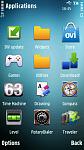

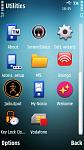



Thanks again! Awesome screenies!
That is not a real solution though because it puzzles me how such a falgship device can't render some...50 icons. Its not like its loading the actual apps, just the icons... I hope introduction of that new scrolling in firmware 20 will also optimize these small lags and inefficiencies. My stepdad's cheap Samsung OS phone loads apps and everything SO damn smooth. I can't understand why this phone can't. I guess I am just venting, but its like they pack fast phones with enough new features to slow them down to the same level as previous phones...its just silly.
I organise my applications in a (fairly) strict way. I have the following folders in Applications:
Media
Office
Games
GPS
Internet
Utilities
Fun
Social Networking
Misc
The only icon that's accessible directly in the Applications folder is the Ovi Store. Everything else goes into the sub-folders. I find this is pretty quick for me, although the Fun folder is getting a bit cluttered now..
Another tip to speed up the phone's menu system is to use a basic theme. I was running Pizeros Soltice and some other image heavy themes installed on C: but then tried the default themes and have now settled on the basic looking Touch Vista theme by tehkseven, which has speeded things massively.
In particular the scrolling of the Applications folder, as the scroll bar used to get stuck halfway wheras now it scrolls as it should. Either the N97 hasn't got the power to scroll/draw screen items with graphics heavy themes, or more likely, it has problems drawing/updating the background when scrolling on the screen.
Oh and I forgot, turn theme effects off as well as autorotate if you can live without it.
lightbulb wrote:Another tip to speed up the phone's menu system is to use a basic theme. I was running Pizeros Soltice and some other image heavy themes installed on C: but then tried the default themes and have now settled on the basic looking Touch Vista theme by tehkseven, which has speeded things massively.In particular the scrolling of the Applications folder, as the scroll bar used to get stuck halfway wheras now it scrolls as it should. Either the N97 hasn't got the power to scroll/draw screen items with graphics heavy themes, or more likely, it has problems drawing/updating the background when scrolling on the screen.
Oh and I forgot, turn theme effects off as well as autorotate if you can live without it.
I want my autorotate, but I use the defualt black theme... and effects are turned off by default. My scrollers gets stuck 2-3 times in Applications for 1-2 seconds before its usable.
After trying Handy Taskman and KillMe I'd have to say that Handy Taskman isn't worth it at all. KillMe 1.36 aggregates (safely) processes that can be removed and it also allows you to remove unnecessary ones during boot/startup so you don't have to do it manually and your unit boots with extra RAM and speed. I'm not advertising it, but I like it. Its like a free easy firmware upgrade for speed.
I think this is all getting out of hand. What is 2 seconds? I have hacked the phone and installed theme effects etc. The phone is so much better, more user friendly, pretier even, and I love it. So I have to wait 2 seconds.... cummon guys it is not the end of the world! Chill out and enjoy what you have in your hands......
Barrie
bsimpson wrote:I think this is all getting out of hand. What is 2 seconds?
It's about 1.8 seconds too much and 1.5 seconds longer than my last N-series phone 😉