Hi All
I have just updated to v12 on a vodafone N97 .I have not restored backup as the device retained all its settings after update. Everything is working fine but I have not noticed any great increase in flash\ram drive. After rebooting ram is a little higher at around 50 -55 mb - running averagely at about 45mb\45mb which is only 2-3 mb higher than before.My c drive still indicates the same at 31\73mb which is exactly the same has before update - which is worryingly uncanny - nokia maps & quick office will account for approx 11mb of that but I would have hoped update to release more (I have not looked deeper to see if update added any additional sis files such as mail exchange).
Is there any official comment on supposed memory increase ? and what sort of memory changes have you achieved ?
Boothy
Hi Boothy
You'll probably find that most of the guys that gained whopping extra mbs on ram and memory after an upgrade are those that debranded their phone and subsequently had to do a hard reset (using the keypad to do it and not the 7370 method).
I didn't have to do a hard reset after my upgrade to v12 and noticed that my ram and c drive memory didn't increase very much at all - i was very disappointed :frown:
so i did a hard reset anyway 🙄
therefore, i'm presuming that there wasn't a huge increase in memory that came along with the upgrade, and it was only due to hard reset that this amount of memory was gained.
I updated to v12 the other day OTA.
Unfortunately not having a memory card at hand and with my laptop unable to download Nokia Suite I was unable to make a backup of the phone.
After the update I lost all connections and subsequently had to do a hard reset (not recommended at all) but it did release 55mb which is a big improvement on pre-update at 28mb. After reinstalling quickoffice and ngage I'm on 49mb atm.
angiepea wrote:Hi BoothyYou'll probably find that most of the guys that gained whopping extra mbs on ram and memory after an upgrade are those that debranded their phone and subsequently had to do a hard reset (using the keypad to do it and not the 7370 method).
I didn't have to do a hard reset after my upgrade to v12 and noticed that my ram and c drive memory didn't increase very much at all - i was very disappointed :frown:
so i did a hard reset anyway 🙄
therefore, i'm presuming that there wasn't a huge increase in memory that came along with the upgrade, and it was only due to hard reset that this amount of memory was gained.
lol beat me to it. yep hard reset releases mb😊
londoner888 wrote:lol beat me to it. yep hard reset releases mb😊
Oh Man !!!! why are we up so early !!!!!!!!! 😃
Whilst you are talking about space on the C drive, When I install an app, where should I choose to install it to?
dog-man
dog-man wrote:Whilst you are talking about space on the C drive, When I install an app, where should I choose to install it to?dog-man
Anywhere but C: (phone memory) drive whenever possible.
I use E: (Mass Memory) drive for every app: possible. Even to the extent of re downloading already installed app's from Dave Cozens site:-
http://davecozens.com/n97/
and Ovi Store just so they can be moved to E: on re installation.
I had better start afresh then as I think I installed a few to the 'C' drive. 😮
dog-man
Try and avoid certain app's that gobble C: drive, such as Ovi Contacts, Nokia Messaging and N-Gage.
I also only install the current theme I'm using to C: drive. If you want to be really tight then use a built-in theme.
Don't forget that even if you install app's to E: or F: they may well write folders on C:.
I have to say that I did think it worthwhile losing a bit of C: to Nokia Java Runtime 2.0 and Ovi Maps beta 3.03.
What a stupid situation though, that on a high end phone we have to be so careful on space to the point where we cannot, or do not, want to install certain app's.
I tend to have about 40Mb of RAM and about 40Mb free on C: at boot-up (see screenshot).
I bet angiepeas bigger than mine! 😊
Attachments:
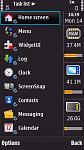
Hey Ian-Ross,
Do I see a 32gb SD in there? Was not aware they are available........
Barrie
[email protected] wrote:I bet angiepeas bigger than mine! 😊
you have a bigger ram, but i have a bigger c drive 😃
but I WANT MORE 🙄
Attachments:
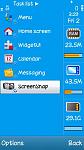
angiepea wrote:you have a bigger ram, but i have a bigger c drive 😃but I WANT MORE 🙄
I see that size does matter angiepea! :wink:
How do you guys bring up that Task List menu??:con?
[email protected] wrote:See here:-http://nokia-n97-software.epocware.com/Handy_Taskman.html
Cheers for the link. Hmmmmm should I d/l? in your opinion was it worth �9?
londoner888 wrote:Cheers for the link. Hmmmmm should I d/l? in your opinion was it worth �9?
There is a FREE alternative to Handy Taskman... Jbak Taskman.
See here:-
http://www.symbian-guru.com/welcome/2008/08/s60-task-manager-replacement-shootout.html

