Hi,
what's the difference between Opera Mini 5.0 beta and Opera Mobile 10 beta?
Has a look at the website and can't work out which one is better. I'm using mini at the moment and it's great, but was wondering is mobile any better.
Thanks
8Ball
Hi,
what's the difference between Opera Mini 5.0 beta and Opera Mobile 10 beta?
Has a look at the website and can't work out which one is better. I'm using mini at the moment and it's great, but was wondering is mobile any better.
Thanks
8Ball
not much except its a native app for symbian. has slightly better functionalities too
able to copy and paste outside of the app
butttttttttttt
TERRIBLE memory management! keeps showing out of memory errors even if you have 30+ MB free ram. happens usually when loading large pages over 1MB in size, and have javascripts runnin all over
not to mention spotty connectivity problems. what can open on the opera mini/nokia web browser cant be opened from opera mobile...
well, its still a beta, so fingers crossed!
Stange you mention the out of memory thing. Because my phone popped up with two quick "out of memory" messages in succession after I closed Opera Mobile, then it carried on its way.
Yes, Opera Mobile 10 is a native S60 app and Opera Mini 5 is Java. Mobile 10 seems to load much faster for me than Mini 5, and looks/runs smoother as well... as you would expect when comparing native apps with java ones.
However other than that I don't think you have much to worry about. They're both about 99% the same, from what I can tell, so you can't really go wrong.
i'm just happy that with OMobile i don't have to click "allow access for this session" like each time i start using OMini!
I downloaded and installed Opera 10 beta earlier on E: drive, just as well as it's 4MB.
I must say that it loads a lot quicker than Opera 5 but then I started to experience the same "Out of Memory" messages that zxon and jerm mention.
I was rather surprised by this as it happened 2 or 3 times in succession.
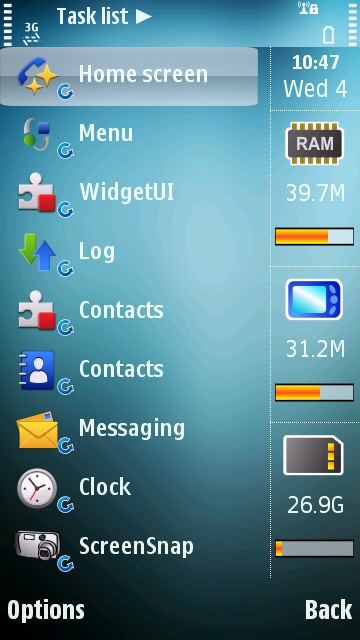
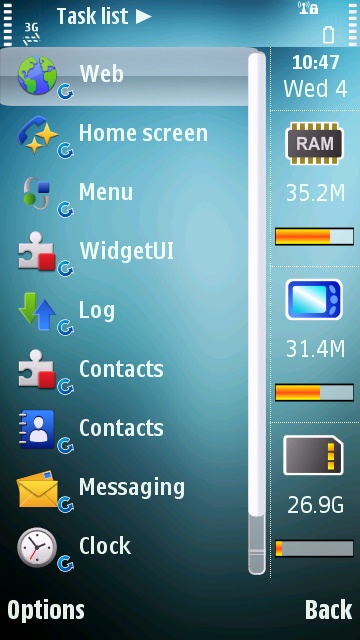
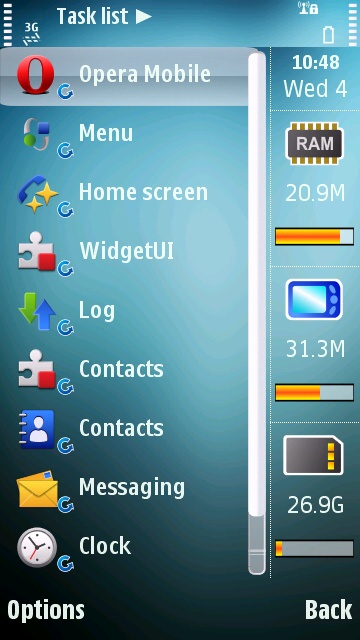
I therefore decided to run a quick test and the screenshots show the results of it.
Fig.1 Shows the RAM at 39.7Mb with the phone in normal standby mode.
Fig.2 Shows the RAM at 35.2Mb with the built-in browser running and the classic white Google search page open.
Fig.3 Shows the RAM at 20.9Mb with Opera 10 beta running and the same Google page loaded.
Whilst I agree that this is not the most scientific test, I could have for instance have loaded a very graphics heavy page on both, it does seem to indicate that whilst the built-in browser is using 4.5Mb, Opera is utilizing a whopping 18.8Mb of RAM or more than 4 times the RAM.
This would explain the "Out of Memory" messages I, and others, get when using Opera.
I loaded and ran Opera Mobile 10 beta last night:
My observations:
Large web pages pretty much guarantee an "out of memory - please close some applications" error. The v20 firmware closed Facebook and Accuweather and the Opera Mini resumed functioning without exit.
However, a large page (on MySpace) resulted in Opera Mobile "hanging" (i.e. no response to the touchscreen).
What happened next is what bothers me...I used the Menu button to show Open Applications and then used the Exit feature to terminate the Opera Mini.
After returning to my Home Screen, I found Opera Mobile was still resident and still hung even though the Open Applications showed that it had closed it.
Multiple attempts to use the Exit feature of the Menu button had the same result.
I attempted to shutdown and reboot the N97 with the power button, but Opera Mobile kept coming back up.
I finally had to remove the battery to effect a shutdown.
I won't be running Opera Mobile again until they get these bugs fixed!
rdcinhou wrote:I loaded and ran Opera Mini 10 beta last night:My observations:
Large web pages pretty much guarantee an "out of memory - please close some applications" error. The v20 firmware closed Facebook and Accuweather and the Opera Mini resumed functioning without exit.
However, a large page (on MySpace) resulted in Opera Mini "hanging" (i.e. no response to the touchscreen).
What happened next is what bothers me...I used the Menu button to show Open Applications and then used the Exit feature to terminate the Opera Mini.
After returning to my Home Screen, I found Opera Mini was still resident and still hung even though the Open Applications showed that it had closed it.
Multiple attempts to use the Exit feature of the Menu button had the same result.
I attempted to shutdown and reboot the N97 with the power button, but Opera Mini kept coming back up.
I finally had to remove the battery to effect a shutdown.
I won't be running Opera Mini again until they get these bugs fixed!
do you mean Opera mobile 10?
Opera mini 5 beta runs like a dream on my N97, VERY rarely it freezes on me, but other than that, no problems at all, not touched native browser since
Sorry, I meant Opera Mobile 10 beta....
I had not yet had my coffee this morning. 🙄
just a wayward thought, has anyone tried installing mobile 10 on the c drive and testing it out with the large pages?
jerm wrote:i'm just happy that with OMobile i don't have to click "allow access for this session" like each time i start using OMini!
Get the certificate-signed version of OMini and then you can allow always
Big advantage of OMob10 is that you can use websites with AJAX.
java apps can be certificate signed? how do i do that?
mini.opera.com/next on your phone -> other download options -> select code signing certificate -> all certificates
Seft wrote:mini.opera.com/next on your phone -> other download options -> select code signing certificate -> all certificates
awesome! conceptually, can widgets be done the same way too? i dont want facebook as a desktop widget but when i click on it to launch it always asks for permission to start and then another one for network access....
I like the opera because of only It is faster than other browser. It is using very low memory.New verion is having great utility for to browsing. It is saving the last session by default. Opera users know its facility and its experience. It is a fast, tab and speed dial. You can zoom it and use widgets for easy use.