Read-only archive of the All About Symbian forum (2001–2013) · About this archive

New Motorola Symbian Phone - 3G Videophone for 3

10 replies · 27,571 views · Started 13 March 2003

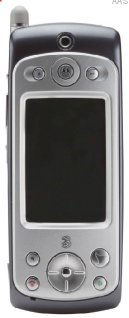
Details of a new Symbian phone from Motorola are emerging thanks to this filing to the FCC. The phone which appears to be UIQ based is a 3G phone and looks like its be branded with Hutchison's 3G service 3 (just starting up in the UK). The phone supports UMTS 3G, but is also supports tri-band GSM meaning it can be used anywhere in the world.
User posted image User posted image

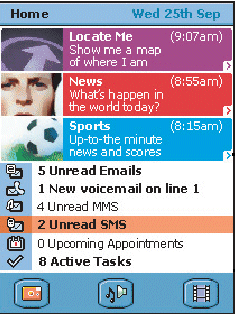
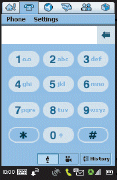
The screen size is 208x320 pixels (which suggests this is a UIQ phone). The screenshot below also show a UIQ interface (notice the familiar elemts from the P800 such as application selection bar and status bar). In other words this is definetely a UIQ phone - which has interesting strategic implications.
User posted image User posted image User posted image

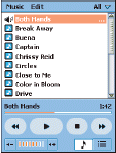
The screnshots above also show a Today view like screen built into the phone. The information slots at the top of the third screenshot suggest that Magpie technology may be being included in this phone. Screenshots also suggest there will be more applications and some improvements (for example the Mp3/ Audio player above shows a fast forward function that the P800 currently does not have).
User posted image

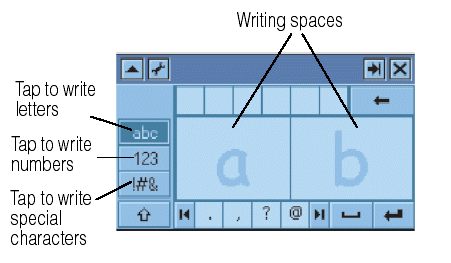
Input may also be different, the above graphic from the manual suggest a different hand writing recognition system is being used. Certainly UIQ and the Symbian OS supports an open interface for handwriting recognition (effectively allowing different input types to be plugged in). UIQ devices can have user slectable handwriting recognition options.

Applications included are Agenda, Messaging, Calculator, Phone, Connect to PC, Time, Contacts, To Do, Control Panel, Voice, Jotter, Web, Music Player, Picture Viewer, Video Player, Camera, Home Screen, and VirusScan.
User posted image

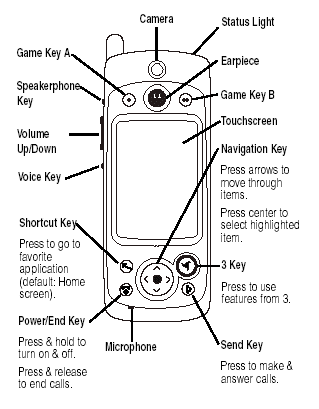
The above diagram from the manual illustrates some of the features on the phone. Of note are the Three key which enables access to special three functions (presumably video on demand etc.). Also there are several game keys suggesting that gaming is seen as an important part of this phone.

Expansion is via a memory card, but it is not clear what type. Its looks like MMD or SD. There is no meniton of bluetooth but clearly such a phone is likely to include this.

The camera is in the front of the phone and enables the two way video phone calls for which 3G / 3 are noted. In this respect this is the first Symbian phone to support video phone calls.

More details as they become available.
oh... YES!!

this could be a UIQ phone I would buy!

a true 3G phone with symbian OS!

can't wait for it to be released!!!!! 8)

Am I the only one who thinks this phone is really ugly !!. Don't get me wrong, I'm pleased to see a Motorola Symbian phone finally but they never seem to be able to keep up with Nokia, SonyEricsson or even Siemens. Any thoughts ?

Correct me if I'm wrong, but one feature that amazingly doesn't appear to be present is Bluetooth; the phone may feature 3G, GPRS, GPS, etc., but Motorola seems to still expect users of an expensive phone in the 21st century to hook it up to a computer using a cable!!! :roll: And if anyone happens to use anything other than a PC (eg. a Mac), this method will presumably be unsupported as it is for some of Motorola's other phones.

Oh dear.

I'm wondering how u gonna take picture with the camera infrot of the screen??? does it has a screen behind too???

When will they ever bring us a GUI that looks good? :s
Look at the ugly graphics :s
Same as p800/7650/9210.
Innovate people! 😃

[quote="Ricardo"] Sorry, but compared to P800 is bigger and uglier. I mean UGLY. This kind of phone, expensive, as to be well designed.I prefer to wait for the P800 with 3G [/quote]

iv got this review yesterday, now id like to share it with all my friends.
Managing an iPod is easy, assuming you only use one computer. Apple built iTunes to not include features that would let you copy music from your iPod to another computer. They did this to ease music industry concerns about copyright infringement and unauthorized sharing of music via the iPod. But, if you buy a new computer, the easiest and fastest way to transfer your iTunes library to the new machine is to copy your iPod library. Also, you might want a backup of your iPod library in case your computer's hard drive is damaged.
After plug in the iPod, wait for iTunes to open, and transfer songs to and from the iPod at your leisure. Simple, what if you have a few computers you listen to music on? What if you have a computer, not only at home, but one at work, and perhaps you also listen to music when visiting relatives, what then?
For me, when I visit my new computer, iTunes has this built-in desire to take over whichever iPod is plugged in, and happily offers to delete every song on my iPod and sync its blank music library. That is definitely not what I want to do.
So why even get third-party software when you get a full version of iTunes for free with the iPod? After trying iPod to PC Transfer, I would ask why wouldn't you use it over iTunes.
iPod to PC Transfer is a one-trick pony as far as software goes. The goal this program has is to allow you to transfer music from your iPod to a computer, backup, restore your iPod to computer, edit and create playlist on iPod. This program can read the iTunes library of any computer you've attached your iPod, it can copy songs to the iTunes library, or simply to the computer's hard drive.
iPod to PC Transfer was able to take the music, podcast from my iPod and copy it to my selected destination on my computer. It worked flawlessly. I just highlighted the songs I wanted to transfer, clicked the "Add to disc" button, and watched it immediately go to work.
At the moment, for what it is attempting to do, iPod to PC Transfer is nearly perfect. If you own an iPod I strongly suggest you try out this program. It will add several useful features to your iPod and streamline transfers. The list of features is excellent and the implementation of these features is almost perfect. The iPod Rip also can trans and copy movie to iPhone, there's really no reason not to use it.
Recommended without reservation.
User posted image