These skins were originally made by Mr. Milk, now modified again by me, Chris Katopodis.
I took them and modified them further to have full English and Greek characters available at the same time while the user is typing (also 0-9
and some basic symbols.. @#$% etc..)

(big hint bubble version)
All edit and predictive text modes and menus work just the same as Mr. Milk had them in his Opera Mini international skin
To Install:
1.) First install the app modified by Mr. Milk called: DayHand Input Keyboard (version 17r4 NOT 19r4). The app needs be signed to install.** (see
bottom)
you can find that here:
http://forum.dailymobile.se/index.php/topic,13370.0.html
2.) Transfer the two folders in this zip file called: "TouchSkin" and "TouchSkinW" to the SD card, then insert the SD card into the phone and use the
phone's file managaer/menu to transfer contents of the 2 folders ("TouchSkin" and "TouchSkinW"😉 onto your nokia 5800's phone memory in a folder
called: "dayhandinput" (in same folder as Images/Sounds) (not the SD card memory, unless you installed the app to the SD card I suppose, not sure
in that case). Transfer the keyboard folders you want to keep "as is" because they contain hidden images in the folder that the system uses. Then
restart the app, choose the dual English Greek keyboard.
~if i had not hidden the keyboard skin images (in the folders), they would show up in our 5800's built-in photo gallery viewer app 😞
Types of keyboards Included:
Any/all of these (folders) would go in the "TouchSkinW" folder on your 5800's "dayhandinput" folder:
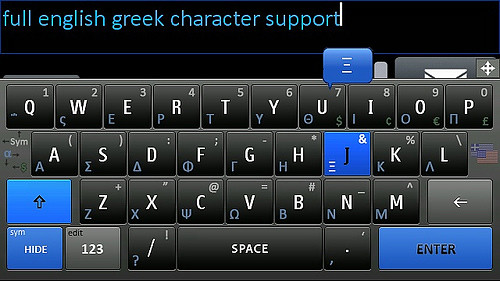
OperaHuge_Eng-Grk = Opera Huge keyboard skin with full english and greek characters and 0-9, basic symbols @#$% etc.. 4 money symbols
($ � € �)
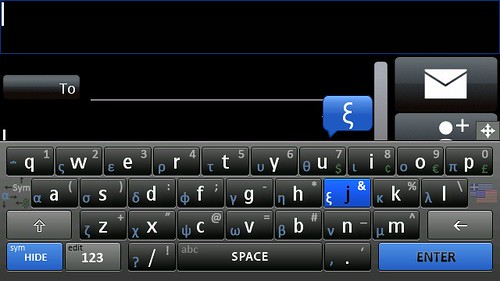
OperaMini_Eng-Grk = Opera Mini keyboard skin with full english and greek characters and 0-9, basic symbols @#$% etc.. 4 money symbols ($
� € �)


OperaHuge_Eng-Grk+Math* = Opera Huge keyboard skin with full english and greek characters and 0-9, basic symbols @#$% etc.., 4 money
symbols ($ � € �), and some trig/calculus/algebra function characters.
OperaMini_Eng-Grk+Math* = Opera Huge keyboard skin with full english and greek characters and 0-9, basic symbols @#$% etc.., 4 money
symbols ($ � € �), and some trig/calculus/algebra function characters (including, ≤ > ≈ � � � √ ∫ ∞ �)
OperaHuge_Eng-Grk+BigHints+Math** = Opera Huge keyboard skin with full english and greek characters and larger preview/hint "bubbles"
above each key you press also money symbols, 0-9, basic symbols @#$% etc..
shown at the top of this post..
OperaMini_Eng-Grk+BigHints+Math** = Opera Mini keyboard skin with full english and greek characters and larger preview/hint "bubbles" above
each key you press also money symbols, 0-9, basic symbols @#$% etc..
2) Either/both of these (folders) would go in the "TouchSkinW" folder on your 5800's "dayhandinput" folder:
OperaMini_Eng-Grk_Vert = Opera Mini keyboard skin with full english and greek characters, also 0-9, basic symbols @#$% etc.. (Good for
when driving 😊)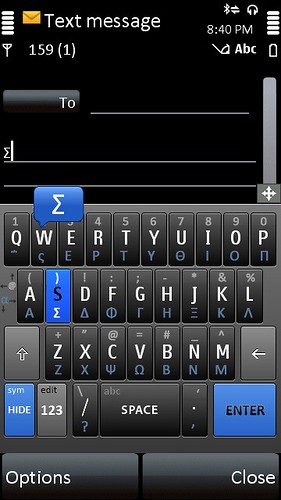

OperaMini_Eng-Grk+BigHints_Vert = Opera Mini keyboard skin with full english and greek characters with larger preview/hint bubbles; also 0-9,
basic symbols @#$% etc.
.OperaMini_Eng-Grk+HugeHint_Vert = Opera Mini keyboard skin with full english and greek characters and a huge preview/hint square above
each key you press, shift letters show ; also 0-9, basic symbols @#$% etc.. (Good for when driving 😊)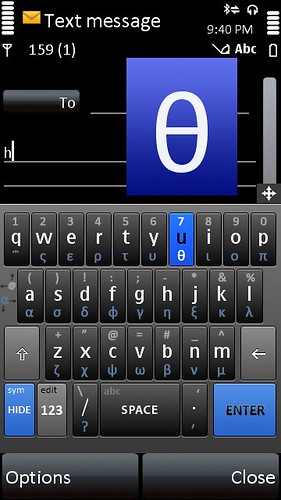
more info:
I included 4 additional versions of the keyboards with add-on math functions/characters if desired; you can delete these 2* keyboards that have
"+Math" in the folder name before transferring to your 5800, but the last 2** have math and big hint “bubbles “ that are only available with math.
(The math characters wouldn't hurt just to have/leave on your keyboard of choice.)
More screenshots of the keyboards on my 5800 are in my photo album at: http://www.flickr.com/photos/katopod86/
To Use:
To make a 4 on the keyboards, press down on key R then drag your finger up as you release it, instead of just tapping the key like usual (that action
would type a R, of course) directions are on each keyboard.
Settings:
I highly recommend enabling the text-input preview window thing so you can see what your typing. You can get picture step-by-step instructions by
downloading the zip file pack with the keyboards below
This keyboard "takes over" the built-in keyboard for the 5800, when installed properly. It even works in the 5800’s built-in browser. The only
time I've ever seen the regular keyboard entry come up after I installed dayhand input was when I was renaming a file or folder.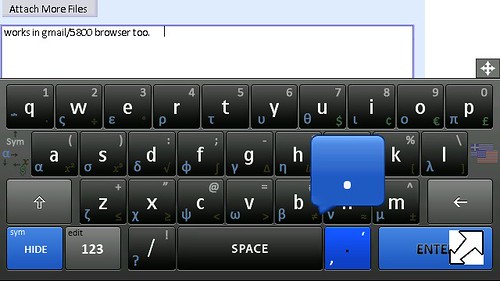
___________________________________________________________________________
**SIGNING THE DAYHAND APPLICATION (so you can install it):
To sign all apps for your phone (like I've just learned how to do this) watch these 2 videos on youtube, they will show you how to hack either your
nokia 5800 or just sign each application individually you want to install (my choice). It’s not as hard as you’d think, really I did it in a little over an hour on
my computer - only drawback was I had to wait a 4 hours for my certificate and key file to be ready.
Instruction video part 1:
http://www.youtube.com/watch?v=coD7XAyv1nQ
Instruction video part 2:
http://www.youtube.com/watch?v=reuWQbDJY_0
and I have included all the necessary files to hack for 5800, that were referred to in the videos in the 2nd link below.
DOWNLOAD:
1ST LINK: All English-Greek keyboard sets for Nokia 5800 / N97:
http://rapidshare.com/files/312589786/DayHand_Input_English-Greek_input_keyboards_S60v5_Rev.2.zip
http://www.megaupload.com/?d=DYLKHFNR
OR- File attached in this post
2ND LINK: complete set of files to hack your nokia 5800XM OR if you want to play it safe, you can just use this to custom sign any .sis/.sisx
application you want to install (will only work for your IMEI, e.i. the IMEI number you follow the directions for)
http://rapidshare.com/files/312326136/Files_to_Easily_Hack_your_Nokia_5800XM.zip
http://www.megaupload.com/?d=GJ6SWXMO
__________________________________________
Also I want to thank Mr. Milk for making the original .ini files and png images and putting this app out there for us.
Oh,, and I really want to know if there is a Greek predictive text file that I can put into the C:/Data/dayhandinput/lib/ folder so I can have Greek
predictive text? The English default one in there now is named: en1 / en2
Anybody know where or how I can make or get this file? (it probably would be named: el1/el2 if it existed)