I wanted to paste an url into an input on a webpage. How can I do this? Pressing and holding shift key does not bring up copy and paste buttons as is the case in, for example, email.
I wanted to paste something into comment input in facebook client - same story - no obvious way of pasting text.
Is there some other method?
How can I highlight and copy text in web browser?
Symbian supports systemwide copy & paste, doesn't it?
where can i find copy & paste?
I did a little search in the N97 sub-forum :
http://www.allaboutsymbian.com/forum//forum/thread/88504/&highlight=Copy+paste
When you want to copy text from a webpage , you can use Mobitol . Enter the webpage's URL in Mobitol . Now you can copy the desired text and copy it to the "Notes" application :
http://cousinisaac.com/mobitol/
😊 Regards jApi NL
How do you copy & paste from browser or txt message then use that in opera mini oe skyfire?
Sorry , I cannot give a detailed description for the N97 . So this is my workaround on the E90 . No touch , but Ctrl key . Most of the time I can use Ctrl + C / V .
Copying an URL in " Web " , first Bookmark the page . Then go to the Bookmark > Options > Edit > Copy URL .
Copying from a Message : Options > Automatic Search On . Highlight the URL (using D-Pad) > Options > Copy .
Pasting an URL in Web : press any button > clear searchbar > Paste .
Paste an URL in Opera Mini 5 : first go to Settings > Inline Editing Off .
Second : Click the www. Bar > Options > Paste and correct the 2 times www. !
You can also Paste the URL in O Mini's Google Search . This is what I do using O Mini 4.2 .
Skyfire accepts Ctrl V without caveats . So does Opera Mobile 10 .
N97 a bit different , but should be possible also .
😊 Regards jApi NL
Thanks for your advice guys.
This is worse than I thought then.
So it turns out that vanilla symbian supports copy & paste only in few areas. Bad. And even more so that c&p is supposedly standard symbian feature.
Your suggestions, while possibly working, are not viable solutions for me. They require too much work to complete a task as simple as pressing ctrl-c, ctrl-v on a desktop.
And they are not universal - guess they won't work in all apps - like facebook.
Sad to learn that only after I bought my mini.
Thanks anyway😊
Is it possable to copy n paste from facebook (using native browser) to a new txt message?
ah, as far as i know, everything can be copied and pasted with the hw keyboard
to highlight, click as normal and select text. next, press and hold the FN key until you see the COPY word on the top right. to paste, do the same, press and hold FN key and click on the PASTE button.
You say click normal and select text. What do you mean by that? And whats the FN key?
FN = function = blue arrow key.
yup, the blue arrow
highlight what you need to copy, and then press and hold the blue arrow key, there'll be an option for COPY and PASTE after that
How do you highlight on facebook? Thats what i dont get
sorry guys, my bad. it's the SHIFT key not the FN key..............................
as for highlighting in facebook (presumably the widget), i don't think you can do that unless in a text box
On Symbian you can only copy and paste editable text. You can just copy and paste anything like on the iPhone, which is why the iPhones implementation of copy and paste, although delayed, is infinitely superior!
jerm wrote:sorry guys, my bad. it's the SHIFT key not the FN key..............................
Ah I see now. Didn't know that was possible.
Anyone know why Opera Mini doesn't copy to the system clipboard? It seems to only have an internal clipboard, since when I copy text, I cannot paste it outside Opera Mini.
Opera mini doesn't allow you copy and paste between the system clipboard.
However Opera Mobile does. Works great! Just select the text and either use the keyboard to copy or use the onscreen menu. Then go to another application (such as notes for example) and paste.
Go to settings in Opera Mini 5 and disable inline editing .
Now the system editing will be used .
For copying almost any text from a webpage : use Mobitol .
See my post above .
😊 Regards jApi NL
jApi NL wrote:Go to settings in Opera Mini 5 and disable inline editing .
Now the system editing will be used .
For copying almost any text from a webpage : use Mobitol .
See my post above .😊 Regards jApi NL
that site you posted dusnt acheive anything and inline editing dusnt appear in the final version of opera mini 5 that i have which is the one official one i got from opera site yet it appeared in both betas...
Is there no way to do it on the native browser?
Opera Mobile doesn't work on my N97... uses too much RAM.
jamessmith01 wrote:Opera Mobile doesn't work on my N97... uses too much RAM.
mobile wont work now anyway due to it being out of beta and is no longer free...
jamessmith01 wrote:Opera Mobile doesn't work on my N97... uses too much RAM.
You're right jamessmith01.
Opera Mobile (v10) uses about twice as much RAM as Opera Mini (v5). See here:-
http://www.allaboutsymbian.com/forum//forum/thread/93743/
bang bang boom wrote:mobile wont work now anyway due to it being out of beta and is no longer free...
On the contrary bang bang boom...
Opera Mobile (v10) and Opera Mini (v5) are both still free and working and available for download here:-
BBB , sorry you are right . This dis-abling of inline editing was only found in Opera Mini 5 beta 1 sadly .
I use mainly OM 4.2 , that's why I forgot . System clipboard works in "Web" and also Opera Mobile 10 .
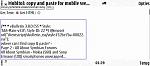
In Web this is the paste of the Mobitol screenshot :
Is there no way to do it on the native
browser?
😊 Regards jApi NL
Attachments:



opera mobile does use more ram than web or mini but still works great on than n97 providing you dont attempt to do multitab browsing. Infact i'm posting this reply from opera mobile now!
ironass wrote:You're right jamessmith01.Opera Mobile (v10) uses about twice as much RAM as Opera Mini (v5). See here:-
http://www.allaboutsymbian.com/forum//forum/thread/93743/
On the contrary bang bang boom...
Opera Mobile (v10) and Opera Mini (v5) are both still free and working and available for download here:-
the opera mobile i had wouldnt work after a while so i assumed it wasnt free anymore.
I redownloaded it and it works fine now... Fuck knows what happened to the other one tho