I though Nokia would implement Symbian^3 features in the V30 firmware just like the S^2 features we got (you known them..) I believe they will not release V30 till the N8 with Symbian^3 is released, which sounds logic. I believe nokia will release the V30 (with Symbian^3 features) when the N8 is released.
I've been reading some posts by members which have observed some weird bugs/glitches which could point to some symbian^3 code already being present in the released firmwares V22 & V12 (mini)
Posted by zxon
Just a quick update on the mysterious dot. I've just seen it again! I was just playing Mario Galaxy 2 when I heard a beep and saw a white light in the corner of my eye... I turned and saw that my phone had (for some reason) restarted itself. I let it boot up and a couple of minutes later I picked it up and saw a "System failure" message faintly visible on the screen. I say faintly, because the screen had locked in this time. That's when I saw the dot, right in the middle at the bottom, where the same dots are on the N8's S^3 OS.Sadly, when I unlocked the phone to try to get a screen capture of it, the bottom bar changed from three boxes (with the dot in the middle one) to just two and the dot disappeared. If I see this again, I'm going to get a camera and take a photo so I can prove it.
I'm currently switching my phone off/on to see if I can get it back...
[EDIT] Nope it hasn't come back I'm afraid. I never thought I'd be disappointed not to see the system failure message haha!
Have any other people found some bugs/glitches related to V30 (S^3)?
This is not a conspiracy thread btw 🙄
Thanks for quoting me 😊
The dot bug I've been referring to is on the N97 Classic's v21 firmware. I'm still trying to get it to reappear so I can take a photo of it.
zxon wrote:Thanks for quoting me 😊The dot bug I've been referring to is on the N97 Classic's v21 firmware. I'm still trying to get it to reappear so I can take a photo of it.
I saw that dot too for a split second while I was setting up my phone after reformating it. But have not seen it after that. I am on V22.0.110
ajeet wrote:I saw that dot too for a split second while I was setting up my phone after reformating it. But have not seen it after that. I am on V22.0.110
Thank god I'm not the only person seeing spots before my eyes 😃
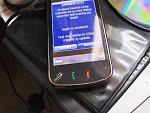
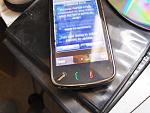
Finally! I have a photo of the dot for you all to see. Not that anyone said on here that I was lying anyway, but I felt compelled to show you all because it's not what we would normally find on an N97. This suggests that the code to allow multiple homescreens like on the N8 IS present in the N97's firmware (See this post for details).
This one appeared when the phone was taken off charge. I was in the living room watching James May's Toy Stories when I heard my phone alert me that I had a text message. It was in the other room charging via USB on my PC. I pop through to pick up the phone and take out the USB cable. As I turned to walk out of the room, looking at the text message (it shows straight away because I have Free ISMS installed) I noticed the dot on the bottom. The screen was lit because I'd just unplugged it but I knew it wouldn't last for long, so I unlocked the phone and the dot disappeared 😡 I went back to the computer and repeated these steps and the dot appeared once again, but only for a split second. This, I thought, was a good time to try to get a picture... and a good one at that!
Below are the results. The first is the screen without the dot (I was too slow with the camera), and the second includes the dot. Just so you know, I've pixellated the text message I received. Don't want any of you prying into my personal life 😉
Attachments:
Cool... it certainly would be weird of them to introduce random bits of code if they don't plan to activate them at a later stage.
jamessmith01 wrote:Cool... it certainly would be weird of them to introduce random bits of code if they don't plan to activate them at a later stage.
I'm surprised more people aren't intrigued by this. It could mean Nokia might add multiple home screens in a later firmware update for the N97, something that most of us have been wanting for a long time.
zxon wrote:I'm surprised more people aren't intrigued by this. It could mean Nokia might add multiple home screens in a later firmware update for the N97, something that most of us have been wanting for a long time.
Sorry zxon!
I was more interested in un-pixelating that text message from your other half that appears in your photo.
So... what's with the wet celery, flying helmet, goggles and the egg whisk? :hmmmm:
ironass wrote:So... what's with the wet celery, flying helmet, goggles and the egg whisk? :hmmmm:
Never you mind :wink:
I'm seeing the dot more frequently now. Whenever I plug my N97 in at work to charge (via USB), it comes up with the usual "Charging" message and the menu to select USB mode. I tap OK for PC Suite, and the dot appears on the bottom for a split second before changing back to a dialler button.
Very odd :con?
zxon wrote:I'm surprised more people aren't intrigued by this. It could mean Nokia might add multiple home screens in a later firmware update for the N97, something that most of us have been wanting for a long time.
In one word.. spoiled by SPB shell..😃
ok.. on topic now.. (and resisting myself from seeing ur msg..:redface😊 Nokia should have do this well before... Adding multiple homescreen shouldn't be that hard...(and SPB shell already proved that)..
I really want multiple homescreen to show up my widgets.. (this is the only feature that differentiate N97, N97 mini from 5800) and when I spend $200 more then I wish I should have more to show than just a higher MP camera and metal back cover...
zxon wrote:Never you mind :wink:I'm seeing the dot more frequently now. Whenever I plug my N97 in at work to charge (via USB), it comes up with the usual "Charging" message and the menu to select USB mode. I tap OK for PC Suite, and the dot appears on the bottom for a split second before changing back to a dialler button.
Very odd :con?
OK... you've got me doing it now!
I closed SPB Shell and replicated exactly what you have mentioned and... voila!... the dot appears, only for a split second.
By the way, I was sober when I did it.
Please don't say that I too am going to become fixated with the "DOT". :afraid:
ironass wrote:I closed SPB Shell and replicated exactly what you have mentioned and... voila!... the dot appears, only for a split second....
Please don't say that I too am going to become fixated with the "DOT". :afraid:
We're all seeing spots before our eyes... well, one each anyway. Which firmware you on
ironass? I'm still on v21 and it happens with me.
I have a strong feeling that, now Symbian^3 is pretty much finished, Nokia might be able to make S60v5 work properly with the coming of v30 on N97. Obviously we won't get a "S60v5 version of S^3" but it would work, just like we had with S60v3 on the N95.
Just imagine it... No white screens of death. Ample free RAM. One press operations. Multiple home screens (just one more would be a bonus, and certainly possible with RAM optimisations).
Might the dots multiply in v30? Who knows... I certainly hope so 🙄
zxon wrote: Which firmware you on ironass?
Go on zxon... take a wild guess from my signature. :dontknow:
ironass wrote:Go on zxon... take a wild guess from my signature. :dontknow:
It had only occurred to me to ask what firmware you were on when I was replying, so I asked.
Ya can't see signatures when you're posting (non-quick) replies 😉
I'll let you off zxon, 😃
I tried to take a screen shot of "THE DOT" but it is literally only a brief flash for me.
This is all very interesting, I think we might be on to something!

Today I had the One Dot as button on my homescreen. When I unlocked my phone it flickerd and there it was, the dialer butten changed to a dot! I have a n97 mini running the latest firmware V12.
Have seen it a few times now - usually after going to the HS after menu for the first time after boot. I think it is S^2 or S^3 module in some ways as the swipe to hide widgets was actually added in v22 firmware (but tinkering in Z: allowed you to set a value to true false (cant remember which way)) and that allowed the slide to hide. Intriguiging but the fact they still have not given C: then 60mb of free space from Z: shows they really are having problems with it software wise - 256MB rom with 73MB C: and about 135MB Z: leaves us 63MB free - where the hell is it?
Mnia786 wrote:... the swipe to hide widgets was actually added in v22 firmware (but tinkering in Z: allowed you to set a value to true false (cant remember which way
I'm sure swiping to hide widgets was in the firmware since day one (v10).

