I sustained a big loss of all my data ( >300 contacts and calendar entries mostly) when they upgraded my firmware at a NCS without making a backup, while I have not been able to make a backup for months either due to this stupid problem. Now my only chance is to restore an old backup and minimize the loss, but this still looks impossible.
As you can see in the picture, although mRouter connects to the phone either via IR or via BT, PC Suite does not recognize the phone! I have tried removing and reinstalling the latest PC Suite, its previous version, versions 1.3.7.2 and 1.4.1.6 of WIDCOMM bluetooth drivers. To no avail. I searched the net, but the best thing I could find was this. Since a firewall can cause this problem, I even disabled the native XP firewall, but again without result.
I really don't know what else to do, besides an HD Format and XP installation, which is out of the question (for now at least), let alone the nightmare of reinstalling all the software and settings. :cry:
I would really appreciate any ideas you may have!
Just try on WildComm...
Right Clic.... Quick connect.... Bluetooth serial port... and your device (or search for it), afterward you mRouter should start to work... It did for me!!
Thanks zoon, but I've also done this, since mrouter is connected as you can see in the image above. Of course in this image you can see it connected via IR, but it's exactly the same with BT !
It's just that PC Suite cannot see this! 😞
[quote="petran"]Thanks zoon, but I've also done this, since mrouter is connected as you can see in the image above. Of course in this image you can see it connected via IR, but it's exactly the same with BT !
It's just that PC Suite cannot see this! 😞[/quote]
It's because the new firmware make PC Suite think it's a 'new' phone.
What I did was just set up the new phone in PC Suite (make sure to choose a different name than the old phone) and do a full backup of the new configuration.
Then in C:\Nokia copy the old phone configuration over the new one.
Then do a restore of the new configuration and your phone should have all its old settings.
-Ciaran
But how can I set up the phone in PC Suite?????
As shown in the image above I have only 2 options: OK and CLOSE. Pressing OK does nothing, pressing CLOSE exits PC Suite!!!!!
LOL same problem with my nokia hohoho.
Had the same Problem here.... but with a nother computer it did function. Do not know why! Maybe it is the lastest service pack from ms that is guilty..
Originally posted by Riffer
Had the same Problem here.... but with a nother computer it did function. Do not know why! Maybe it is the lastest service pack from ms that is guilty..
I doubt that. Both my office and home PCs have all the latest SPs from windows update, and although it works fine at work, at home I have the above problem.
I keep hearing more and more people having this problem! Will there ever be a solution?!
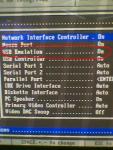
When the PC starts, hit F2 I think for setup, and set the USB Emulation option to ON. Hopefully this should solve your problem.
Cheers,
CJ
Originally posted by cj99
When the PC starts, hit F2 I think for setup, and set the USB Emulation option to ON. Hopefully this should solve your problem.Cheers,
CJ
Thanks for replying..
If you were referring to me, there is no such option when I press DEL (not F2, different bios!). But even if there were, I surely did not change it before it stopped functioning! 😞
Here's a screen as to what I'm talking about. I'm using win2k pro so I'm not sure, if it is different when using XP. What I know is that I was facing the same problem that you explained and when I changed this setting, everything worked like a charm.
btw, the pic was taken by my phone 😃
Cheers,
CJ
Attachments:
Remove all apps.......clean registry.......install BT software first....and then PC Suite.....
Originally posted by MaleBuffy
Remove all apps.......clean registry.......install BT software first....and then PC Suite.....
I'm afraid I've done all that already, more than once! 😞 Including running Nokia's registry cleaner AND removing all registry references manually. I really hoped the cause would be known by now, if not the solution..
..have the same problem since i reinstalled the pc suite.
It worked well before, but then i had the bad idea to reinstall it (reason was to have a german version) and now although there is a mrouter connect, the pc suite does not recognize the phone.
Tried to send a mail to nokia hotline, but they cannot help me and never heard of such a problem ???!
Hello There!
I had the same problems with my Acer BT and Nokia 7650 unter XP.
I never had problems sending pictures, programs or Sound from one sied to the other.
I finally solved it!
I cleaned the registry with the reg-cleaner from nokia and uninstalled the BT-software (v 1.3).
Then I installed everything again (with the Nokia Connection Manager).
When I connected the PC and the phone (mRouter showed me) I had to choose "serial connection" and not "Bluetooth" under Connection Manager with the connected Port mRouter showed me. Then I was able to Start the PC-Suite.
I hope I can help someone with this little hints.
See ya
DerFux
I had this problem where Mrouter was connecting on work computer but there was no actual pairing through serial connection (pc suite) what I found was when double clicking on the mrouter logo adn it brings up all the com ports untick all of them and the tick one back on and try to connect through all of them individually but after ticking each one go into the bluetooth icon and double click serial connection (will probably come up with connection not available) then wait to see if it connects then try next com port as for some reason I could connect through two com ports but only one worked with Pc suite..
On another note my home computer does not like any install of PcSuite and is coming up with an error saying that it cant create empty document or something - any ideas?
P
