im just in the middle of conveting a film into .rm
ill let ya know if its any good in a bit maybe post it on the forum if im allowed.
SAbz
---------------------------------------------------------------------------------
....Edit....
Step by step guide to converting films for the N-Gage. Click HERE to download!
Due to copyright issuess,links to full movies can't be posted.Short clips are OK.
ok np. ill leave a "how i did it" instead.
SAbz
i finally got a full film on me fone!
using the following settings i converted 45 mins of films into a 25mb clip. So ive got one half of the film on the floboard memory card the other half on my 32mb card.
using helix producer plus vr9 i used the following settings (these are stolen from another thread):
Audio Mode: Music
Video Mode: Normal Motion Video
Real 8 Codec (or the phone will not read it)
Size: 176x144
2-pass normally off (for speed)
Maintain ratio/High quality resize/High Quality audio resampling
Then I created a new audience template called 3650 with these settings:
For A/V encoding:
Constant bit rate: 80Kbps
Frames: 20 fps (This equates to roughly every other frame of video)
Voice codec: 16Kbps voice (G2, RA8)
Music: 16Kbps
For audio only encoding:
didnt change it
depending on how loud the film is i increased the audio gain in settings.
i then selected the movie file directly off one of my vcd's (F: --> MPEGAV --> AVSEQ01)
pressed encode and 20 mins later, voila!
The video and audio quality is fantastic!
Hopefully this will come in use for someone else!
SAbz
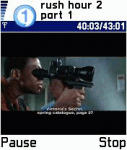
here are some screen shots:
Attachments:
Nice!
OFF topic:What's is the capacity of the MMC card that comes with the N-Gage?16 or 32 MB?
32mb but its got the flo board game on it, but u can take it off.
suppose this is off topic really but where do you get yer simpsons episodes from ? infact can you even tell me on ere hmmmmm
Originally posted by DaiMonde
suppose this is off topic really but where do you get yer simpsons episodes from ? infact can you even tell me on ere hmmmmm
Again, copyrighted material, no links please, I have a feeling a P2P program will shed some light on the matter though.
most of my simpsons eps and films are ripped from my dvds and vcds.
SAbz
sorry j2theIZZO, thought i was on dodgy ground !
not that i know what a p2p is...honest.
p2p apps: Napster,Kazaa,eMule,eDonkey,Morpheus,WinMX.
A few people said they had a few problems getting the settings to work. So ive made a step by step guide, during my boring english lesson.
hopefully this will help.
SAbz
http://homepage.ntlworld.com/tasci.com
I have loads of simpsons episodes on dvd so how would I go about changing the vob's into rm.
Heya Kross, Use something like FlaskMPEG to encode the vob files into avi. then follow the intructions above to convert it to .rm .
Slightly off topic but have i seen your name on the ngage arena forum?
SAbz
Can I use that or do I need the Plus version. Basic is Free and Plus is $200 😡
Unfortunately only half the settings work in the basic version, so yea you do need the plus version.
SAbz
yea ... true.. i d/l basic & it doesn't allow to encode to Real8 code... 😞
There are other programs and settings you can use to convert them into other file types, that are of similar quality, and most of the programs used are freeware or trialware.
Ill write another step by step for them and post them later.
SAbz
is thre any way you can watch movies fullscreen?
Try PvPlayer from www.pv.com
Cheers for the help i will give it a go
I don't have a N-Gage yet, but I already got the program and converted videos with it.
If I convert a widescreen movie to Real Media-format, does N-Gage automatically add the black boxes to top and bottom of the video? (Width is 176 px and height is something)
Or do I have to make everything exactly 176x144 px? (The video would be stretched)
Just keep everything as 176x144 . This will unfortuantely mean ur film will have black boxes, top and bottom. The only way to get rid of them is by using TMPEGenc or something similar, and resize the film as normal screen rather than widescreen.
My film in the screenshot was in widescreen.
SAbz
hi guys, to make life super easy for everybody i already posted detailed instructions on how to encode video for your ngage without having to worry about resolution settings, fps, etc a day or 2 ago....best of all, i listed 2 free apps which pretty much do all the guess work for you. i even posted a short film i encoded for everybody to watch and enjoy.
-peace 😉
From playing around with helix and a few QT trailers I reckon the best combination of fps and bit rate seems to be :
fps 1/2 whatever it was originally encoded with (so it will be either 12 or 15 fps)
100 kps..
With these settings it does not seem to skip frames or get delayed.. and the file sizes are not much different to those generated with 20fps and 80 kps.
Matt
Yea, ive been on the n-gage arena boards.
very cool, i will be trying this soon... movies on my gage...awesome.


