how i can change operator logo on my 6600?which apps is request? please help me!
operator logo
Hi,
Install using SeleQ or OPman software or simply copy it to c:\System\Apps\phone\oplogo\ directory in your nokia 6600 and reboot.
Rgds
Marirs
No such derectory in 6600...cheked SeleQ!!!
If the directory doesn't exist, you can create it.
However, not any file name is acceptable; the file needs to be named using the mobile country & mobile network (operator) codes (MCC & MNC).
You can use FExplorer (http://www.gosymbian.com) to see what the codes are (Options -> Network -> Info).
But FExplorer can also do all the dirty work if you select an image you want as an operator logo, and do Options -> File -> Set as operator logo.
Is there such thing as blank operator logo for nokia 6600? Series 40 phones can download blank operator logos so they won't cover the wallpaper. If there is such thing, could you please tell me where to get it? Thanks!
Yes, a blank logo would block the network operator name and enhance the overall appearance of the theme. Does anyone know if there is one for the 6600?
Hi,
For blank operator logo, just make a 1 pixel picture using paint or similar, in the colour of the top screen area (depending on theme of course) then send it to your phone and set this image as operator logo.
Will this just block out the operator name or will it appear as a white blank space?
You will have just 1 pixel as the operator logo,so if you choose the right colour it will seem blank!
Thanks, elton! I'll try it out later.
Hi All,
Does anyone know how-to, or has even made a transparent oplogo?
Just an idea.
Ian
All,
The closest I can get to a blank operator logo was to install FExplorer and then simply delete the files in the phone\oplogo directory.
Sounds dangerous, but when re-booted the phone simply displays the Operator text with a transparent background, in my case 'o2 - uk' which does not take up too much space, better than a white bar imho.
Hope this helps...
Jamin
They all dispaly op logo with transparent background??????????
If you do as i said above it leaves it completely CLEAR!
Which is what i thought we were talking about???😕
It pays to listen to Elton. He he he... 😛
Maybe a stupid question ... but is there a way to "re-install" the original Operator Logo ?
Originally posted by elton
They all dispaly op logo with transparent background??????????
If you do as i said above it leaves it completely CLEAR!
Which is what i thought we were talking about???😕
Hi,
Oh yeah, I've read the above and understand it with the one pixel thing, It's been around since the release of the 7650's.
But what colour then is transparent on an op logo?
What I want is say my name, 'Coolice' as my op logo. But I don't want it centred on a white background like I always get if I make one.
Yeah I can make individual op logo's that go with a specific theme, matching in with the colours.
But I just want the writing, with a transparent border so that the theme can change and not leave me with a white block.
Ian
I agree there ... I would be nice to have a transparant logo with just your text that adapts automatically to the theme.
I've tried the Photoshop solution but it still displays the white background ...
To re-install the op logo: Delete the current op logo from the C: drive of your phone (using SeleQ or FExplorer) then restart your phone. This should do the trick. 😉
That wasnt the question cfcmd,
Are you really the Managing Director of Chelsea Football Club??????
Hey All,
This is a good one I think, no ones got an answer as yet to this. Unless it's the apps we use to change to oplogo thats giving the problem?
There must be a way to make a logo with a transparent background, so only the writing is visible like the standard 02-UK one for instance.
Any ideas maybe?
Ian
Sorry, Elton. I was actually answering rufus4ever's question earlier. 😛
Originally posted by coolice
Hey All,This is a good one I think, no ones got an answer as yet to this. Unless it's the apps we use to change to oplogo thats giving the problem?
There must be a way to make a logo with a transparent background, so only the writing is visible like the standard 02-UK one for instance.
Any ideas maybe?
Ian
Thats exactly my point that I made earlier.
The only way to get a 'generic' transparent logo is to have no op logo.....
Originally posted by CorradoVR6
Thats exactly my point that I made earlier.The only way to get a 'generic' transparent logo is to have no op logo.....
Hi,
I agree with you to a degree mate, but then it's no fun having our provider logo and not a customised one.
We all want a nice oplogo, we pay the providers enough without advertising for them as well.
I will say it again, no one can solve this dilema yet.
Be it a fault of our own doing, or a limitation of the application's we are using to specify the oplogo, but so far it cannot be done.
The question is why? How come the opertaor one can be and ours cannot?
I can have my standard 02 one back so any theme isn't blocked by a 97 x 25 box of a different colour to the theme, but thats no fun.
Ian
Guys, I think the best question is: how do we remove the network logo, whether temporarily or permanently? This means totally remove the network logo and not just cover it up with a 1x1 pixel picture.
Does anyone have an answer for this?
Maybe if you find the file where the OPERATORS are DESCRIBED you can change your operator's name to " " so that NOTHING would appear 😃
I have 3 op logo files in Z:/System/Data but im not deleting them to find out if it works,coz im not that fussed about it!
I think there is a certain amount of confusion as to what this thread is asking now,can i just clarify that we are now talking about changing (not removing) the op text such as vodafone uk, o2 uk etc so that your name or whatever can be displayed but with a masked background?
I know this wasnt the ORIGINAL question but i think that is where it has moved on to now?
Hi,
That idea will not work anyway, as we cannot touch any files that are on the Z: drive.
Well, we can but we need a very expensive piece of equipment and a lot of knowledge.
What I want to try and stop is this :
Ian
Attachments:
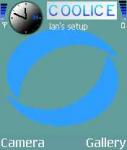

That's what I call C O O L! 😎
Exactly Ian,
I think maybe the only answer to this would be to do as AEFox suggested "Crop image (97x25) when making theme and supply this with it (as some theme makers do) you could then Insert Text or whatever over the top if thats your fancy!
But getting this to happen is a whole different ball game!😊
Originally posted by elton
Exactly Ian,
I think maybe the only answer to this would be to do as AEFox suggested "Crop image (97x25) when making theme and supply this with it (as some theme makers do) you could then Insert Text or whatever over the top if thats your fancy!
But getting this to happen is a whole different ball game!😊
Hi Elton,
Yeah, your right mate. I've done this for one of my themes I'm using, so far it's the only way. It's just a pain to keep assigning the different oplogos when you change the theme.
Well it's not hard with Opman but a pity we have to do it.
Here is a great tool to help make oplogos from the themes idle screen.
Not made by me but by a guy with a nick of 'Wouwz'.
Basically, open the idle screen picture that is 208x176.
Copy and paste this picture as transparent selection over the top of it, you may have to change the white section to pure white.
Then with the selection tool select the small box. You may have to 'select all' then 'invert' selection.
Copy and paste as new image and voila, one oplogo.
Ian
Attachments: