After a long long night.... I made it!!!!! my custom theme is now on my X and I can't be more happy!!!! this is my first one so maybe you aren't gonna like the look but gosh it was hard!!!
screenshots :
Attachments:
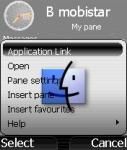
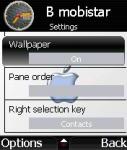
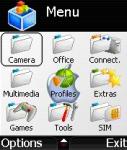
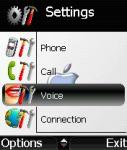
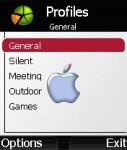


After a long long night.... I made it!!!!! my custom theme is now on my X and I can't be more happy!!!! this is my first one so maybe you aren't gonna like the look but gosh it was hard!!!
screenshots :
I may aswell be the first to ask this..... How?????? 😊
lol just finc out a little bug in my profile screen, here it is fixed + some other screenshots


omegax wrote:I may aswell be the first to ask this..... How?????? 😊
I was expecting this 😉
so first download "mbm wizard" to edit the pics, then download form "z\system\data" the 2 files: themedefault_themeicon.mbm and themedefault.rsc then edit with and hex editor the rsc file to change the z\system\data\themedefault_themeicons.mbm to c:\system\etc....
all the graphics are done on themeicon.mbm, be sure to keep the good size!!!! if you are not carefull enough, you will be forced to hard reset....
once you've edited the files, put themeicon on c:\system\data and the rsc file to c:\system\data\theme (create if not present)
be carefull!!! and backup everything before doing anything, you will hard reset some times before you get it work!!!
I may just give this a try, or wait and see if any theme creator does actually get released which doesn't involve having to hard reset my phone 😊
Thanks for the info, the apple theme looks pretty good 😊
Thank you very very very much !!!!!!!!!!
Can you explain me, please, how we can download it and put in the X ???
Best Regards
Stefano.
casatiel wrote:Thank you very very very much !!!!!!!!!!Can you explain me, please, how we can download it and put in the X ???
Best Regards
Stefano.
ok ok I'll give you everything I've done, but use it at your OWN RISK!! I'm not responsible if something goes wrong... so here you got:
1)unrar
2)put the .rsc file in c:\system\data\theme (create if not exist)
3) put the 2 .mbm in c:\system\data.
4)select defaulttheme from menu
5)enjoy!!!
anyone has tried yet? did it work???
here is an update of my theme... for those who are interested.
link below...
mendocino wrote:ok ok I'll give you everything I've done, but use it at your OWN RISK!! I'm not responsible if something goes wrong... so here you got:
1)unrar
2)put the .rsc file in c:\system\data\theme (create if not exist)
3) put the 2 .mbm in c:\system\data.
4)select defaulttheme from menu
5)enjoy!!!
try with this one... tell me if it worked, witch firmware do you have?
thanks 😃 😃 😃
I have inserted new sounds for the startup and the alarm.
create c:\system\data\sounds, put in files wav for startup renamed "qau_wav_sysap_default.wav", "qau_wav_startup_default.wav"
for the new startup sound modify themedefault.rsc
line F0 7A in 63
line 168 7A in 63
line 1E0 7A in 63
line 258 7A in 63
line 2F8 7A in 63
Hi 😃
ps.
editor freeware for rsc files http://www.handshake.de/user/chmaas/delphi/download/xvi32.zip
karkarlo wrote:thanks 😃 😃 😃I have inserted new sounds for the startup and the alarm.
create c:\system\data\sounds, put in files wav for startup renamed "qau_wav_sysap_default.wav", "qau_wav_startup_default.wav"
for the new startup sound modify themedefault.rsc
line F0 7A in 63
line 168 7A in 63
line 1E0 7A in 63
line 258 7A in 63
line 2F8 7A in 63Hi 😃
ps.
editor freeware for rsc files http://www.handshake.de/user/chmaas/delphi/download/xvi32.zip
WHOA there buddy.... there is plenty to do here! 😊
Now how about an mbm editor that is compatible with the mbm files on sendo x...?
nice theme😃
Wonderful Theme !!!!!! 😮 😮 😮 :icon14: :icon14: 😉 😉 :icon14: :icon14:
Thank you !!!!!!!!!!!!!!!!!!!!! 😊
is it possible to save all the three extra themes that we got at the same time on the x and then switch thru them ? i tried renamin the mbm and rsc files on the windows theme that was posted here, it showed up in display settings in the x but when i selected it , it still showed me the same theme that mendencino has posted here. kinda irritatiing to delete themes from the x to install new ones
boogieindubai wrote:is it possible to save all the three extra themes that we got at the same time on the x and then switch thru them ? i tried renamin the mbm and rsc files on the windows theme that was posted here, it showed up in display settings in the x but when i selected it , it still showed me the same theme that mendencino has posted here. kinda irritatiing to delete themes from the x to install new ones
I've the same problem .
P.S. I think we can only rename the .rsc file, and when we need a change we had to replace only the .mbm ........... 🙄
casatiel wrote:I've the same problem .P.S. I think we can only rename the .rsc file, and when we need a change we had to replace only the .mbm ........... 🙄
It is much more wiser to create a addtional theme by editing Sendo.rsc or Curves.rsc. Just change the proper paths from Z:/ to c:/ 😃 Copy all the necessary files to C and mirror the paths at C ...
By changing the startup sounds , you are likely to crash your phone, since NOT ALL WAV format are supported. If it crashed it will go into an endless startuploop whichs means you have to reformet the phone pressing the "5" key at startup!
:icon4:
More I'm not allowed to say ...
casatiel wrote:I've the same problem .P.S. I think we can only rename the .rsc file, and when we need a change we had to replace only the .mbm ........... 🙄
you are pretty close casatiel!!! what you need to do is to rename the rsc and mbm files and after that, edit the rsc file with for ex ultra edit and search for the 2 files I gave you (so here: themedefault_themeIcons and XIP) then change that for the new name you gave. that's it!!!!
I made you a new packadge here with a new files' names : download this and you'll be able to change the default theme again!
BTW, If any of you could discover how to change the color of the font in the menu that would be awesome!!!!! It sould be in the .rsc hidden somewhere...
:icon14:
Hi all,
For the two themes that I have released, I will modify them so that you can install all of them at once (which means more themes to choose from) onto the phone.
Also, all the bugs/graphics will be fixed in the final release (which I expect should be out sometime around christmas).
However, I have exams right now which means I won't have time to do it. If anyone can do it for me (ie. following what mendocino said at post #18 in this thread) then that would be great! 😊
More themes for you all after I finish my exam~~~~meanwhile, here is a little preview of what my next theme will be:
As you all know it is christmas time, and so I am thinking of creating several themes based on christmas...any ideas/suggestions welcome!
you are pretty close casatiel!!! what you need to do is to rename the rsc and mbm files and after that, edit the rsc file with for ex ultra edit and search for the 2 files I gave you (so here: themedefault_themeIcons and XIP) then change that for the new name you gave. that's it!!!!
hmm mend i understood what u meant with renamin the mbm and rsc files, but what do u mean by "edit the rsc file with for ex ultra edit" ???????? do u mean we should change the mbm and rsc files names , then go back and change the rsc file name again and then the mbm file names again?!?!?!?!?
boogieindubai => so once you've changed the two files name, edit the rsc file with ultra edit and change the reference to the two files in the rsc file examble given below.
REMEMBER TO CHANGE BOTH REFERENCE AND TO PUT A "." BETWEEN EVERY LETTER!!!

Ok, i may be being really stupid here but, i dont understand all this. How do you know what image dimentions to use, colour depth, filesize etc? How do you save these files as something that the Sendo will recognise?
MAybe im being really slow, or missing something obvious, but i like graphics editing, so id love the chance to customize my Sendo.
omegax wrote:Ok, i may be being really stupid here but, i dont understand all this. How do you know what image dimentions to use, colour depth, filesize etc? How do you save these files as something that the Sendo will recognise?MAybe im being really slow, or missing something obvious, but i like graphics editing, so id love the chance to customize my Sendo.
for your info, some files are the picture shown in the menu, other are their masks, you'll find it obvious while looking at all the picture in the mbm file...
Im assuming you use mbm wizard for this. If i try all i get is an 'Not a valid archive' error
Nevermind, my prog was just knackered. No wonder i didnt get it lol
Ill have to try and remember my Windowblinds days with all the masks and stuff 😊
Thanks 😃
where can i download ultraedit32???!??!?!??
try http://www.download.com/UltraEdit-32/3000-2352_4-10297316.html?tag=lst-0-1
Does the image names have to be the same as the ones in the archive? I would assume so, but its worth asking 😊
Hi all,For the two themes that I have released, I will modify them so that you can install all of them at once (which means more themes to choose from) onto the phone.
Also, all the bugs/graphics will be fixed in the final release (which I expect should be out sometime around christmas).However, I have exams right now which means I won't have time to do it. If anyone can do it for me (ie. following what mendocino said at post #18 in this thread) then that would be great! 😊
More themes for you all after I finish my exam~~~~meanwhile, here is a little preview of what my next theme will be:
As you all know it is christmas time, and so I am thinking of creating several themes based on christmas...any ideas/suggestions welcome!
Anyone?
omegax wrote:try http://www.download.com/UltraEdit-32/3000-2352_4-10297316.html?tag=lst-0-1Does the image names have to be the same as the ones in the archive? I would assume so, but its worth asking 😊
no sure you got it right.....
you have to DECOMPILE the mbm I gave you, then modify the extracted bmp's, RECOMPILE everything to a new mbm file and refer to this mbm on the rsc file... 😉