oh ok, well it was worth finding out.
*adds info into the book of what to do and what not to do*
New firmware released! Now possible to flash from home!
I just got my replacement phone... fixed all the problems i was having but still has annoying bugs with the old firmware...
So i tried to flash it...
I followed the guide Exactly... but it errors when i flash....
Ape->Trying to verify communication 79 of 80
Ape->Trying to verify communication 80 of 80
Ape->Failed to verify communication.
Cmt->Estimated flashing time 7 min 12 sec
Cmt->D:\Mobile\N80\Firmware\miro_3.0617.0.6_prd_western_C00_cc.fpsx
Cmt->Erasing of file 1 started
Cmt->Data sending failed. Resending. Make sure that the cable is connected
Cmt->Data sending failed. Resending. Make sure that the cable is connected
Cmt->Adl Loader Erase Area: 84009427 MTI error
Cmt->Flashing failed
Cmt side flashing failed. Cannot continue. Check that you did not started flashing in Test mode.
Flashing failed.
Flashing failed.
Flashing failed.
Error occured during the flashing procedure.
HRESULT 0x84009427 (-2080336857)
Unable to get error message
Any idea??
My phone is fine.... doesnt seem to have done anything.
Yep Orange do use V02
thinking of doing it but as mine is working fine at the moment I'm loathe to break it. If my local NSC isn't too far away I may let them do it
Hai fooks,
Here os a link to a other forum about this subject: Its on Howard forum.
http://www.howardforums.com//forum/thread/913725/&highlight=N80
You can see there that many other people had done it already. There's no asurrence it will work but most people have done it oke. Some have issues with the software and others have issues afterwards. But most afterwards problems are fixed or where faults by them self.
But just like the page is saying ITS AT YOUR OWN RISK.😮
But I agree with Resonate1 that if you do like it's sad is 98 % safe.:saint:
For the list of lanquages look at howard for Polish. I haven't seen this one. Perhaps jou can check with *#0000# and look what it say after N80 between the (..) this is the version.
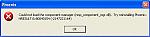
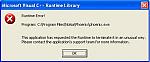
Ok have tried twice to install the Phoenix and clicknig the install on the other program when prompted but keep getting these errors when i try to run the program..Any body throw any light on the situation....
Have tried to have a look at howard forums but that comes up IP blocked....
Attachments:


Just finished flashing my N80, it worked great, just followed the instructions from the nokia.dogtoe site...
*#000# now shows:
V 3.0617.0.6
03.05.2006
RM-92
Nokia N80 (01)
😊
mtb2002 wrote:Ok have tried twice to install the Phoenix and clicknig the install on the other program when prompted but keep getting these errors when i try to run the program..Any body throw any light on the situation....
Have tried to have a look at howard forums but that comes up IP blocked....
Is this when you are installing phoenix 2004 or 2006? when i install 2004 i didnt restart my computer the same when i installed 2006.
I didnt seem to have a problem at all, i just downloaded everything and then followed the instructions
I rebooted the PC at the end of the install as per the instructions for the 04 one at http://nokia.dogtoe.com/ is this not the thing to do....
When I click the desktop Icon after the restart it comes up with the Errors..
UPDATE-
I have uninstalled the lot and deleted all the files and folders and tried again without a re-start and the result is still the same....
ravin3d wrote:Just finished flashing my N80, it worked great, just followed the instructions from the nokia.dogtoe site...*#000# now shows:
V 3.0617.0.6
03.05.2006
RM-92
Nokia N80 (01)
😊
could you tell me what's languages are onder V1 in your phone?
Thx..
mtb2002 wrote:I rebooted the PC at the end of the install as per the instructions for the 04 one at http://nokia.dogtoe.com/ is this not the thing to do....When I click the desktop Icon after the restart it comes up with the Errors..
UPDATE-
I have uninstalled the lot and deleted all the files and folders and tried again without a re-start and the result is still the same....
There are 2 errors after the reboot. When you start the 2004 version it is possible that you get more errors. Just open it and egnore the erorrs. Install 2006 without booting. After you done this it should work. If not the properly you got a software conflict. When I installed it on my XP Prof. it was saying that the software aint compatible. With version you have on your PC?? 2000, XP prof, home??
Ok PC is runnig XP pro and the Laptop is XP Home....Now on the Laptop I now get- 'DESkey not found, Insert DESkey and Restart Application'..Thats after following all the destructions to the letter...
Think I will just give up and find a Nokia Service Center....:frown:
mtb2002 wrote:Ok PC is runnig XP pro and the Laptop is XP Home....Now on the Laptop I now get- 'DESkey not found, Insert DESkey and Restart Application'..Thats after following all the destructions to the letter...Think I will just give up and find a Nokia Service Center....:frown:
No this is good. Egnore the errors and continue...
Look also at this link:
http://www.iphone-forum.org/nokia-bb5-platform-n70n90n91663066806681/t-a-perfect-guide-for-updating-firmware-in-nokia-n70-using-phoenix-software-106873.html/?highlight=n80
When i download a theme from the nett i get the innstall option. When i take innstall it sayes that i cant innstall .sis files, can this have something to do with the flashing. Allso the pc suiet wannt connect with phone. But i can connect to the computer with the transfer option. Oo :?
Oas wrote:When i download a theme from the nett i get the innstall option. When i take innstall it sayes that i cant innstall .sis files, can this have something to do with the flashing. Allso the pc suiet wannt connect with phone. But i can connect to the computer with the transfer option. Oo :?
Nope. The theme is not compatible with the 3e edtion symbian software. You must make your theme compatible. Surf arround here to watch how you do it.. or go to Howard forum and surf there..
good luck..
About the pc suite..I have the same issues and did it everthing un install etc... now it took it on my ohter pc and it works fine. I Did not get it wright with the first pc. still not...
Just flashed N80, takes a while but great improvements so far. web browser seems much quicker and without error msgs (sites like www.engadget.com)
It was worring with some of the messages that appeard while instaling the software and while flashing but just "OK"d them all anyway..
*#0000# Now displays:
V3.0617.0.6
03-05-2006
RM-92
Nokia N80 (01)
It also doesnt loose much info from the phone like calendar entries and message settings, network settings, etc.. but it does seem to loose phone contacts and resets the phone lock code to 12345..
So far so good so. tnx all.. :icon14:
Milli from NL wrote:could you tell me what's languages are onder V1 in your phone?
Thx..
The languages are:
English
French
Dutch
Italian
Spanish
Portugues (spell ?)
Milli from NL wrote:Nope. The theme is not compatible with the 3e edtion symbian software. You must make your theme compatible. Surf arround here to watch how you do it.. or go to Howard forum and surf there..
good luck..About the pc suite..I have the same issues and did it everthing un install etc... now it took it on my ohter pc and it works fine. I Did not get it wright with the first pc. still not...
Ok that was good to hear :icon14:
How do you check which version you have?
GazP wrote:I just got my replacement phone... fixed all the problems i was having but still has annoying bugs with the old firmware...So i tried to flash it...
I followed the guide Exactly... but it errors when i flash....
Ape->Trying to verify communication 79 of 80
Ape->Trying to verify communication 80 of 80
Ape->Failed to verify communication.
Cmt->Estimated flashing time 7 min 12 sec
Cmt->D:\Mobile\N80\Firmware\miro_3.0617.0.6_prd_western_C00_cc.fpsx
Cmt->Erasing of file 1 started
Cmt->Data sending failed. Resending. Make sure that the cable is connected
Cmt->Data sending failed. Resending. Make sure that the cable is connected
Cmt->Adl Loader Erase Area: 84009427 MTI error
Cmt->Flashing failed
Cmt side flashing failed. Cannot continue. Check that you did not started flashing in Test mode.
Flashing failed.
Flashing failed.Flashing failed.
Error occured during the flashing procedure.
HRESULT 0x84009427 (-2080336857)
Unable to get error messageAny idea??
My phone is fine.... doesnt seem to have done anything.
You have a connectivity issue. Are you choosing PC Suite from the phone? Is it installing ALL the drivers. Have you uninstalled all other nokia software? Does phoenix show the current firmware of your phone in the bottom status window when you scan device prior to starting the flashing process.
*#0000#
does anyone know when the service centres will have the new firmware available to flash.
Just phoned my nearest one and they have .3
I tried the instructions to do it myself but when it came to installing the crack file after dongle prompt it just kept asking for the dongle
Bobbles wrote:*#0000#does anyone know when the service centres will have the new firmware available to flash.
Just phoned my nearest one and they have .3
I tried the instructions to do it myself but when it came to installing the crack file after dongle prompt it just kept asking for the dongle
You need to extract the Self extracting rar file at the exact time just after you click retry and accept to overwrite the DLL's. This will crack the application and should then skip the dongle request.
ss3000 wrote:oh ok, well it was worth finding out.
*adds info into the book of what to do and what not to do*
What phone do you got?
If its a BB5 phone (6630 onwards) then this method should work fine with the correct firmware.
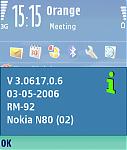
Just to let everyone know, I've managed to flash my UK Orange N80 to v3.0617.0.6. The phone now reads:
V 3.0617.0.6
03-05-2006
RM-92
Nokia N80 (02)
I used the V02 PPM file.
Before starting the flash I did get a warning about not being able to detect the version of the prommer, but I took the chance and clicked OK. 5 minutes later and the phone's up and running with the new firmware.
Upgrading has also removed the naff Orange "photography" application, enabled the PTT and Kodak applications, and also the Orange startup splash seems to have disappeared! I haven't lost any data or settings on the phone, either.
Can't complain at that.
mcsleazycrisps wrote:Just to let everyone know, I've managed to flash my UK Orange N80 to v3.0617.0.6. The phone now reads:V 3.0617.0.6
03-05-2006
RM-92
Nokia N80 (02)I used the V02 PPM file.
Before starting the flash I did get a warning about not being able to detect the version of the prommer, but I took the chance and clicked OK. 5 minutes later and the phone's up and running with the new firmware.
Upgrading has also removed the naff Orange "photography" application, enabled the PTT and Kodak applications, and also the Orange startup splash seems to have disappeared! I haven't lost any data or settings on the phone, either.
Can't complain at that.
Another success story!
Just to show it can be done, I've attached a screenshot.
Attachments:

This is just not ment to happen for my N80...Just spent 14 miles return journey to get my N80 upgraded. Spent 3 hours spending money waiting for them to call me to say its done.....
Pick it up brought it home and it still has the same Firmware on...according to them the still do not have the v 3.0617.0.6.
He wasn't to impressed when I told him it was available for the internet....:redface:
Got to phone back 2rmw to see if they can get hold of it....
well i have just spent a very nervous 5 mins updating the firmware on my N80, spent the entire time looking through my fingers.
followed the guide from http://nokia.dogtoe.com/ and it worked like a charm, so i would like to thank to everybody here who has helped.
and to whoever tried it first, you must have balls of steel!
ps. do i need to uninstall diego and pheonix etc.. to be able to put PC Suite back on my laptop?
I've got the link, and read the instructions, but i'm not that teccy, so went to a CPW who are supposed to be able to flash the phone.
they said its too new and they don't have the software. Just wait a while and they will get it eventually🙄 that's after waiting for a woman to have the whole workings of a blackberry explained to her. what are instruction manuals for:con?
so if you have the ability, go for it, or wait ages for the NSC to catch up.
bikespod wrote:I've got the link, and read the instructions, but i'm not that teccy, so went to a CPW who are supposed to be able to flash the phone.they said its too new and they don't have the software. Just wait a while and they will get it eventually🙄 that's after waiting for a woman to have the whole workings of a blackberry explained to her. what are instruction manuals for:con?
so if you have the ability, go for it, or wait ages for the NSC to catch up.
Just had an E mail From CPW saying that my local branch will be able to help with the upgrade....Told them which phone as well....Going to call them 2mrw to see what they say....
Have spent afternoon installing and uninstalling all types of software but just cannot seem to get Phoinex working...Now getting a load off errors saying .DLL files missing.....
Mine got as far as most peoples in phoenix then started kicking up a ' cannot change phone status'
it just wouldnt have it all 😞
Come on Nokia make it easier than d'ling and cracking 😊