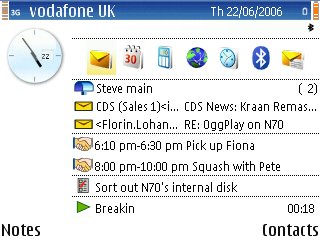
is there anyway to get the unread emails in the active display under the calender events ??
also , about showing the WLAN wizard info there ??
like in these pics
http://darlamack.blogs.com/photos/uncategorized/wlan_wizard_1.png
http://www.allaboutsymbian.com/features/images/e61cleanstandby.jpg
:con?
inkredi wrote:is there anyway to get the unread emails in the active display under the calender events ??
also , about showing the WLAN wizard info there ??like in these pics
http://darlamack.blogs.com/photos/uncategorized/wlan_wizard_1.png
http://www.allaboutsymbian.com/features/images/e61cleanstandby.jpg
:con?
I don't know how to achieve the Email summary - but wuld be very interested in finding out how! 😉
As for the WLAN Wizard, it's always been displayed like that on my N80 since I flashed to with V4 Firmware. What FW do you have? (Type *#0000# and post the results)
I have another problem with the yahoo mail. Everytime i sign on it just says to put in my account details and then just disconnects my aim mail works fine
i know the *#0000# 😎 been with nokia ma whole life :tongue:
V 4.0623.0.41 :icon4:
i saw http://www.howardforums.com/showpost.php?p=8400762&postcount=5
but am still hoping there is some program to do anything to it, coz i was about to get the E60, i dont wanna regret it.
inkredi wrote:i know the *#0000# 😎 been with nokia ma whole life :tongue: V 4.0623.0.41 :icon4:
i saw http://www.howardforums.com/showpost.php?p=8400762&postcount=5
but am still hoping there is some program to do anything to it, coz i was about to get the E60, i dont wanna regret it.
You have the latest N80 FW as far as I know. Perhaps I was mistaken and it's the N80IE FW (4.0632.0.38) which I recently installed that displays the WLAN Wizard on the Standby Screen?
P.S. Was not trying to be funny by stating how to display FW version, but I am always aware other folk reading the forum might be newbies and don't the code 😉
dez_borders wrote:You have the latest N80 FW as far as I know. Perhaps I was mistaken and it's the N80IE FW (4.0632.0.38) which I recently installed that displays the WLAN Wizard on the Standby Screen?P.S. Was not trying to be funny by stating how to display FW version, but I am always aware other folk reading the forum might be newbies and don't the code 😉
Yes Dez..its just the IE that displays the wlan lan on the standby screen...
i recommend you use the profimail, at least, it shows you, how many unread e-mails you have.
am already using profmail, i want to get them on the active standby like the E-Series thing.
Ive just upgraded to ie version and HAD the network connection icon in the bottom half of the active standby ... but now its gone????
kontraband wrote:Ive just upgraded to ie version and HAD the network connection icon in the bottom half of the active standby ... but now its gone????
Just turn phone on and off. Happened to me a few times before and switching it off and on sorted it out.
ag wrote:Just turn phone on and off. Happened to me a few times before and switching it off and on sorted it out.
well whaddaya know... that did the trick... 2nd reboot it came back.
Cheers ag :icon14: