Turning out to be a busy day! N-Gage just went live. Phew. More on this as the evening wears on, I suspect, for now here's the English Download link. (via p@sco)
Read on in the full article.
Turning out to be a busy day! N-Gage just went live. Phew. More on this as the evening wears on, I suspect, for now here's the English Download link. (via p@sco)
Read on in the full article.
I just installed the client on my N82 and I get a "system error" dialog when I try to run it. I'll try again later.
Go here for some screenshots and a list supported devices 😉
http://snoyt.vox.com/library/post/n-gage-going-online-right-now.html
snoyt
If you're getting the 'System error' message check none of your access points 3G, GPRS, and Wifi have ' or " in. That fixed it for me. The fix came from a moderator in the launch party chat (http://forums.arena.n-gage.com/nokia/chat?chat.id=ngagelaunchparty), if you go say hi apparently you'll be credited with points for participating in the launch.
As I suspected. The N93 is (currently) not supported.
Us N93 owners have been waiting the longest for next gen N-gage, since it is (AFAIK) the oldest N-gage compatible device. And it was Nokia's flag ship device when we bought it. And we're not getting any firmware updates either, even though they are desperately needed. It seems we have been totally abandoned!
I don't normally whine like this, but I expected more when I bought a Nokia flag ship device.
Steve, It let me login with my reserved name.
Just tried to add you with 'slitchfield' and it says you don't exist 😊
Just tested Brain Challenge on my N95 8GB...its brilliant,the basic concept is the same as the java game but with added benefits of better sound,zero loading times...and more...🙄
The 1 thing I notice that by installing this new full release it deletes the "1st access" version as well as all the demo's that you have...so you forced to reinstalled or download them all again...
very disappiont after all the hype and this is what we get, very shameful.
@Enfors(regarding the N93),
Hopefully the fact the N93 is one of the phones currently not supported(coming soon) means Nokia are getting their act together and working on a decent long needed firmware update. Guess we can but hope as the way I see it is if the N-Gage support update could likely be the last firmware update the N93 will receive(seeing as it's apparently been 2 years since the last one).
The only positive thing I take out of this is the N-Gage app is probably forcing an update which otherwise was looking unlikely to ever happen.
It is utterly inconsistent with other apps, and inconvenient, that all the games are rotated CCW in landscape! As if they all are for lefties. All the right-handed people have to scramble in Options and do Flip, so that the gaming buttons finally come under right hand.
As of ~9:00 Friday morning, the site is collapsing under the pressure, so I'll try later. Par for the course, I suppose.
When you first install it, it doesn't ask which access points you want to use, I just stumbled across that setting and found that it had just gone for the one at the top of my list in alphabetical order, which happens to be a friend's WiFi two hundred miles away. Even then, after I'd set the access points to the ones I wanted to use, it continued with the one it had been using, which was GPRS. It shows this in tiny letters in the top right. I'm on a capped plan so that only cost me a quid, but there could be some very pissed off punters by the end of this weekend. In the end, I seemed to have to restart the handset to get N-gage to use the access point I wanted.
BTW, Steve, it does actually seem to be allowing me to log on with the name I reserved a few months ago. Hard to tell, because it isn't obvious whether you're logged on or not.
Also, interesting that System Rush Evolution still doesn't have any instructions. WTF am I supposed to do, exactly?
Oh, and while I'm in rant mode, what is this nonsense with the controls on the left by default? Have the left-hander-human-rights lobby finally scored a victory?
With regards to the left Vs right handed controls, take a look at most gaming controllers.... where are the D Pads on them ?? 😊


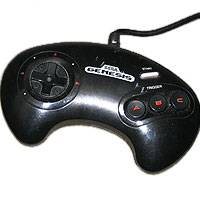


I'm right handed and can't see what all the fuss is about myself.
Correct. The D-pad is on the left. But where are the other buttons? They're on the right!
So... flip this image upside down and TA DA !!! 😉

the best part of this is the on the N95 it allows landscape with D-pad on the left and the stop and play keys on the multimedia pad as gaming buttons. sweet!!!
6120 Classic ?!?!?
(and 6220 Classic !?!?!)
Nokia needs to concentrate on getting some 3D hardware accelerated only games out for the N95/N82/N93...it is clear they will fall beinhd that little upstart Apple iPhone otherwise! Hope a rethink in strategy is on the cards!
You say download using the usual PC Suite route - I've just downloaded it to my Mac and Bluetoothed it over, no problems ...